
Unblock Eject for Mac
Shows which apps have files open on a disk that won't eject, quits them politely and ejects.
By stanczykwyatt. Free and open source, MIT licence.
Unblock Eject at a glance
- Version
- 0.1.0
- Released
- 3 November 2026
- Download size
- 1.1 MB
- Works on
- Apple silicon and Intel
- Licence
- MIT
- Category
- Menu Bar and Notch
- Developer
- stanczykwyatt
- GitHub stars
- 0
About Unblock Eject
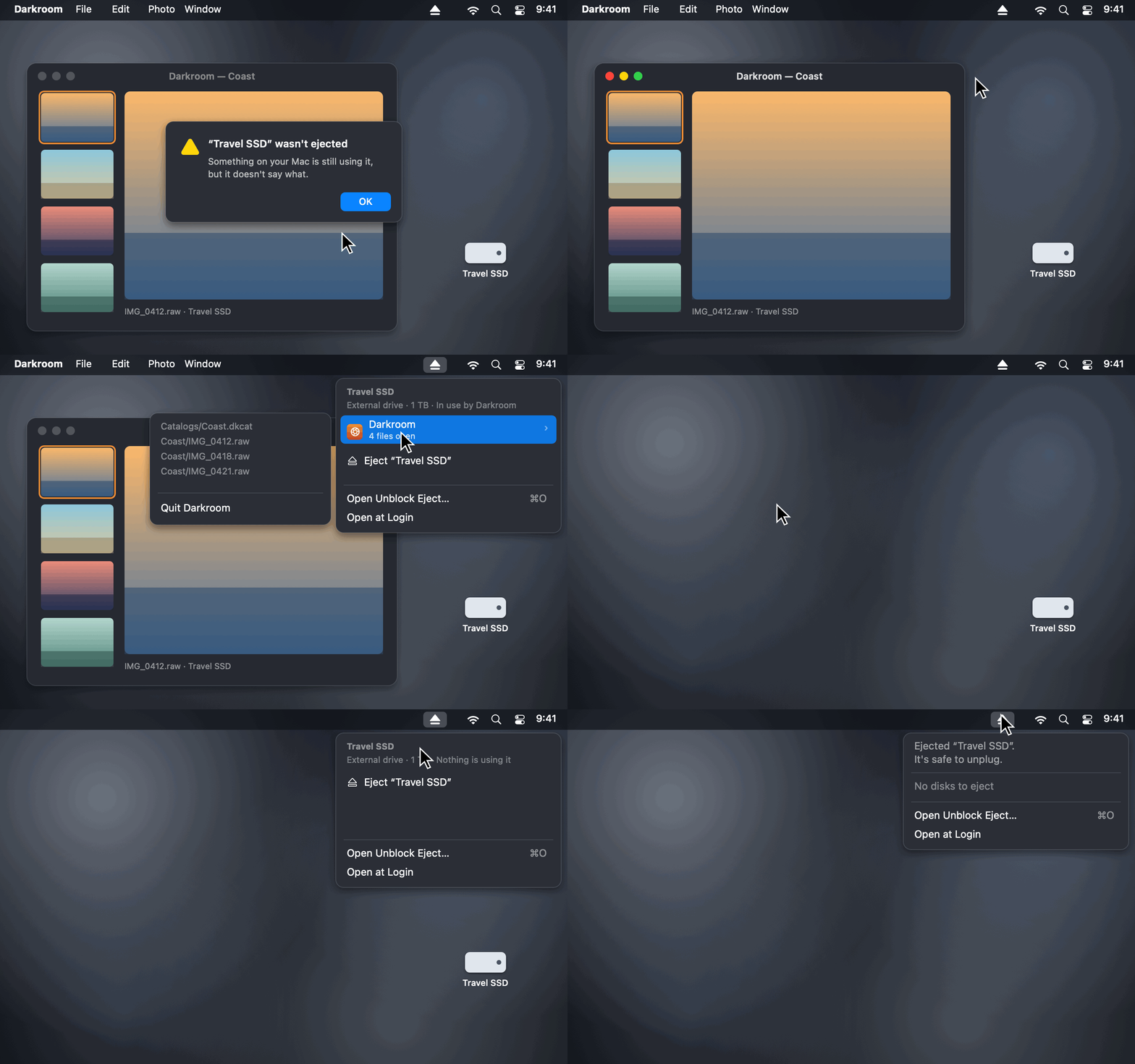
Mac menu bar app that shows which apps keep your external drive, memory card or disk image from ejecting, quits them politely and ejects. For "The disk wasn't ejected because one or more programs may be using it." Free, never force-quits, no internet access.
Screenshots
How to install Unblock Eject on a Mac
- Get OpenDMG. It is a free app store for open source Mac apps. Download OpenDMG.
- Search for Unblock Eject and press Get. OpenDMG downloads version 0.1.0 from stanczykwyatt's own GitHub release.
- Open it. The download is checked against its SHA-256 fingerprint and its signature is checked on your Mac before it lands in Applications.
Updates to Unblock Eject show up in OpenDMG and install with one button. No account is needed.
Prefer to do it by hand? The developer's file is on GitHub: Unblock-Eject.zip (1.1 MB).
What is new in Unblock Eject 0.1.0
First release of Unblock Eject, a free, open-source menu bar app that shows what's keeping your disk from ejecting.

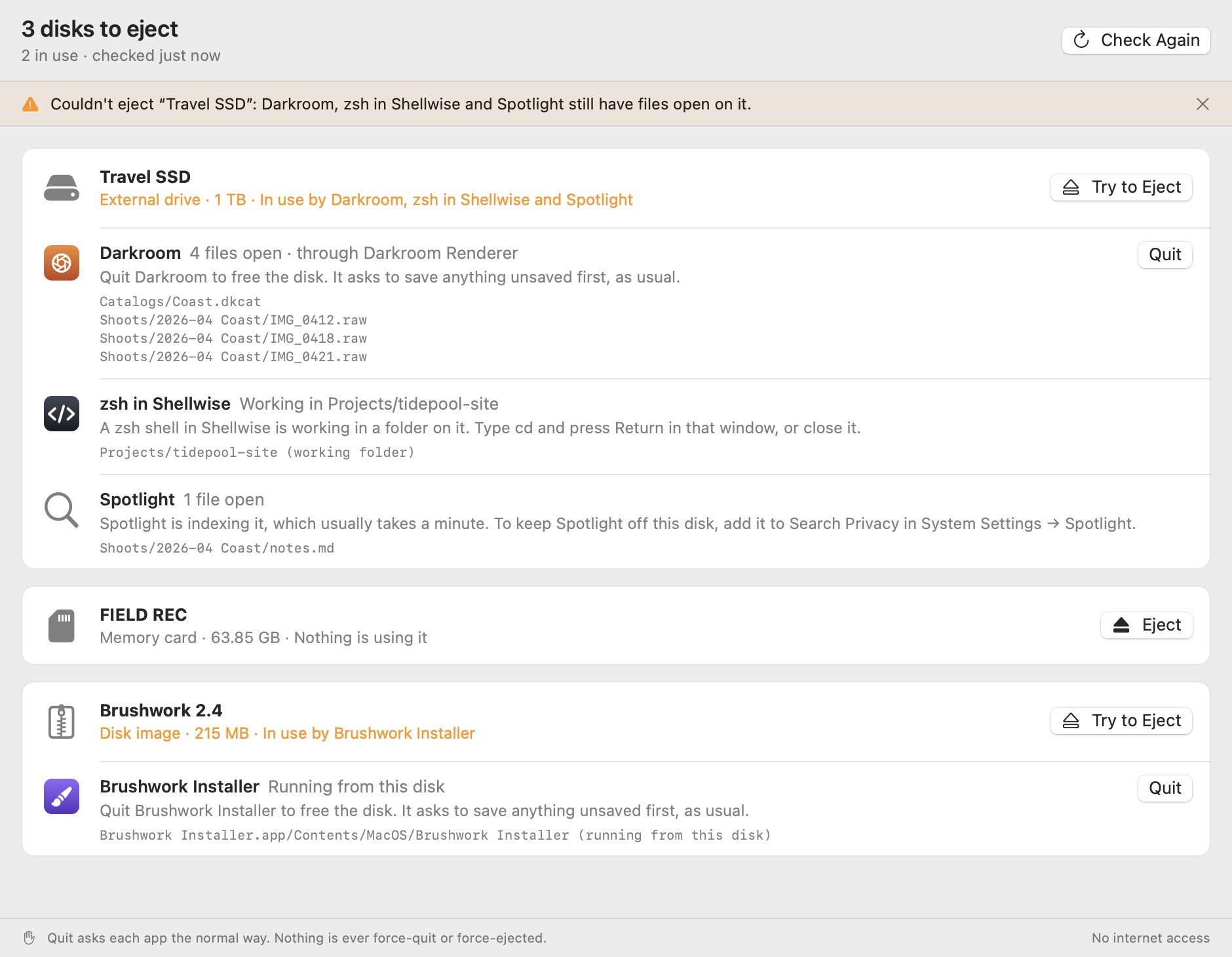
- **Every disk you can eject,** external drives, memory cards and disk images, with each app and process that has a file open on it, its icon and the files.
- **Helpers grouped with their app,** so a renderer or background helper shows up as the app you know.
- **A polite Quit** for the app that's in the way: the same request as its own Quit command, so it can ask to save first. Never forced, and only when you click.
- **Plain explanations** for what can't be quit: a shell in a terminal, a running command, Spotlight, Time Machine, Quick Look, a Photos or Music library, a disk image still open from the disk, and Finder.
- **Eject from the menu or the window,** the whole drive at once, the way Finder does, with disk images detached. If it can't, the window says what's still in the way.
- **The `unblock-eject` command line tool** to print the same list, or JSON, for any disk or path. It only looks.
- No entitlements, no permissions, no internet access and no dependencies. It never opens your files.

Network shares aren't listed yet; they're on the [roadmap](https://github.com/users/stanczykwyatt/projects/1).

## Install
…
More Menu Bar and Notch apps
-
 StatsmacOS system monitor in your menu bar
-
 IcePowerful menu bar manager for macOS (upstream, temporarily inactive)
-
 Hidden BarAn ultra-light MacOS utility that helps hide menu bar icons
-
 ThawThe open-source menu bar manager: hide, organize, and take control of menu bar icons
-
 Boring NotchTurn your MacBook notch into a music and file control center
-
 FineTunePer-Application Audio Control for macOS