

Thaw for Mac
The open-source menu bar manager: hide, organize, and take control of menu bar icons.
By thaw-app. Free and open source, GPL-3.0 licence.
Thaw at a glance
- Version
- 3.0.0-beta.7 (pre-release)
- Released
- 18 November 2026
- Download size
- 13 MB
- Works on
- Apple silicon and Intel
- Licence
- GPL-3.0
- Category
- Menu Bar and Notch
- Developer
- thaw-app
- GitHub stars
- 13K
About Thaw
The open source menu bar manager
Screenshots

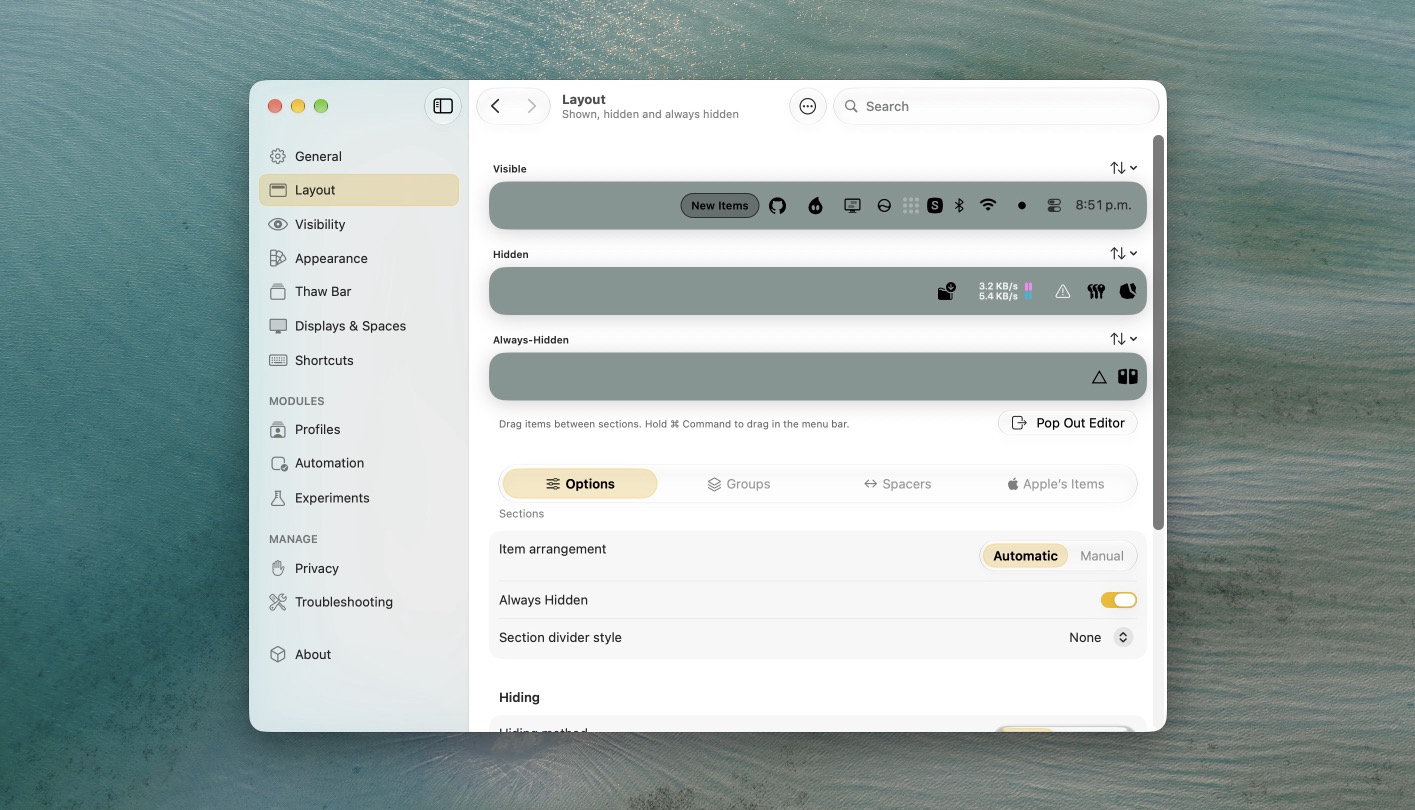
How to install Thaw on a Mac
- Get OpenDMG. It is a free app store for open source Mac apps. Download OpenDMG.
- Search for Thaw and press Get. OpenDMG downloads version 3.0.0-beta.7 from thaw-app's own GitHub release.
- Open it. The download is checked against its SHA-256 fingerprint and its signature is checked on your Mac before it lands in Applications.
Updates to Thaw show up in OpenDMG and install with one button. No account is needed.
Prefer to do it by hand? The developer's file is on GitHub: Thaw.dmg (13 MB).
What is new in Thaw 3.0.0-beta.7
**macOS 27 only · Build 126**

This beta has everything from alpha.13 and alpha.14, and the fixes made since. Scripts, Triggers and Widgets become modules you can switch on and off, Settings is rebuilt on [ThawUI](https://github.com/thaw-app/ThawUI), Layout gets a pop-out window and undo for every edit, and search becomes Floe's launcher. Your settings, triggers, scripts and widget design carry over.

Thaw 3 is now feature frozen: no new features before 3.0, only finishing the ones already here, like Pop Out Editor. From here on, betas only get fixes for bugs that get in your way, and smaller fixes ship in the alphas. See you in Vice City.

> [!TIP]
> If you'd like to help, [#1529](https://github.com/thaw-app/Thaw/issues/1529) lists work that's ready to pick up. Some of it needs no Swift at all.

### New

- **Pop Out Editor (work in progress).** Opens Layout in a window with every item in a list, a filter, an editor for the selected item and full keyboard control.
- **Every Layout edit can be undone** with ⌘Z, including moving a group, Move to and Move All.
- **Drag down the Layout window's checkboxes** to show or hide several items at once.
- **Trackpad taps for Layout and sliders,** when a drag crosses a section or lands and when a slider reaches its default.
- **The current Space in the menu bar,** in Displays › Spaces.
…
More Menu Bar and Notch apps
-
 StatsmacOS system monitor in your menu bar
-
 IcePowerful menu bar manager for macOS (upstream, temporarily inactive)
-
 Hidden BarAn ultra-light MacOS utility that helps hide menu bar icons
-
 Boring NotchTurn your MacBook notch into a music and file control center
-
 FineTunePer-Application Audio Control for macOS
-
 eulmacOS status monitoring app written in SwiftUI