

Stash for Mac
One-click menu bar item hider for macOS.
By brentc22. Free and open source, MIT licence.
Stash at a glance
- Version
- 0.3.1
- Released
- 9 November 2026
- Download size
- 1.5 MB
- Works on
- Apple silicon and Intel
- Licence
- MIT
- Category
- Menu Bar and Notch
- Developer
- brentc22
- GitHub stars
- 11
About Stash
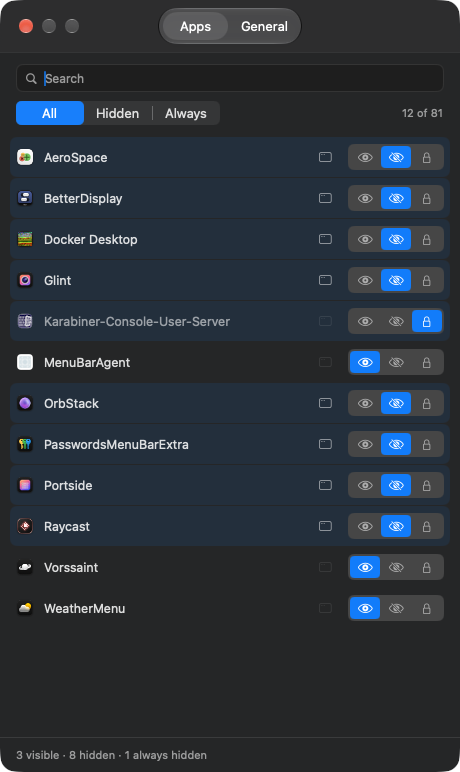
Free, open source menu bar hider for macOS 27, built on the assessment-mode allowlist
Screenshots


How to install Stash on a Mac
- Get OpenDMG. It is a free app store for open source Mac apps. Download OpenDMG.
- Search for Stash and press Get. OpenDMG downloads version 0.3.1 from brentc22's own GitHub release.
- Open it. The download is checked against its SHA-256 fingerprint and its signature is checked on your Mac before it lands in Applications.
Updates to Stash show up in OpenDMG and install with one button. No account is needed.
Prefer to do it by hand? The developer's file is on GitHub: Stash-0.3.1.zip (1.5 MB).
What is new in Stash 0.3.1
## What's fixed

- **Control Center controls stay in the menu bar.** A control you add to the menu bar on its own (Dark Mode, Stage Manager, a third-party control) was hidden for as long as Stash ran, expanded or not, and had no row in Settings. Stash now keeps controls visible and lists them in Settings with a switch icon, so you can set them to Visible, Hide or Always hide like any app. (#10)

## Install or update

Stash offers the update itself. With Homebrew:

```sh
brew upgrade --cask brentc22/stash/stash
xattr -dr com.apple.quarantine /Applications/Stash.app
```
More Menu Bar and Notch apps
-
 StatsmacOS system monitor in your menu bar
-
 IcePowerful menu bar manager for macOS (upstream, temporarily inactive)
-
 Hidden BarAn ultra-light MacOS utility that helps hide menu bar icons
-
 ThawThe open-source menu bar manager: hide, organize, and take control of menu bar icons
-
 Boring NotchTurn your MacBook notch into a music and file control center
-
 FineTunePer-Application Audio Control for macOS