
SmartHiddenBar for Mac
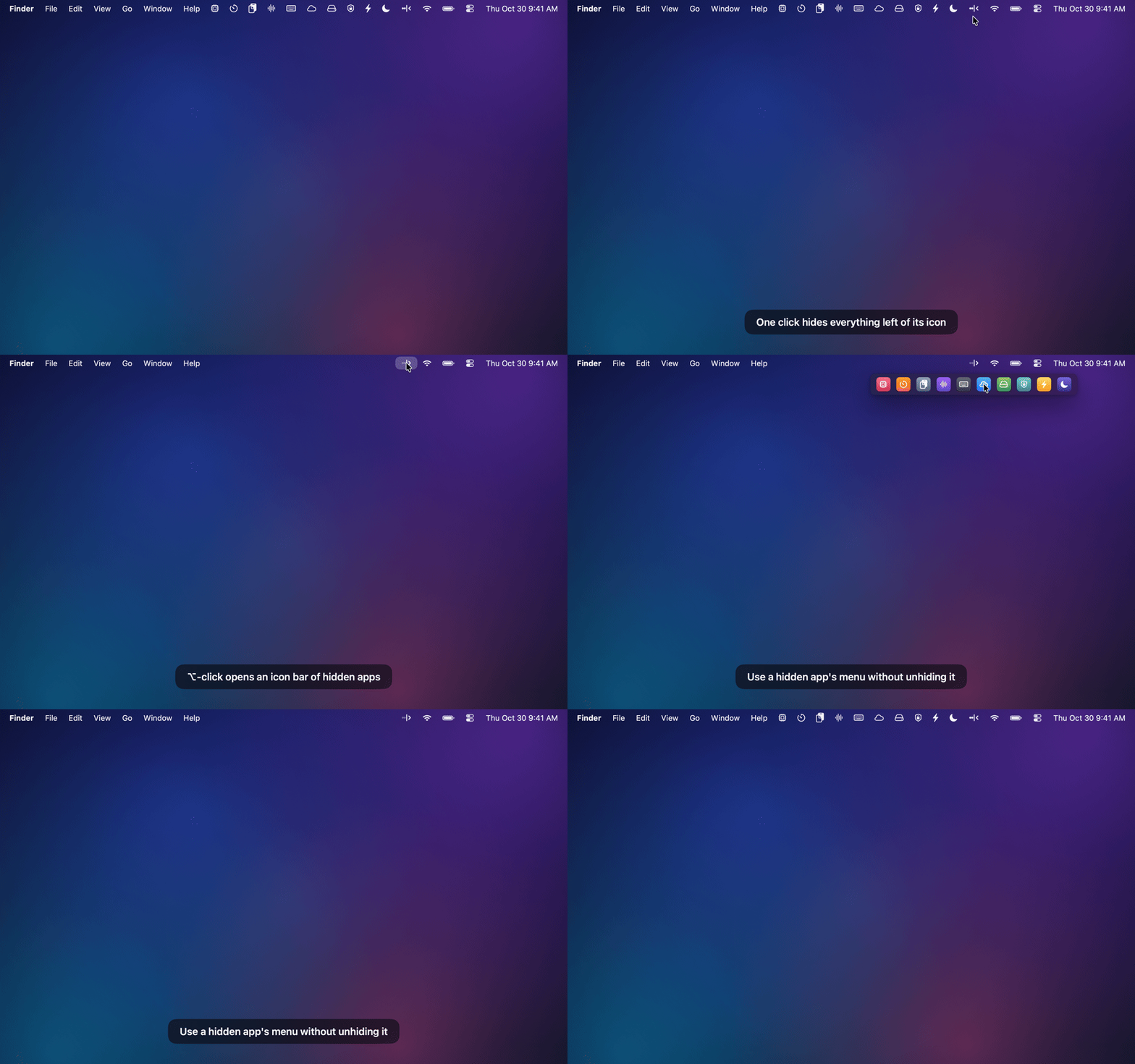
Hides menu bar items on macOS 27 and opens a hidden item's menu without unhiding it.
By roypadina. Free and open source.
SmartHiddenBar at a glance
- Version
- 1.6.1
- Released
- 4 November 2026
- Download size
- 1.4 MB
- Works on
- Apple silicon and Intel
- Category
- Menu Bar and Notch
- Developer
- roypadina
- GitHub stars
- 7
About SmartHiddenBar
Hide, list and open macOS 27 menu bar items — a Hidden Bar alternative with an icon bar and menu mirroring
Screenshots

How to install SmartHiddenBar on a Mac
- Get OpenDMG. It is a free app store for open source Mac apps. Download OpenDMG.
- Search for SmartHiddenBar and press Get. OpenDMG downloads version 1.6.1 from roypadina's own GitHub release.
- Open it. The download is checked against its SHA-256 fingerprint and its signature is checked on your Mac before it lands in Applications.
Updates to SmartHiddenBar show up in OpenDMG and install with one button. No account is needed.
Prefer to do it by hand? The developer's file is on GitHub: SmartHiddenBar.zip (1.4 MB).
What is new in SmartHiddenBar 1.6.1
SHA-256: 6e64ca122d117d48daaf9ab8c0cf2226e5fc38a786895bad6c893c806db02240

### Fixed
- A menu bar app that was quit and opened again while SmartHiddenBar was hiding stayed hidden until SmartHiddenBar itself restarted, even right of the icon or while items were shown. macOS never lists an icon created while its app is off the allow-list, so SmartHiddenBar never saw it to allow it. Menu bar apps it already knows are now allowed ahead of time, running or not, unless they sit left of the icon. An app that sat left of the icon before SmartHiddenBar last started can show for a few seconds after it opens, until the next check hides it.

### Added
- The log names apps whose menu bar items appear or leave, with their position, so a missing icon can be traced.
More Menu Bar and Notch apps
-
 StatsmacOS system monitor in your menu bar
-
 IcePowerful menu bar manager for macOS (upstream, temporarily inactive)
-
 Hidden BarAn ultra-light MacOS utility that helps hide menu bar icons
-
 ThawThe open-source menu bar manager: hide, organize, and take control of menu bar icons
-
 Boring NotchTurn your MacBook notch into a music and file control center
-
 FineTunePer-Application Audio Control for macOS