
Portside for Mac
Menu bar app to group dev servers by repo and worktree, with one-click stop.
By brentc22. Free and open source, MIT licence.
Portside at a glance
- Version
- 0.3.0
- Released
- 9 November 2026
- Download size
- 1.5 MB
- Works on
- Apple silicon and Intel
- Licence
- MIT
- Category
- Menu Bar and Notch
- Developer
- brentc22
- GitHub stars
- 0
About Portside
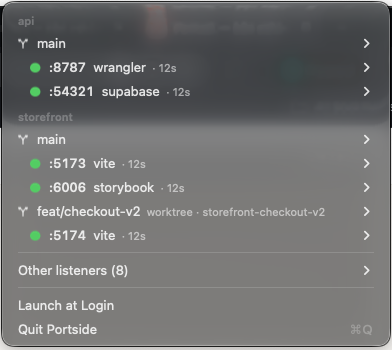
Every dev server on your Mac, grouped by repo and git worktree — in the menu bar.
Screenshots
How to install Portside on a Mac
- Get OpenDMG. It is a free app store for open source Mac apps. Download OpenDMG.
- Search for Portside and press Get. OpenDMG downloads version 0.3.0 from brentc22's own GitHub release.
- Open it. The download is checked against its SHA-256 fingerprint and its signature is checked on your Mac before it lands in Applications.
Updates to Portside show up in OpenDMG and install with one button. No account is needed.
Prefer to do it by hand? The developer's file is on GitHub: Portside.zip (1.5 MB).
What is new in Portside 0.3.0
## 0.3.0 — 2026-11-09

- Docker and OrbStack containers show up by name. Published ports used to collapse into a
 single `docker` row under *Other listeners*; now every container gets its own row (#5)
- A container from a Compose or Supabase project inside a git checkout sits under that repo;
 other containers get a new **Containers** section
- **Stop** and **Kill** on a container run `docker stop` / `docker kill` instead of signalling
 the VM's port proxy, which took every container down with it
More Menu Bar and Notch apps
-
 StatsmacOS system monitor in your menu bar
-
 IcePowerful menu bar manager for macOS (upstream, temporarily inactive)
-
 Hidden BarAn ultra-light MacOS utility that helps hide menu bar icons
-
 ThawThe open-source menu bar manager: hide, organize, and take control of menu bar icons
-
 Boring NotchTurn your MacBook notch into a music and file control center
-
 FineTunePer-Application Audio Control for macOS