
Polka for Mac
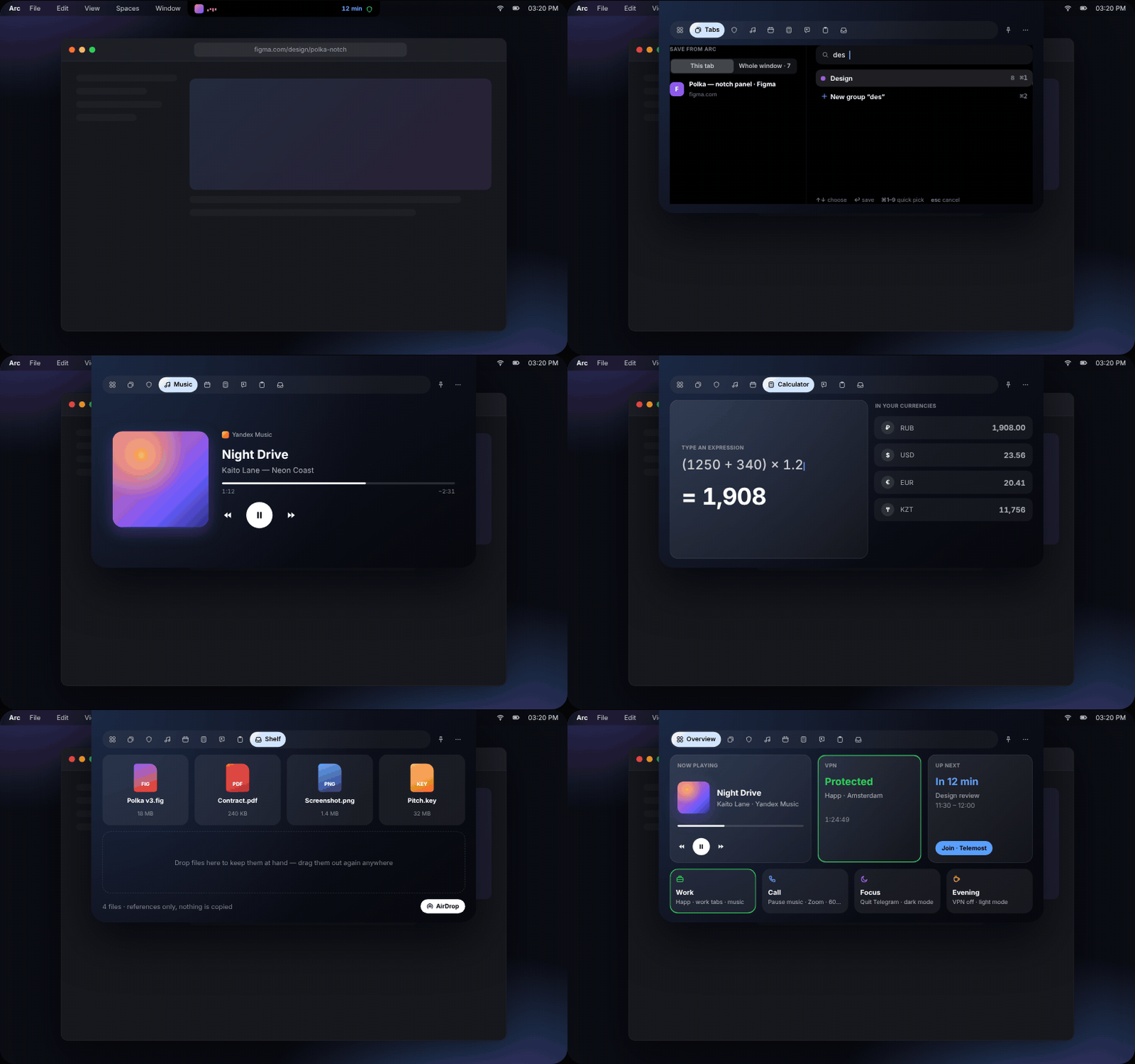
Notch hub for browser tabs, VPNs, music, calendar, translation, clipboard, and files.
By romabmstu. Free and open source, MIT licence.
Polka at a glance
- Version
- 0.1.3
- Released
- 12 November 2026
- Download size
- 6.5 MB
- Works on
- Apple silicon and Intel
- Licence
- MIT
- Category
- Menu Bar and Notch
- Developer
- romabmstu
- GitHub stars
- 5
About Polka
Your MacBook’s notch, finally useful: tabs from any browser, VPNs, music, calendar, translator and clipboard in one panel. Free and open source.
Screenshots
How to install Polka on a Mac
- Get OpenDMG. It is a free app store for open source Mac apps. Download OpenDMG.
- Search for Polka and press Get. OpenDMG downloads version 0.1.3 from romabmstu's own GitHub release.
- Open it. The download is checked against its SHA-256 fingerprint and its signature is checked on your Mac before it lands in Applications.
Updates to Polka show up in OpenDMG and install with one button. No account is needed.
Prefer to do it by hand? The developer's file is on GitHub: Polka.dmg (6.5 MB).
What is new in Polka 0.1.3
### Fixed

- A file dragged from the Files section into Mail or another app keeps its name. The receiving app now gets the file itself instead of a copy it had to name on its own.
- Files follows a file that was renamed or moved after it was added: the tile shows the current name and dragging it out still works. A deleted file is marked as not found instead of dragging out as nothing.
- A file dropped onto the panel or pasted as a link is stored by its real path, not by a system reference that has no name.
- Two pictures sent to Files from clipboard history within the same second no longer overwrite each other.
- Music that stopped on its own, for example when the internet dropped, no longer looks like it is playing. The waveform beside the notch turns into an amber sign, the cover goes gray, the position stands still, and the Music section says why: no internet, or no sound on this Mac. Everything comes back by itself when the sound does.
- VPN switches are bright green whenever a VPN is on. The system switch lost its color while the panel was not the active window, so a connected VPN could look switched off.

### Changed

- Setting up FSNT is three numbered steps that name the menus and buttons as FSNT shows them, with a Paste button for the key and a clear message when the key or the connection is wrong.

### Install
…
More Menu Bar and Notch apps
-
 StatsmacOS system monitor in your menu bar
-
 IcePowerful menu bar manager for macOS (upstream, temporarily inactive)
-
 Hidden BarAn ultra-light MacOS utility that helps hide menu bar icons
-
 ThawThe open-source menu bar manager: hide, organize, and take control of menu bar icons
-
 Boring NotchTurn your MacBook notch into a music and file control center
-
 FineTunePer-Application Audio Control for macOS