
DisplayLatch for Mac
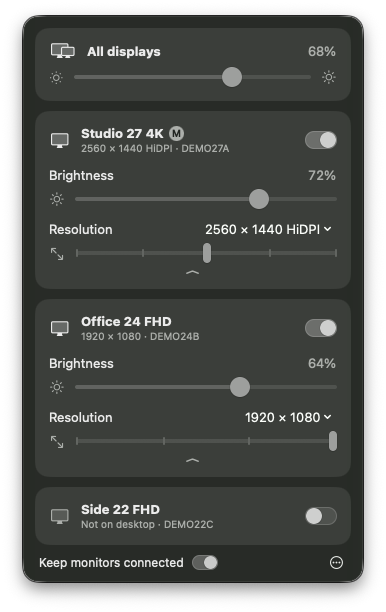
Control external monitor brightness over DDC, reconnect monitors left black after sleep and disconnect displays without unplugging.
By Hitesh-Sisara. Free and open source, MIT licence.
DisplayLatch at a glance
- Version
- 1.0.0
- Released
- 18 November 2026
- Download size
- 1.6 MB
- Works on
- Apple silicon and Intel
- Licence
- MIT
- Category
- Menu Bar and Notch
- Developer
- Hitesh-Sisara
- GitHub stars
- 5
About DisplayLatch
Free, open-source Mac menu-bar app: control external monitor brightness (DDC), one slider for all displays, and auto-reconnect monitors stuck black after sleep. BetterDisplay alternative.
Screenshots
How to install DisplayLatch on a Mac
- Get OpenDMG. It is a free app store for open source Mac apps. Download OpenDMG.
- Search for DisplayLatch and press Get. OpenDMG downloads version 1.0.0 from Hitesh-Sisara's own GitHub release.
- Open it. The download is checked against its SHA-256 fingerprint and its signature is checked on your Mac before it lands in Applications.
Updates to DisplayLatch show up in OpenDMG and install with one button. No account is needed.
Prefer to do it by hand? The developer's file is on GitHub: DisplayLatch.dmg (1.6 MB).
What is new in DisplayLatch 1.0.0
**Full Changelog**: https://github.com/Hitesh-Sisara/DisplayLatch/commits/v1.0.0
More Menu Bar and Notch apps
-
 StatsmacOS system monitor in your menu bar
-
 IcePowerful menu bar manager for macOS (upstream, temporarily inactive)
-
 Hidden BarAn ultra-light MacOS utility that helps hide menu bar icons
-
 ThawThe open-source menu bar manager: hide, organize, and take control of menu bar icons
-
 Boring NotchTurn your MacBook notch into a music and file control center
-
 FineTunePer-Application Audio Control for macOS