

WhatCable for Mac
Explains what each connected USB-C cable can actually do and why charging may be slow.
By darrylmorley. Free and open source.
WhatCable at a glance
- Version
- 1.4.0
- Released
- 8 August 2026
- Download size
- 16 MB
- Works on
- Apple silicon and Intel
- Category
- Menu Bar and Notch
- Developer
- darrylmorley
- GitHub stars
- 8.9K
About WhatCable
macOS menu bar app that tells you, in plain English, what each USB-C cable plugged into your Mac can actually do
Screenshots
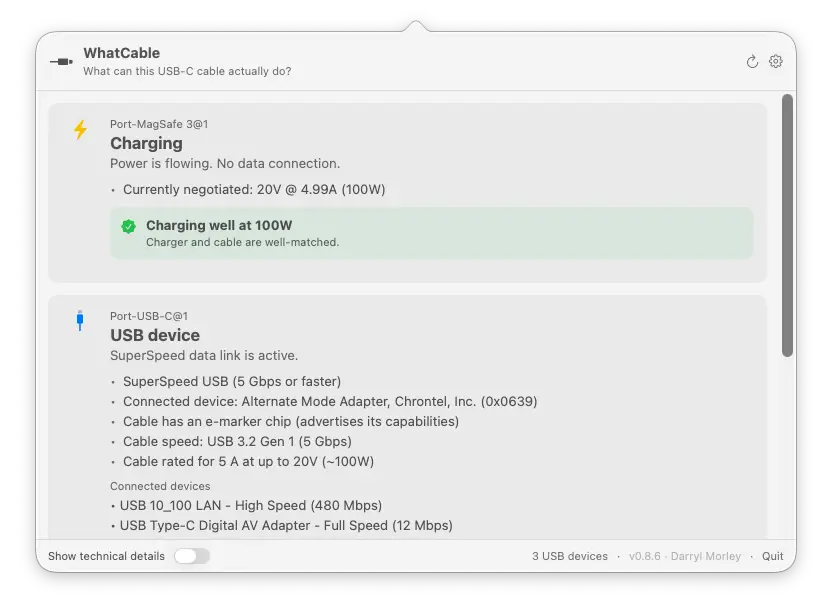
How to install WhatCable on a Mac
- Get OpenDMG. It is a free app store for open source Mac apps. Download OpenDMG.
- Search for WhatCable and press Get. OpenDMG downloads version 1.4.0 from darrylmorley's own GitHub release.
- Open it. The download is checked against its SHA-256 fingerprint and its signature is checked on your Mac before it lands in Applications.
Updates to WhatCable show up in OpenDMG and install with one button. No account is needed.
Prefer to do it by hand? The developer's file is on GitHub: WhatCable.zip (16 MB).
What is new in WhatCable 1.4.0
# Devices behind docks land in the right place, and speed blame gets honest

## Connected devices

- **Devices behind docks are placed by the chain's actual topology, not by name matching.** A drive on a dock used to be filed under whichever device happened to share a name with something in the chain, so an SSD could show up inside the wrong enclosure. The tree now follows the PCIe path the device actually hangs off. Thanks @cannotcollide (#493), whose CalDigit chain with two same-vendor enclosures caught it and whose diagnostic submissions proved the fix.
- **Thunderbolt tunnels set up by the firmware at boot are no longer dropped from the tree**, and a display reporting an empty name no longer counts as having one.

## Speed verdicts

- **"Cable is limiting data speed" stopped blaming the cable for a slow device.** On a multi-hop chain the verdict compared against the first thing in the chain (often an adapter), not the device at the end. It now walks to the end of the chain before deciding who is the limit. Thanks @cannotcollide (#507).
…
More Menu Bar and Notch apps
-
 StatsmacOS system monitor in your menu bar
-
 IcePowerful menu bar manager for macOS (upstream, temporarily inactive)
-
 Hidden BarAn ultra-light MacOS utility that helps hide menu bar icons
-
 ThawThe open-source menu bar manager: hide, organize, and take control of menu bar icons
-
 Boring NotchTurn your MacBook notch into a music and file control center
-
 eulmacOS status monitoring app written in SwiftUI