
Tintpad for Mac
Hotkey to open terminal at the right repo with Claude Code, Codex, or any agent, ready to go.
By sorkila. Free and open source, MIT licence.
Tintpad at a glance
- Version
- 0.4.4
- Released
- 25 October 2026
- Download size
- 4.7 MB
- Works on
- Apple silicon and Intel
- Licence
- MIT
- Category
- Developer Tools
- Developer
- sorkila
- GitHub stars
- 17
About Tintpad
It falls out of your notch. Hotkey, repo, Return: your terminal opens with Claude Code, Codex or any agent already running. Free, MIT, local-only macOS.
How to install Tintpad on a Mac
- Get OpenDMG. It is a free app store for open source Mac apps. Download OpenDMG.
- Search for Tintpad and press Get. OpenDMG downloads version 0.4.4 from sorkila's own GitHub release.
- Open it. The download is checked against its SHA-256 fingerprint and its signature is checked on your Mac before it lands in Applications.
Updates to Tintpad show up in OpenDMG and install with one button. No account is needed.
Prefer to do it by hand? The developer's file is on GitHub: Tintpad.dmg (4.7 MB).
What is new in Tintpad 0.4.4
### New in 0.4.4 #### Fixed - **Tintpad no longer spins at launch.** 0.4.3 held a full CPU core from the moment it opened and could neither quit nor update itself. If you installed 0.4.3, force quit Tintpad (⌥⌘⎋) and download this version, it can't update on its own. 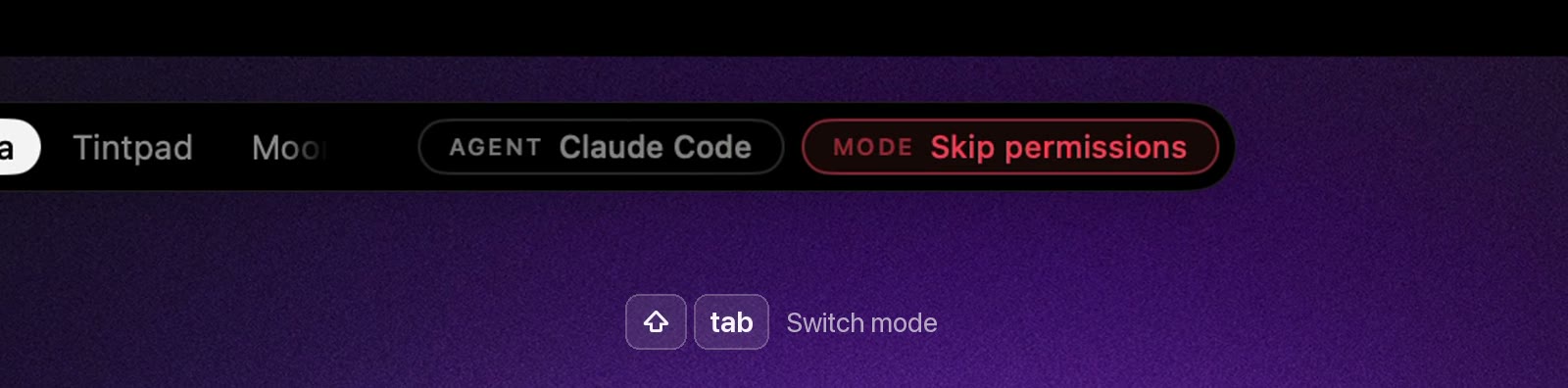 ### Install or update - Already running Tintpad? It updates itself through Sparkle (menu bar → Check for Updates…). - New here: **download `Tintpad.dmg` below**, drag it to Applications, launch. macOS 14+. Or `brew install --cask sorkila/tap/tintpad` (Homebrew asks once to trust the tap). - Signed with a Developer ID and notarized. sha256 `0446fc824e69a8789fb59d54c03d107a2739890f188732faf238587b28af9781` <details><summary>What Tintpad is</summary> Press ⌥⌘Space and a black drop falls out of your Mac's notch with your repos inside. Return opens your terminal at that repo with your coding agent (Claude Code, Codex, any CLI) already running, in the mode you used there last. AGENT and MODE chips say exactly what Return runs, and a mode that skips permissions turns red first. Seven terminals, git worktrees (⌃W), headless dispatch (⌃⏎), frecency search. Free and MIT, local-only, no accounts, nothing to unlock. </details> …
More Developer Tools apps
-
 UTMVirtual machines for iOS and macOS
-
 vphone-cliCLI to boot a virtual iPhone (iOS 26) with Apple Virtualization.framework and PCC…
-
 VirtualBuddyVirtual machine manager for running recent macOS versions on Apple Silicon
-
 WWDCUnofficial WWDC app for macOS
-
 Xcodes.appThe easiest way to install and switch between multiple versions of Xcode
-
 Postgres.appThe easiest way to get started with PostgreSQL on the Mac