
System Data for Mac
Reveal what is really inside "System Data" and delete it, item by item.
By Jarvis322. Free and open source.
System Data at a glance
- Version
- 1.7.0
- Released
- 4 October 2026
- Download size
- 7.3 MB
- Works on
- Apple silicon and Intel
- Category
- System Tools
- Developer
- Jarvis322
- GitHub stars
- 913
About System Data
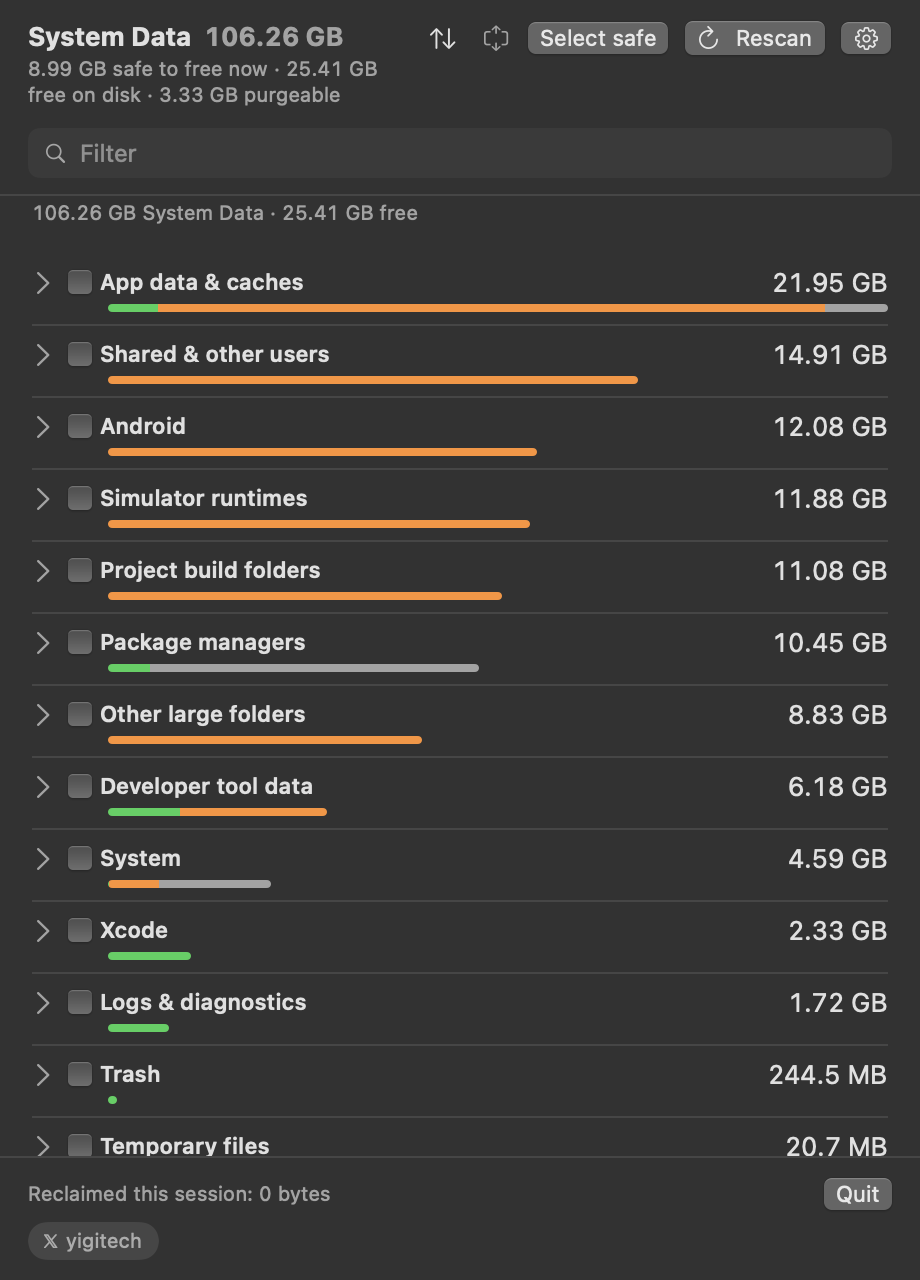
See what is really inside macOS System Data and delete it item by item. A free menu bar app that explains every category and shows each command before it runs.
Screenshots
How to install System Data on a Mac
- Get OpenDMG. It is a free app store for open source Mac apps. Download OpenDMG.
- Search for System Data and press Get. OpenDMG downloads version 1.7.0 from Jarvis322's own GitHub release.
- Open it. The download is checked against its SHA-256 fingerprint and its signature is checked on your Mac before it lands in Applications.
Updates to System Data show up in OpenDMG and install with one button. No account is needed.
Prefer to do it by hand? The developer's file is on GitHub: SysDataMenu-1.7.0.dmg (7.3 MB).
What is new in System Data 1.7.0
- **AI models and tools, as a group.** Ollama, Hugging Face, LM Studio and PyTorch downloads, the AI coding tools' folders, Claude's local VM bundles and Chrome's on-device model used to be spread over Developer tool data and App data. They now sit together. Ollama and Hugging Face are listed model by model. An Ollama model is sized from its manifest, with layers shared between models counted once, and is removed with `ollama rm`: deleting its blobs by hand would damage the models that share them.
- **Why a category grew.** Opening the unusual-growth notification now goes to History, which starts with the items behind the growth: each one's usual size against its size now, or marked new when no earlier scan knew it.
- **Touch ID before a delete.** An optional switch in the settings menu asks for Touch ID, an Apple Watch or the Mac's password after you press Delete. Cancelling leaves the confirmation open and deletes nothing. It guards deletes confirmed in the window; the weekly automatic clean and Shortcuts run without anyone present and never ask.
- **`SysDataMenu --clean`.** The weekly clean from a terminal. On its own it prints every Safe item with the command that would run and deletes nothing; `--apply` deletes them. It covers what the automatic clean covers and never anything under Review or Manual.
…
More System Tools apps
-
 PearcleanerApp Cleaner and Uninstaller Tool
-
 OpenInTerminalFinder toolbar tool for opening the current folder in a terminal
-
 PureMacFree open-source system cleaner with privacy protection
-
 DockDoorWindow peeking for macOS
-
 LatestApp update checker that notifies you of available updates for installed applications
-
 DorsoPosture reminder that progressively blurs your screen when you slouch