
Smorza for Mac
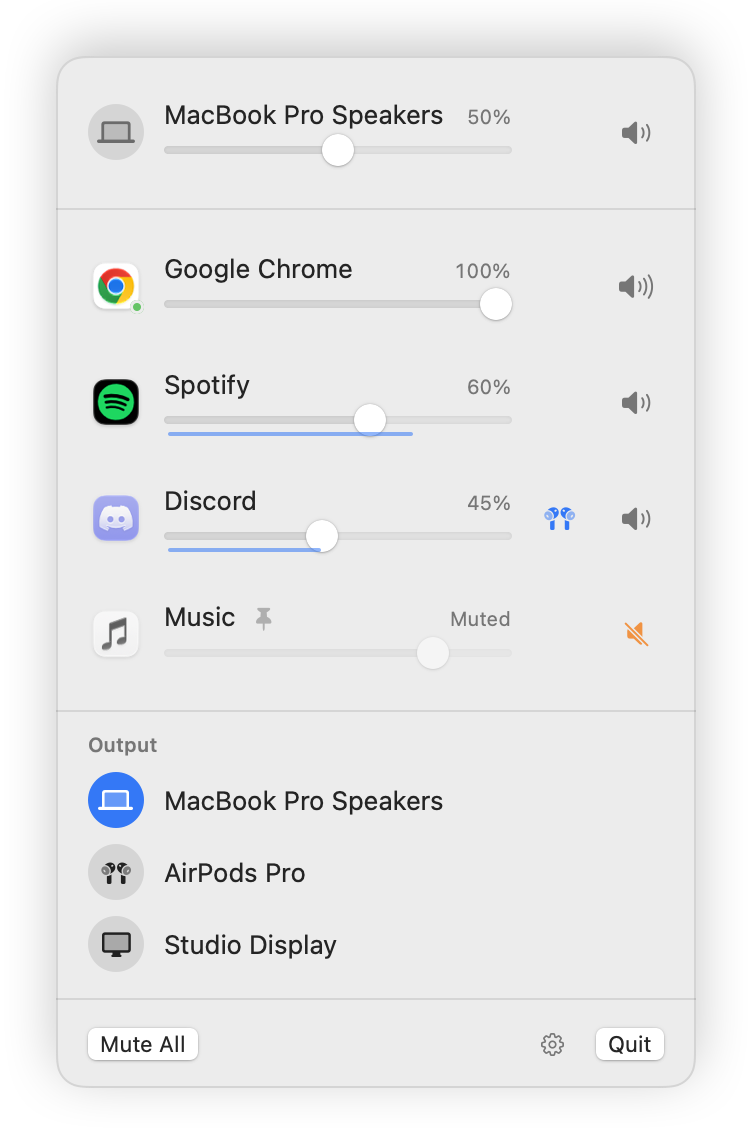
Per-app volume mixer to adjust, mute, and choose audio output devices.
By rokoov. Free and open source, MIT licence.
Smorza at a glance
- Version
- 0.4.0
- Released
- 21 November 2026
- Download size
- 2.5 MB
- Works on
- Apple silicon and Intel
- Licence
- MIT
- Category
- Audio and Music
- Developer
- rokoov
- GitHub stars
- 13
About Smorza
Free, open source per-app volume mixer for the macOS menu bar
Screenshots
How to install Smorza on a Mac
- Get OpenDMG. It is a free app store for open source Mac apps. Download OpenDMG.
- Search for Smorza and press Get. OpenDMG downloads version 0.4.0 from rokoov's own GitHub release.
- Open it. The download is checked against its SHA-256 fingerprint and its signature is checked on your Mac before it lands in Applications.
Updates to Smorza show up in OpenDMG and install with one button. No account is needed.
Prefer to do it by hand? The developer's file is on GitHub: Smorza-0.4.0.dmg (2.5 MB).
What is new in Smorza 0.4.0
Smorza 0.4.0

- A welcome window explains the one permission before macOS asks for it
- Actions for the Shortcuts app, and smorza:// links for Terminal and Raycast
- Shortcuts to open the mixer and to turn the playing app up, down or mute it
- Ignore an app: Smorza leaves its sound alone and stops listing it
- A Notifications & alerts row for the system alert volume
- The menu bar icon shows Mute All, and the output volume if you like
- Sliders in each app's colour, and Liquid Glass on macOS 26
- German, French and Croatian
- The volume keys now change the playing app instead of the app in front

If you use the volume keys, macOS may ask for Accessibility again after this update.
More Audio and Music apps
-
 MonitorControlAdjust external monitor settings
-
 FluidVoiceVoice-to-text app with AI enhancement
-
 VoiceInkReal-time speech-to-text app
-
 eqMacSystem-wide audio equalizer and volume mixer
-
 LyricsXDisplay lyrics for iTunes/Spotify
-
 FreeFlowPush-to-talk speech-to-text tool that inserts polished transcripts into any app