

Screen Capture for Mac
Private, on-device screenshot tool with scrolling capture for Apple Silicon Macs.
By nasadunadu. Free and open source, Apache-2.0 licence.
Screen Capture at a glance
- Version
- 0.5.0
- Released
- 31 October 2026
- Download size
- 2.0 MB
- Works on
- Apple silicon
- Licence
- Apache-2.0
- Category
- Video and Screen Capture
- Developer
- nasadunadu
- GitHub stars
- 5
About Screen Capture
Native Swift macOS screenshot & sticky-aware scrolling long-capture app (ScreenCaptureKit, Apple Notarized, 100% On-Device) · 原生免费无内购 Mac 截图与防卡死滚动长截图工具
Screenshots
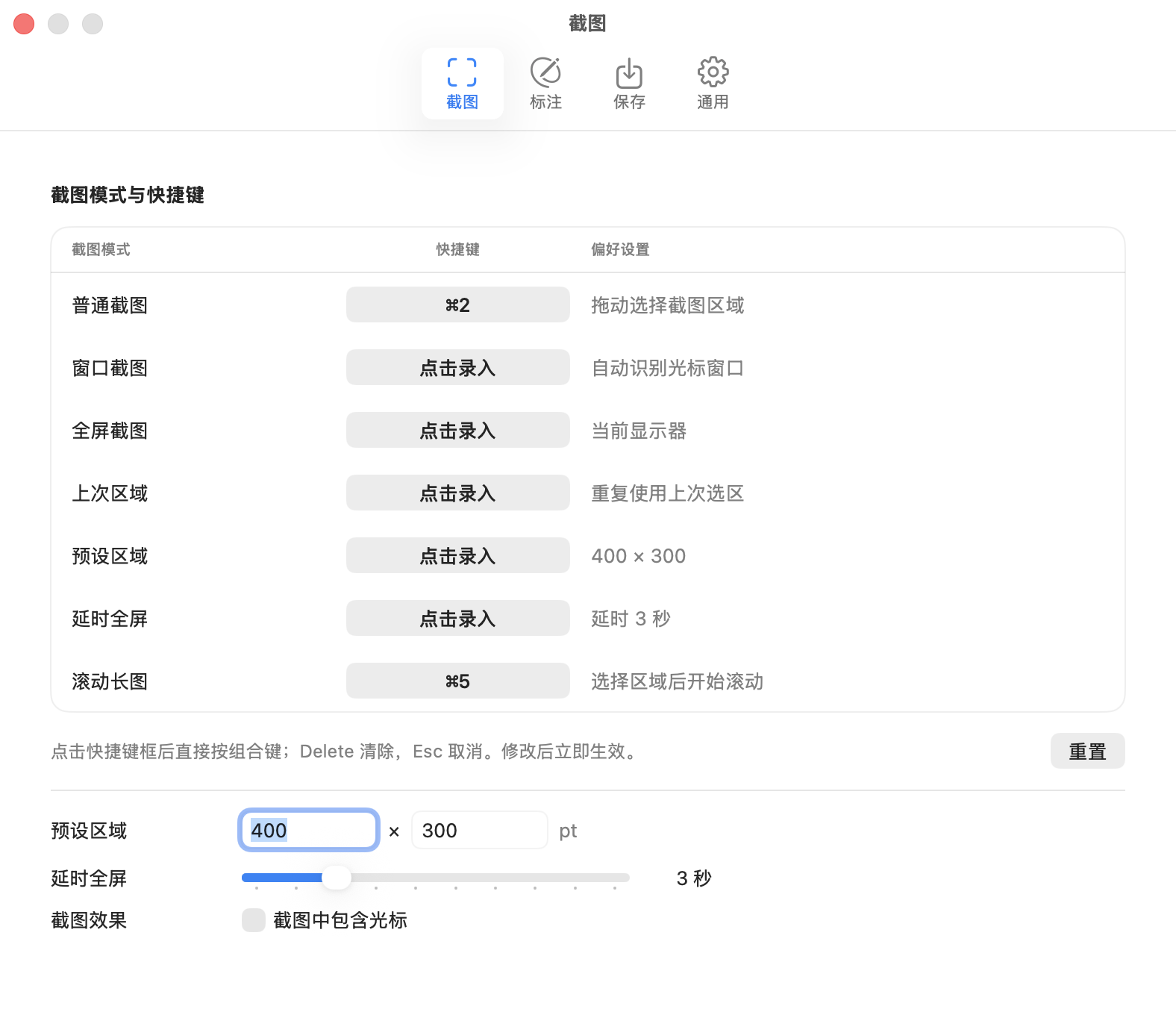
How to install Screen Capture on a Mac
- Get OpenDMG. It is a free app store for open source Mac apps. Download OpenDMG.
- Search for Screen Capture and press Get. OpenDMG downloads version 0.5.0 from nasadunadu's own GitHub release.
- Open it. The download is checked against its SHA-256 fingerprint and its signature is checked on your Mac before it lands in Applications.
Updates to Screen Capture show up in OpenDMG and install with one button. No account is needed.
Prefer to do it by hand? The developer's file is on GitHub: ScreenCapture-0.5.0-macos-arm64.dmg (2.0 MB).
What is new in Screen Capture 0.5.0
# Screen Capture v0.5.0

WindowServer 稳定性加固 · 长截图拼接防卡死与去重引擎升级 · 紧凑型 AI 矢量工具条 · Apple Silicon 原生构建 · Build 35

## 下载与安装

### 方式一:Homebrew Cask 一键安装(推荐)
```sh
brew tap nasadunadu/tap https://github.com/nasadunadu/screen-capture-macos.git
brew install --cask screencapture
```

### 方式二:直接下载已公证 DMG
下载 [`ScreenCapture-0.5.0-macos-arm64.dmg`](https://github.com/nasadunadu/screen-capture-macos/releases/download/v0.5.0/ScreenCapture-0.5.0-macos-arm64.dmg),退出旧应用,打开 DMG,将 `ScreenCapture` 拖入“应用程序”替换旧版。同时提供 `ScreenCapture-0.5.0-macos-arm64.zip` 备用下载。无需安装 Xcode,升级自动保留既有快捷键、偏好设置、屏幕录制授权与已保存截图。

---

## 本次核心更新

### 1. 系统级稳定性加固(根治 macOS 26/27 `WindowServer` 闪退黑屏隐患)
- **进程级 `SCContentFilter` 排除机制**:将 `ScreenCaptureKit` 采集过滤从逐窗口数组 `excludingWindows` 升级为进程级 `excludingApplications: [ownApplication]`,避免 `WindowServer` 在 120Hz ProMotion 合成帧期间递归校验刚销毁窗口的 `RestrictedLayerHosts` 节点引发 `Invalid window` 崩溃。
- **跨显示周期安全退役(`EditorPanel.retire`)**:重构选区遮罩、标注面板与长截图浮窗的销毁生命周期,显式锁定 `isReleasedWhenClosed = false` 与 `animationBehavior = .none`,先隐藏窗口并解绑 SwiftUI `NSHostingView` 视图树,延后 `50ms` 跨越当前 `WindowServer` 渲染周期后再释放底层窗口引用。
- **流式采集优雅解绑**:`RegionCaptureStream.stop()` 在调用 `stopCapture()` 前显式移除 `SCStreamOutput` 监听,杜绝停止瞬间残留帧回调竞态。

### 2. 滚动长截图(Long Capture)防卡死与高精度去重拼接
- **解耦固定顶/底栏(Sticky Header/Footer)遮罩搜索**:移除固定边缘特征检测对未遮罩普通匹配得分(`ordinaryMatch.score >= 0.16`)的前置依赖,解决带有吸顶导航栏、底部悬浮输入框或工具栏的页面在滚动中段因重叠打分被拉低而“滚屏卡死不动”的问题。
…
More Video and Screen Capture apps
-
 IINAThe modern video player for macOS
-
 Palmier ProOpen source video editor where you and AI agents generate and edit videos together in the…
-
 Quick RecorderA lightweight and high-performance screen recorder for macOS
-
 macshotScreenshot and screen recording tool with annotation, OCR, and scroll capture
-
 SnapzyOpen-source tool for screenshots, screen recording, annotation, and editing
-
 ScreendropBeautiful screenshot and screen recording tool — a native, self-hostable, and free Loom…