

Palmier Pro for Mac
Open source video editor where you and AI agents generate and edit videos together in the timeline.
By palmier-io. Free and open source, GPL-3.0 licence.
Palmier Pro at a glance
- Version
- 0.12.1
- Released
- 2 November 2026
- Download size
- 110 MB
- Works on
- Apple silicon and Intel
- Licence
- GPL-3.0
- Category
- Video and Screen Capture
- Developer
- palmier-io
- GitHub stars
- 15K
About Palmier Pro
macOS video editor built for AI
Screenshots
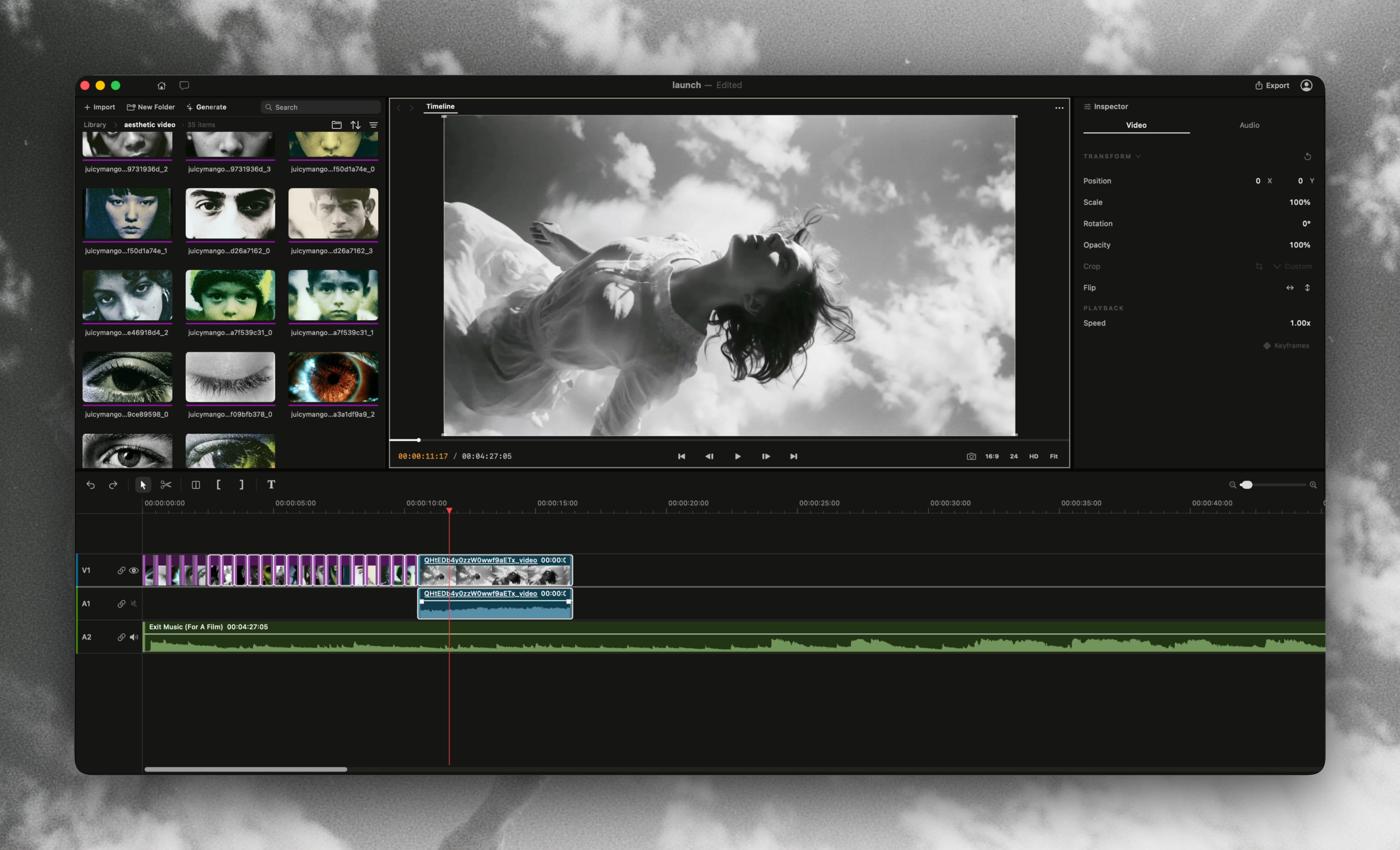
How to install Palmier Pro on a Mac
- Get OpenDMG. It is a free app store for open source Mac apps. Download OpenDMG.
- Search for Palmier Pro and press Get. OpenDMG downloads version 0.12.1 from palmier-io's own GitHub release.
- Open it. The download is checked against its SHA-256 fingerprint and its signature is checked on your Mac before it lands in Applications.
Updates to Palmier Pro show up in OpenDMG and install with one button. No account is needed.
Prefer to do it by hand? The developer's file is on GitHub: PalmierPro.dmg (110 MB).
What is new in Palmier Pro 0.12.1
## What's new

- Merge pull request #268 from palmier-io/fix/email-signup-provision
- [fix] Omit missing profile fields when provisioning an account
- Merge pull request #267 from palmier-io/cursor/email-sign-in-c936
- [fix] Own email attempts per sign-in form and close the Agent sign-in window
- [ui] Route every sign-in entry point through the shared sign-in dialog
- [fix] Keep the issued email code when a resend fails
- [agent] Open the unified sign-in window from manage_account
- [fix] Harden sign-in sheet against stale sends and silent Google failures
- [ui] Remove sign-in sheet caption
- [ui] Center sign-in sheet and add Google logo
- [ui] Unify sign-in sheet and fix cramped layout
- [feat] Add sign in with email that reuses an existing Google account
- [build] Publish v0.12.0 appcast
More Video and Screen Capture apps
-
 IINAThe modern video player for macOS
-
 Quick RecorderA lightweight and high-performance screen recorder for macOS
-
 macshotScreenshot and screen recording tool with annotation, OCR, and scroll capture
-
 SnapzyOpen-source tool for screenshots, screen recording, annotation, and editing
-
 ScreendropBeautiful screenshot and screen recording tool — a native, self-hostable, and free Loom…
-
 BetterCaptureFree and open source screen recorder with professional encoding support