

Pinpoint for Mac
Capture your screen, drop numbered markers, and copy a ready-to-paste prompt for your AI agent.
By croustibat. Free and open source, MIT licence.
Pinpoint at a glance
- Version
- 0.7.3
- Released
- 29 September 2026
- Download size
- 3.9 MB
- Works on
- Apple silicon and Intel
- Licence
- MIT
- Category
- Video and Screen Capture
- Developer
- croustibat
- GitHub stars
- 16
Screenshots
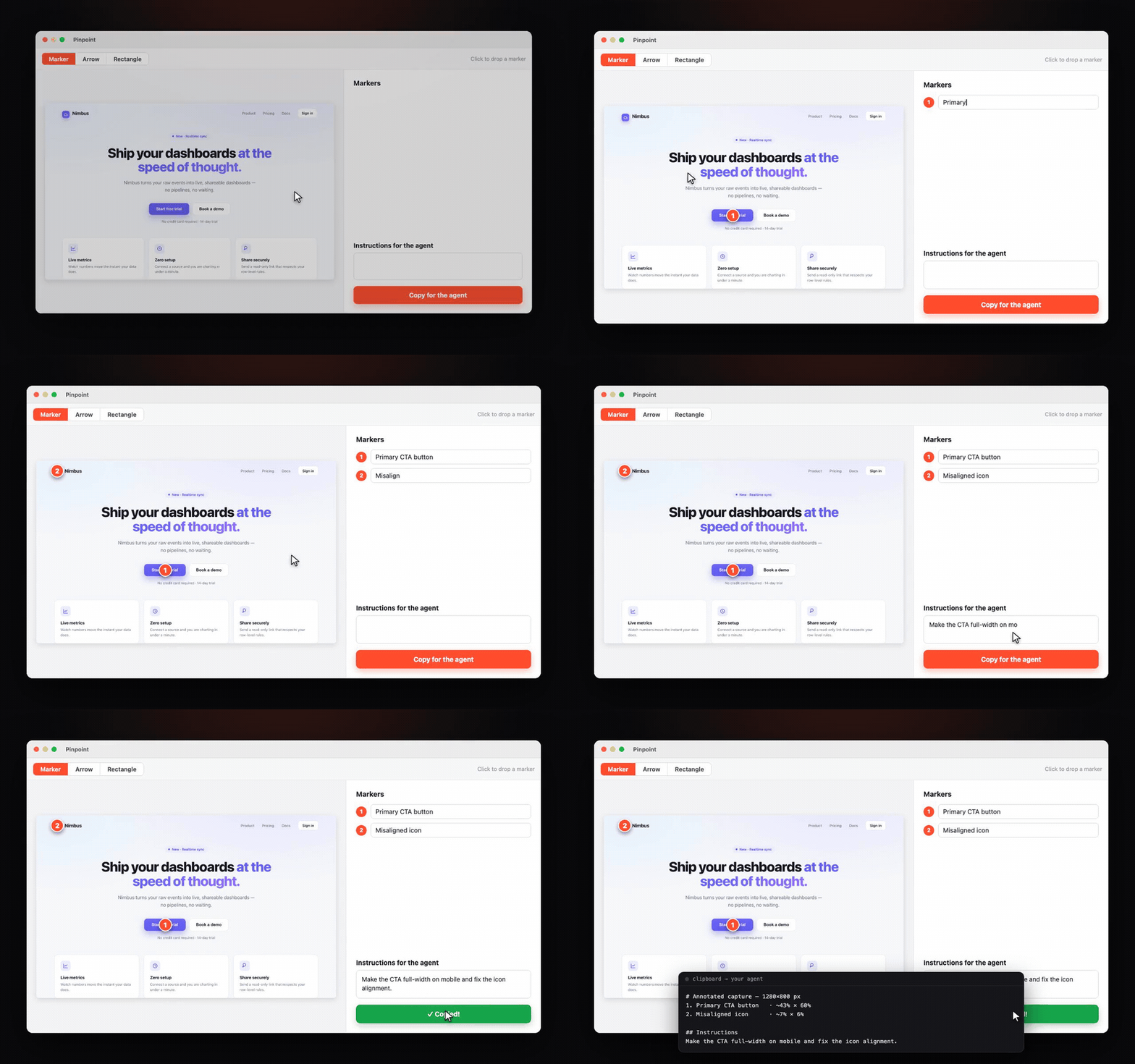
How to install Pinpoint on a Mac
- Get OpenDMG. It is a free app store for open source Mac apps. Download OpenDMG.
- Search for Pinpoint and press Get. OpenDMG downloads version 0.7.3 from croustibat's own GitHub release.
- Open it. The download is checked against its SHA-256 fingerprint and its signature is checked on your Mac before it lands in Applications.
Updates to Pinpoint show up in OpenDMG and install with one button. No account is needed.
Prefer to do it by hand? The developer's file is on GitHub: Pinpoint.dmg (3.9 MB).
What is new in Pinpoint 0.7.3
## What's New in 0.7.3

**Clean up the Shelf.** A new ✨ button in the Shelf header reviews your old screenshots before anything goes. The screenshot folder only ever grows — a few months in, it holds hundreds of files nobody will open again.

- **Smart** proposes exact duplicates, the retakes of a burst (shots seconds apart — the last one is kept), screenshots never reopened after 30 days, and anything older than 90 days.
- **Custom** lets you pick the age yourself (a week to a year), optionally limited to screenshots never reopened.

Everything is grouped by reason and ticked; untick a row or a whole group, peek with Quick Look, and see how much space you get back. Nothing moves until you confirm, and then it goes to the **Trash**, not into the void. Favorites, titled screenshots, the last week and any image macOS didn't take as a screenshot are never proposed — if the Shelf watches your Desktop, your photos are safe.

**Annotate whatever is on the clipboard.** Press ⌥⇧A — or pick *Annotate Clipboard Image* in the menu — and the copied image opens straight in the editor, a file copied in Finder included. Nothing to annotate? A small toast says so instead of an alert stealing focus. The shortcut can be changed in Settings ▸ Capture.

**Drop an image onto the menu bar icon** to open it in the editor.
…
More Video and Screen Capture apps
-
 IINAThe modern video player for macOS
-
 Palmier ProOpen source video editor where you and AI agents generate and edit videos together in the…
-
 macshotScreenshot and screen recording tool with annotation, OCR, and scroll capture
-
 SnapzyOpen-source tool for screenshots, screen recording, annotation, and editing
-
 ScreendropBeautiful screenshot and screen recording tool — a native, self-hostable, and free Loom…
-
 BetterCaptureFree and open source screen recorder with professional encoding support