
Nocturne for Mac
One-click menu bar utility that hides the clock to keep you focused and restores it just as quickly.
By dotcomjack. Free and open source, MIT licence.
Nocturne at a glance
- Version
- 1.5.0
- Released
- 26 September 2026
- Download size
- 863 KB
- Works on
- Apple silicon and Intel
- Licence
- MIT
- Category
- Menu Bar and Notch
- Developer
- dotcomjack
- GitHub stars
- 7
About Nocturne
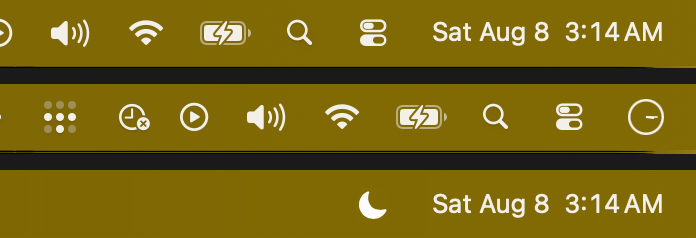
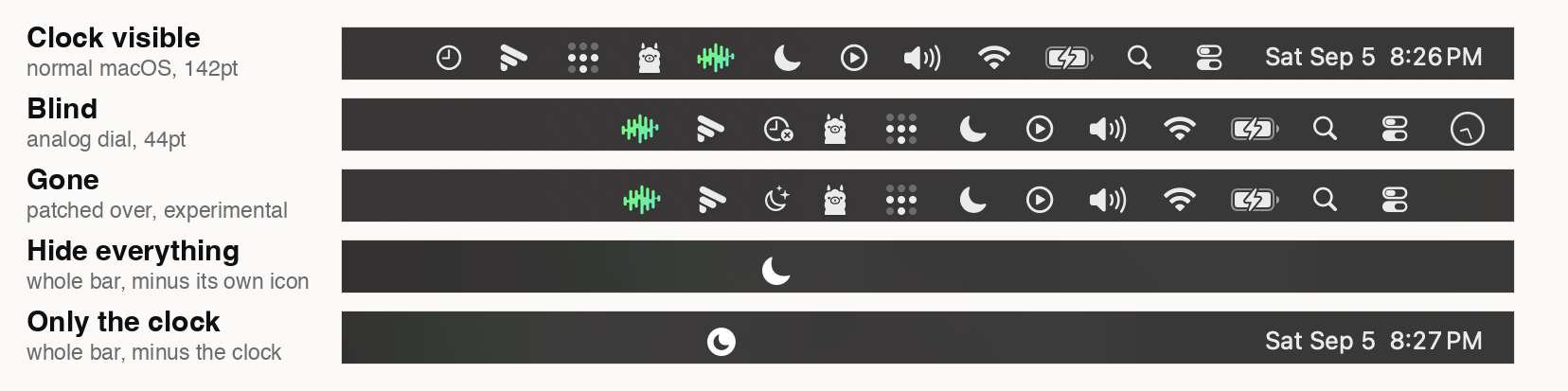
macOS gives every menu bar icon a hide toggle except the clock. Nocturne makes it unreadable instead. One click, no permissions, no private APIs.
Screenshots
How to install Nocturne on a Mac
- Get OpenDMG. It is a free app store for open source Mac apps. Download OpenDMG.
- Search for Nocturne and press Get. OpenDMG downloads version 1.5.0 from dotcomjack's own GitHub release.
- Open it. The download is checked against its SHA-256 fingerprint and its signature is checked on your Mac before it lands in Applications.
Updates to Nocturne show up in OpenDMG and install with one button. No account is needed.
Prefer to do it by hand? The developer's file is on GitHub: Nocturne-1.5.0.dmg (863 KB).
What is new in Nocturne 1.5.0
### Lighter, measurably

Nothing on screen changes. What changes is what Nocturne costs while it sits
there. Measured on macOS 26.6.2 against the shipped 1.4.1, same machine, same
settings (Only the clock, Hover to show on, shimmer Occasionally), each build
at steady state:

| | 1.4.1 | now |
|---|---|---|
| CPU at rest, input idle | 0.173% | 0.042% |
| Wakeups at rest | 3.71/s | 1.00/s |
| CPU while the pointer moves (120Hz) | 3.76% | 0.60% |

"At rest" counts only the seconds in which there was no keyboard or pointer
input at all, read from the HID idle timer, because a window with the owner
using the Mac folds pointer events into the number and flatters nobody.

Where it came from, largest first:

- **The pointer.** Hover to show watched every mouse move on every screen, and
 each one cost this process a wakeup to learn the pointer was still over a
 document. The monitor now naps for 150ms after any move that is nowhere near
 a bar, then looks once at where the pointer is. On a bar it stays awake, so
 leaving is seen at once. A listen-only event tap looked cheaper and is a
 trap: from an ad-hoc signed `.app` it is created without error and delivers
 0 of 2,099 events, because it needs Input Monitoring even for the mouse.
- **The placement tick** read the window list four times every 2s in Only the
 clock with Hover to show, all describing the same instant. It reads it once,
…
More Menu Bar and Notch apps
-
 StatsmacOS system monitor in your menu bar
-
 IcePowerful menu bar manager for macOS (upstream, temporarily inactive)
-
 Hidden BarAn ultra-light MacOS utility that helps hide menu bar icons
-
 ThawThe open-source menu bar manager: hide, organize, and take control of menu bar icons
-
 Boring NotchTurn your MacBook notch into a music and file control center
-
 eulmacOS status monitoring app written in SwiftUI