

muxbar for Mac
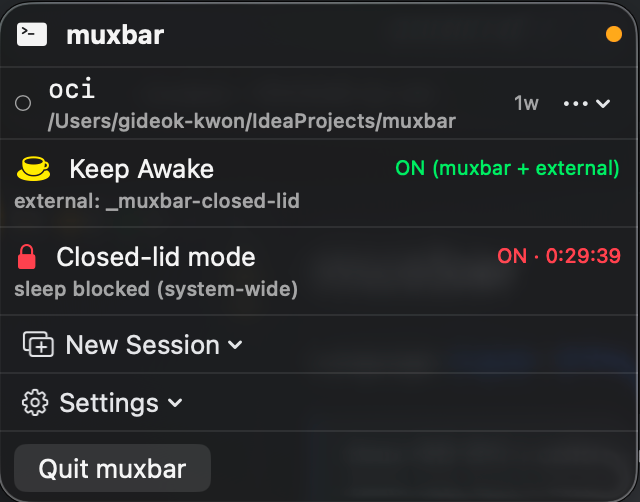
Menu bar tmux session manager with quick attach, live preview, templates, global hotkeys, and Keep Awake via caffeinate.
By 1989v. Free and open source, MIT licence.
muxbar at a glance
- Version
- 0.3.2
- Released
- 22 May 2026
- Download size
- 1.4 MB
- Works on
- Apple silicon and Intel
- Licence
- MIT
- Category
- Menu Bar and Notch
- Developer
- 1989v
- GitHub stars
- 16
About muxbar
Native macOS menu bar app — tmux session manager, Keep Awake / closed-lid mode (lid shut, work running), long-running script launcher (OCI polling, capacity wait, backups). Swift + SwiftUI.
Screenshots
How to install muxbar on a Mac
- Get OpenDMG. It is a free app store for open source Mac apps. Download OpenDMG.
- Search for muxbar and press Get. OpenDMG downloads version 0.3.2 from 1989v's own GitHub release.
- Open it. The download is checked against its SHA-256 fingerprint and its signature is checked on your Mac before it lands in Applications.
Updates to muxbar show up in OpenDMG and install with one button. No account is needed.
Prefer to do it by hand? The developer's file is on GitHub: muxbar-0.3.2.dmg (1.4 MB).
What is new in muxbar 0.3.2
## Fix

- **Closed-lid mode 자동 해제(timer / AC 분리 / lid 열림)가 비밀번호 dialog 에 막히지 않습니다.** 이전엔 타이머 만료 시 admin password prompt 가 떠서 cancel 하면 모드가 그대로 유지됐는데 (타이머 의미 무색), 이제 자동 해제는 `sudo -n pmset` 으로 silent 시도만 합니다. NOPASSWD 룰이 있으면 정상 복원, 없으면 caffeinate 세션을 정리하고 state 를 OFF 로 둔 뒤 "메뉴에서 OFF 토글로 pmset 복원 다시 시도" 알림을 발송합니다. **"N분 뒤 자동 종료" 약속이 비밀번호 입력 없이도 무조건 지켜집니다.**
- 수동 OFF 의 password cancel 동작(state ON 유지 + AC/lid monitor 재무장)은 그대로입니다.

## Docs

- README/README.ko: Closed-lid mode 를 **헤드리스 클램쉘**(외부 디스플레이 없이 동작하는 clamshell) 로 명시. macOS 정식 클램쉘 모드와의 비교 표 보강.

## Install

```bash
brew install --cask 1989v/tap/muxbar
```

또는 아래 `muxbar-0.3.2.dmg` 다운로드 → 우클릭 → 열기 (ad-hoc 서명).
More Menu Bar and Notch apps
-
 StatsmacOS system monitor in your menu bar
-
 IcePowerful menu bar manager for macOS (upstream, temporarily inactive)
-
 Hidden BarAn ultra-light MacOS utility that helps hide menu bar icons
-
 ThawThe open-source menu bar manager: hide, organize, and take control of menu bar icons
-
 Boring NotchTurn your MacBook notch into a music and file control center
-
 eulmacOS status monitoring app written in SwiftUI