

Light Stats for Mac
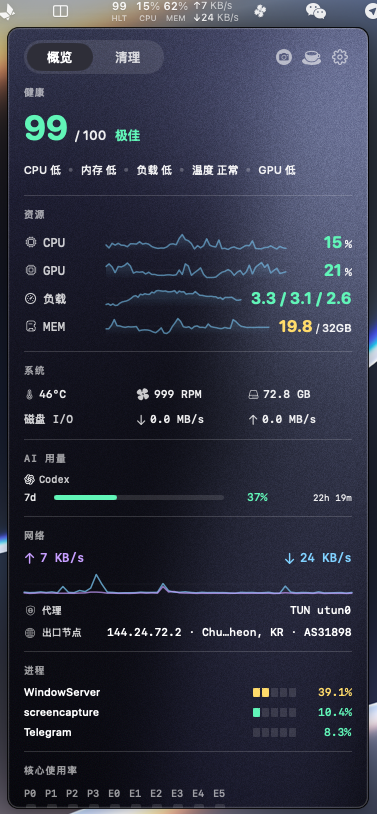
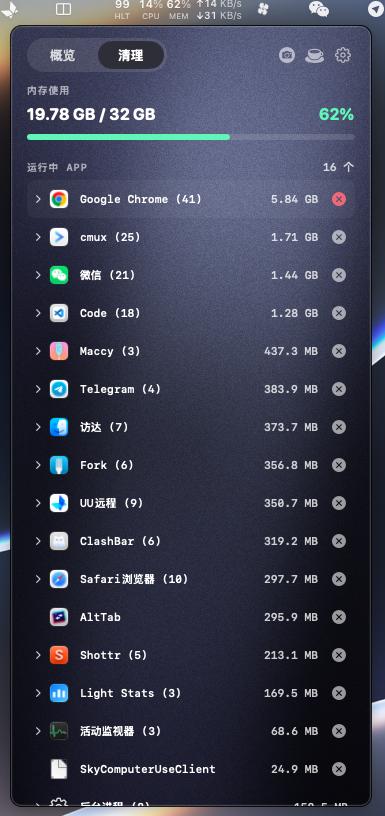
Menu bar instrument that shows whether your Mac is under pressure right now with a 0-100 health score and live CPU, GPU, and memory-pressure signals, plus optional developer tools for AI CLI usage and proxy context.
By EvilIrving. Free and open source, MIT licence.
Light Stats at a glance
- Version
- 1.9.6
- Released
- 22 September 2026
- Download size
- 5.3 MB
- Works on
- Apple silicon and Intel
- Licence
- MIT
- Category
- System Tools
- Developer
- EvilIrving
- GitHub stars
- 30
About Light Stats
Native macOS menu bar system monitor. Live CPU/GPU/memory-pressure signals, a 0-100 health score, no telemetry.
Screenshots
How to install Light Stats on a Mac
- Get OpenDMG. It is a free app store for open source Mac apps. Download OpenDMG.
- Search for Light Stats and press Get. OpenDMG downloads version 1.9.6 from EvilIrving's own GitHub release.
- Open it. The download is checked against its SHA-256 fingerprint and its signature is checked on your Mac before it lands in Applications.
Updates to Light Stats show up in OpenDMG and install with one button. No account is needed.
Prefer to do it by hand? The developer's file is on GitHub: Light-Stats-1.9.6.dmg (5.3 MB).
What is new in Light Stats 1.9.6
## Light Stats 1.9.6

这一版新增窗口管理:把窗口拖到屏幕边缘即可吸附成对半、四角或三分,再用顶部边缘的布局岛在更多布局之间一键落位;每个动作都能绑定自己的全局快捷键。「拖到边缘」由谁执行可以二选一——Light Stats 自己的引擎,或 macOS 自带的平铺——两个实现不会同时生效。同时加入 Dock 点击收起窗口、摇晃隐藏与恢复、菜单栏的窗口控制菜单,以及清理页的固定批处理退出分组。窗口管理默认关闭,在设置里开启。

This release adds window management: drag a window to a screen edge to snap it to a half, a corner, or a third, then use the layout island on the top edge to place it in one move across more layouts; every action can have its own global shortcut. Who performs the edge gesture is a choice — the Light Stats engine, or macOS' built-in tiling — so two implementations never run at the same time. It also brings Dock-click collapse, shake to hide and restore, a window-control menu in the menu bar, and a pinned batch-quit group in Cleanup. Window management is off until you enable it.

### 新增

- 拖到屏幕边缘吸附:对半、四角、三分(含 1/3 与 2/3)、底边三分位;顶部边缘的布局岛可直接把窗口落位到某一格
- Drag a window to a screen edge to snap: halves, corners, thirds (including 1/3 and 2/3), and bottom-edge thirds; the layout island on the top edge places a window straight into a tile
- 布局岛内的布局可切换(对半、三分、四角、六格、九格、左右堆叠),并能选择岛里显示哪些
- The island's layouts are switchable (halves, thirds, quadrants, sixths, ninths, left and right stack), and you choose which ones it offers
- 每个吸附动作都能自定义全局快捷键,包括移到上一块/下一块显示器、居中、最大化、最小化与还原
…
More System Tools apps
-
 PearcleanerApp Cleaner and Uninstaller Tool
-
 OpenInTerminalFinder toolbar tool for opening the current folder in a terminal
-
 PureMacFree open-source system cleaner with privacy protection
-
 DockDoorWindow peeking for macOS
-
 LatestApp update checker that notifies you of available updates for installed applications
-
 DorsoPosture reminder that progressively blurs your screen when you slouch