

LazyTune for Mac
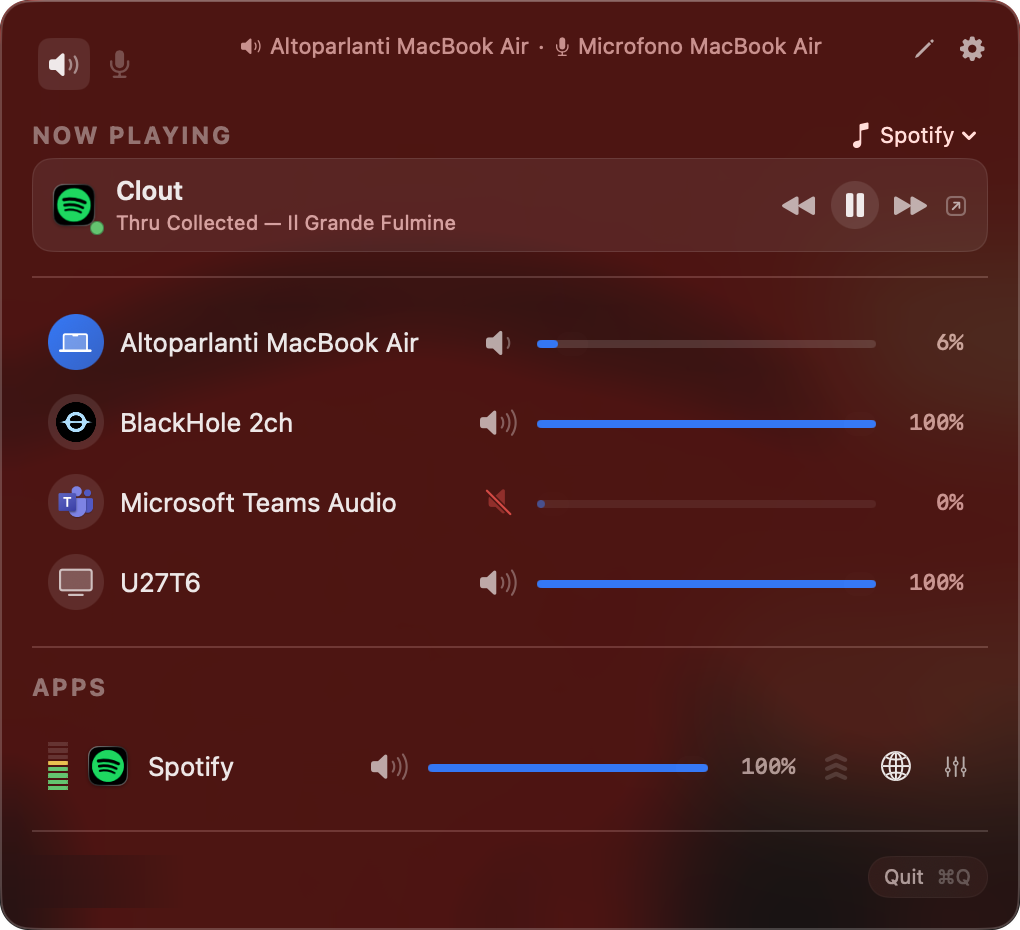
Lightweight menu bar per-app audio mixer with Zero-Touch Passthrough and universal media key control (F7/F8/F9) for web and desktop players.
By Vic3z. Free and open source, GPL-3.0 licence.
LazyTune at a glance
- Version
- 1.1.0
- Released
- 22 November 2026
- Download size
- 4.4 MB
- Works on
- Apple silicon and Intel
- Licence
- GPL-3.0
- Category
- Audio and Music
- Developer
- Vic3z
- GitHub stars
- 5
About LazyTune
Unified macOS per-app audio mixer + universal media key controller (F7/F8/F9) for web & native players. Ultra-lightweight (~50 MB RAM, 0% idle CPU, lazy-loaded EQ)
Screenshots
How to install LazyTune on a Mac
- Get OpenDMG. It is a free app store for open source Mac apps. Download OpenDMG.
- Search for LazyTune and press Get. OpenDMG downloads version 1.1.0 from Vic3z's own GitHub release.
- Open it. The download is checked against its SHA-256 fingerprint and its signature is checked on your Mac before it lands in Applications.
Updates to LazyTune show up in OpenDMG and install with one button. No account is needed.
Prefer to do it by hand? The developer's file is on GitHub: LazyTune.dmg (4.4 MB).
What is new in LazyTune 1.1.0
### ⚡ TL;DR
- **Zero-Touch Passthrough (Sticky, ON by default):** Apps at `100%` volume with no EQ/Boost/custom routing bypass CoreAudio taps completely — **bit-perfect native macOS audio, 0 ms extra latency, and zero crackling**. Taps attach on-demand on first adjustment (sticky during playback, no second audio gap) and release automatically after 30s of silence/inactivity or on Mac sleep.
- **Native macOS Bluetooth & Device Switching:** Connecting Bluetooth headphones, USB DACs, or external displays now follows standard macOS auto-switching out of the box instead of forcing audio back to speakers.
- **Full CoreAudio Anti-Crackle & Sleep/Wake Fixes:** Eliminated post-sleep audio corruption, dead `HealthMonitor`, unnecessary same-clock drift resampling, and single-channel gate bugs.
- **Auto-Open Popup on Launch:** Opening or re-opening LazyTune now automatically reveals the menu bar popup for immediate visual feedback.

---

### 🔧 What Changed (Deep Dive)

#### 1. Zero-Touch Passthrough ("Sticky" On-Demand Audio Tapping)
- Added a **Zero-Touch Passthrough** toggle in **Settings → Audio** (enabled by default).
- Previously, every running audio app was immediately intercepted with a private CoreAudio `CATapDescription` (`.mutedWhenTapped`) and `AudioAggregateDevice`, even at `100%` volume / `1x` boost / flat EQ / default output.
…
More Audio and Music apps
-
 MonitorControlAdjust external monitor settings
-
 FluidVoiceVoice-to-text app with AI enhancement
-
 VoiceInkReal-time speech-to-text app
-
 eqMacSystem-wide audio equalizer and volume mixer
-
 LyricsXDisplay lyrics for iTunes/Spotify
-
 FreeFlowPush-to-talk speech-to-text tool that inserts polished transcripts into any app