

Hardly Working for Mac
Menu bar app that keeps your Teams and Slack status active while you're away.
By Blazmad. Free and open source, MIT licence.
Hardly Working at a glance
- Version
- 1.0.2
- Released
- 17 August 2026
- Download size
- 1.4 MB
- Works on
- Apple silicon and Intel
- Licence
- MIT
- Category
- Menu Bar and Notch
- Developer
- Blazmad
- GitHub stars
- 0
About Hardly Working
Tiny macOS menu bar app that keeps your Teams / Slack status from going Away while you step away. Free, signed and notarized.
Screenshots
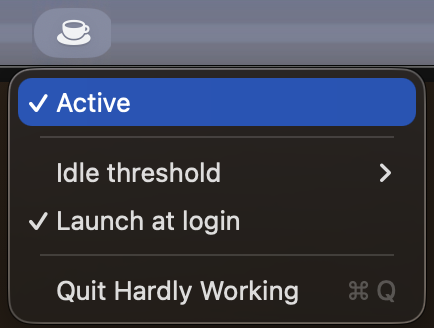
How to install Hardly Working on a Mac
- Get OpenDMG. It is a free app store for open source Mac apps. Download OpenDMG.
- Search for Hardly Working and press Get. OpenDMG downloads version 1.0.2 from Blazmad's own GitHub release.
- Open it. The download is checked against its SHA-256 fingerprint and its signature is checked on your Mac before it lands in Applications.
Updates to Hardly Working show up in OpenDMG and install with one button. No account is needed.
Prefer to do it by hand? The developer's file is on GitHub: HardlyWorking-1.0.2.dmg (1.4 MB).
What is new in Hardly Working 1.0.2
Version de maintenance. **Rien ne change pour vous à l'usage** — même app, mêmes réglages, mêmes permissions.

**Installation** — ouvrez le DMG, glissez l'app dans Applications, lancez-la. Une icône de tasse apparaît dans la barre de menus.

**Puis accordez la permission Accessibilité — elle est obligatoire.** Au premier lancement l'app ne l'a pas encore : l'icône affiche donc un triangle d'alerte, et **elle ne vous demandera rien d'elle-même**. Cliquez sur l'icône, puis sur « Open Accessibility Settings… » : c'est ce clic qui déclenche l'autorisation système et ouvre Réglages Système → Confidentialité et sécurité. Selon la version de macOS, vous devrez peut-être faire défiler jusqu'à « Accessibilité ». Cochez « Hardly Working ». Sans cette permission, macOS bloque tout mouvement de souris synthétique — aucun abonnement ni certificat ne peut la remplacer.

**À savoir avant d'installer :** tant que l'app est active, votre Mac ne se met plus en veille tout seul — et votre session ne se verrouille plus non plus, puisque c'est le même compteur d'inactivité qui pilote les deux. Verrouillez en partant avec `Ctrl-Cmd-Q`, ou réglez un coin actif sur « Verrouiller l'écran ».

Requiert macOS 14 ou ultérieur.

---

### Ce qui change depuis la 1.0.1
…
More Menu Bar and Notch apps
-
 StatsmacOS system monitor in your menu bar
-
 IcePowerful menu bar manager for macOS (upstream, temporarily inactive)
-
 Hidden BarAn ultra-light MacOS utility that helps hide menu bar icons
-
 ThawThe open-source menu bar manager: hide, organize, and take control of menu bar icons
-
 Boring NotchTurn your MacBook notch into a music and file control center
-
 eulmacOS status monitoring app written in SwiftUI