

FreeAudio (hakanotal) for Mac
Free, open-source per-app volume and output control, including HDMI/DisplayPort monitor volume.
By hakanotal. Free and open source, MIT licence.
FreeAudio (hakanotal) at a glance
- Version
- 2.0
- Released
- 7 October 2026
- Download size
- 1001 KB
- Works on
- Apple silicon and Intel
- Licence
- MIT
- Category
- Audio and Music
- Developer
- hakanotal
- GitHub stars
- 2
About FreeAudio (hakanotal)
Free & open-source alternative to SoundSource for macOS
Screenshots

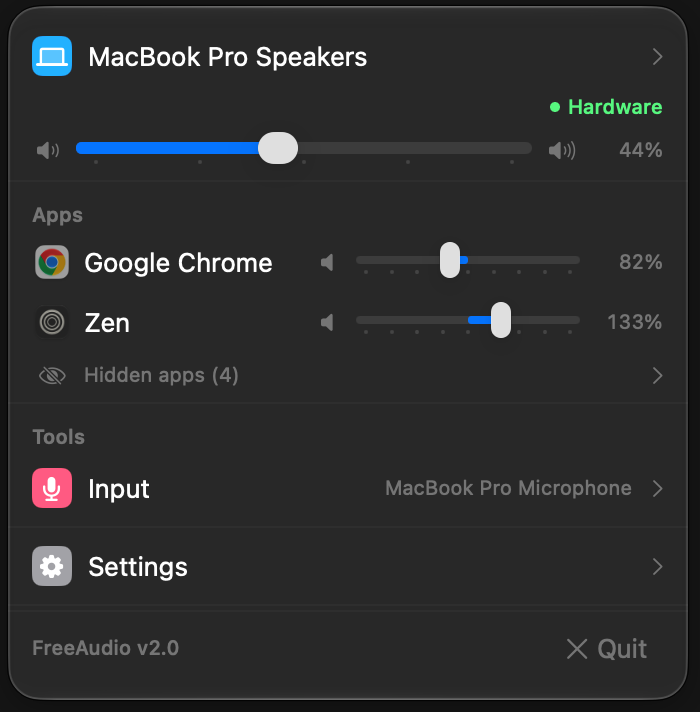
How to install FreeAudio (hakanotal) on a Mac
- Get OpenDMG. It is a free app store for open source Mac apps. Download OpenDMG.
- Search for FreeAudio (hakanotal) and press Get. OpenDMG downloads version 2.0 from hakanotal's own GitHub release.
- Open it. The download is checked against its SHA-256 fingerprint and its signature is checked on your Mac before it lands in Applications.
Updates to FreeAudio (hakanotal) show up in OpenDMG and install with one button. No account is needed.
Prefer to do it by hand? The developer's file is on GitHub: FreeAudio-2.0.dmg (1001 KB).
What is new in FreeAudio (hakanotal) 2.0
- **New icon:** an equalizer in the menu bar, for the app and on the installer disk image (volume sliders keep their speaker symbols)
- **Snappier panel:** sections and dropdowns open at once with a quick fade and close instantly, instead of a slow spring that lagged behind the window
- **Per-app output routing:** choose an output for any app in its detail view (click the app's name). The choice is remembered per app; while that device isn't connected the app plays on the system default and moves back when it returns. Routed apps show a small device icon next to their name, and apps routed to a monitor with software volume get that monitor's level
- **All open apps that play sound are listed,** not only the ones playing right now, so you can set an app's level before it makes a sound. Idle apps have a dimmed icon; playing apps show a small waveform. Background processes (system services, menu bar helpers, command-line tools) still only appear while they play
- **Hide apps:** point at an app and click the crossed-out eye that appears next to its name (or right-click → Hide). Hovering also shows a reset button for apps with changed settings. Hidden apps that are open collect under "Hidden apps" at the bottom; expand it to adjust them or choose Show to bring one back. Hiding is only visual: a hidden app's saved level, mute and output still apply
…
More Audio and Music apps
-
 MonitorControlAdjust external monitor settings
-
 FluidVoiceVoice-to-text app with AI enhancement
-
 eqMacSystem-wide audio equalizer and volume mixer
-
 VoiceInkReal-time speech-to-text app
-
 LyricsXDisplay lyrics for iTunes/Spotify
-
 FreeFlowPush-to-talk speech-to-text tool that inserts polished transcripts into any app