
Earshot for Mac
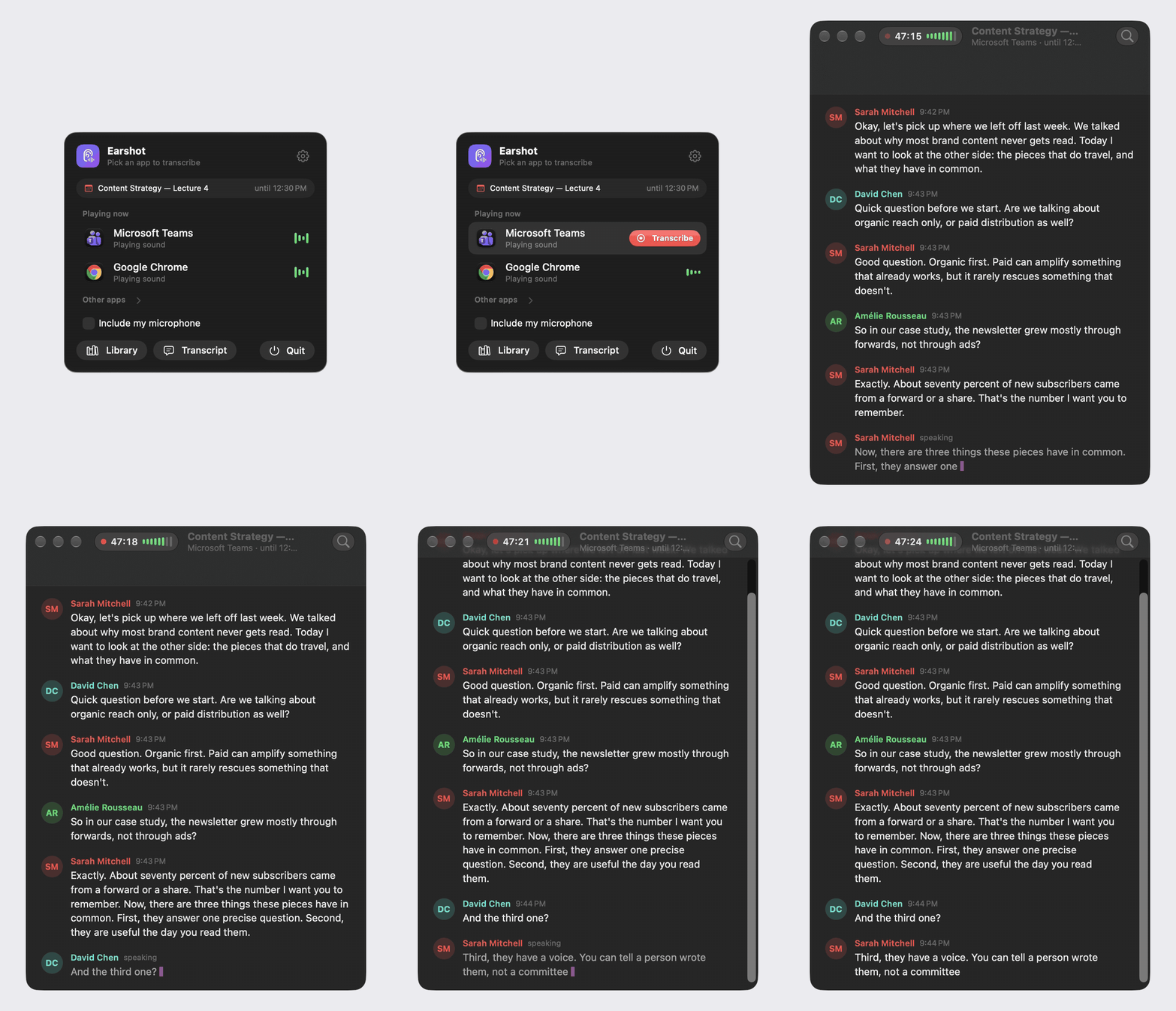
Live, on-device transcription of any app on your Mac, with speaker names.
By Bouliw. Free and open source, MIT licence.
Earshot at a glance
- Version
- 0.6.3
- Released
- 13 November 2026
- Download size
- 7.4 MB
- Works on
- Apple silicon and Intel
- Licence
- MIT
- Category
- Audio and Music
- Developer
- Bouliw
- GitHub stars
- 15
Screenshots
How to install Earshot on a Mac
- Get OpenDMG. It is a free app store for open source Mac apps. Download OpenDMG.
- Search for Earshot and press Get. OpenDMG downloads version 0.6.3 from Bouliw's own GitHub release.
- Open it. The download is checked against its SHA-256 fingerprint and its signature is checked on your Mac before it lands in Applications.
Updates to Earshot show up in OpenDMG and install with one button. No account is needed.
Prefer to do it by hand? The developer's file is on GitHub: Earshot.dmg (7.4 MB).
What is new in Earshot 0.6.3
No more made-up lines while the other side talks

Since 0.6.1 the microphone stays open during the call, so that what you say over the other side is kept. But with headphones, or past the echo canceller, it also hears a faint copy of the call, and Whisper turned it into lines nobody said, under your name.

Earshot now tells that copy from your voice before transcribing: it is much quieter than you, and its loudness follows the call's, a moment later. Those stretches are left out. When you cut someone off or answer as they stop, you speak at your usual level with a rhythm of your own, so what you say is still transcribed.

- **Mac and Windows:** when the transcript is written after the call.
- **Mac:** `defaults write io.github.bouliw.Earshot keepTracks -bool true` keeps each session's two hidden tracks (the app and the microphone), to look into how the microphone was cleaned.

**Install on the Mac:** download `Earshot.dmg` and drag Earshot to Applications, replacing the old one. Requires macOS 26 or later on Apple silicon.

**Install on Windows:** download `Earshot-Windows-x64.zip` (Intel and AMD) or `Earshot-Windows-arm64.zip` (Arm PCs), extract it and open `Earshot.exe`. If SmartScreen stops it, click **More info**, then **Run anyway**.
More Audio and Music apps
-
 MonitorControlAdjust external monitor settings
-
 FluidVoiceVoice-to-text app with AI enhancement
-
 VoiceInkReal-time speech-to-text app
-
 eqMacSystem-wide audio equalizer and volume mixer
-
 LyricsXDisplay lyrics for iTunes/Spotify
-
 FreeFlowPush-to-talk speech-to-text tool that inserts polished transcripts into any app