

Dimly for Mac
Per-display brightness, blackout, and sleep control for external monitors.
By Punshnut. Free and open source, AGPL-3.0 licence.
Dimly at a glance
- Version
- 2026.6.0
- Released
- 26 July 2026
- Download size
- 8.5 MB
- Works on
- Apple silicon and Intel
- Licence
- AGPL-3.0
- Category
- System Tools
- Developer
- Punshnut
- GitHub stars
- 28
About Dimly
a lightweight macOS menu‑bar switch for external monitors - instantly mute glare with fast blackout or true DDC/CI sleep, plus per‑display toggles.
Screenshots
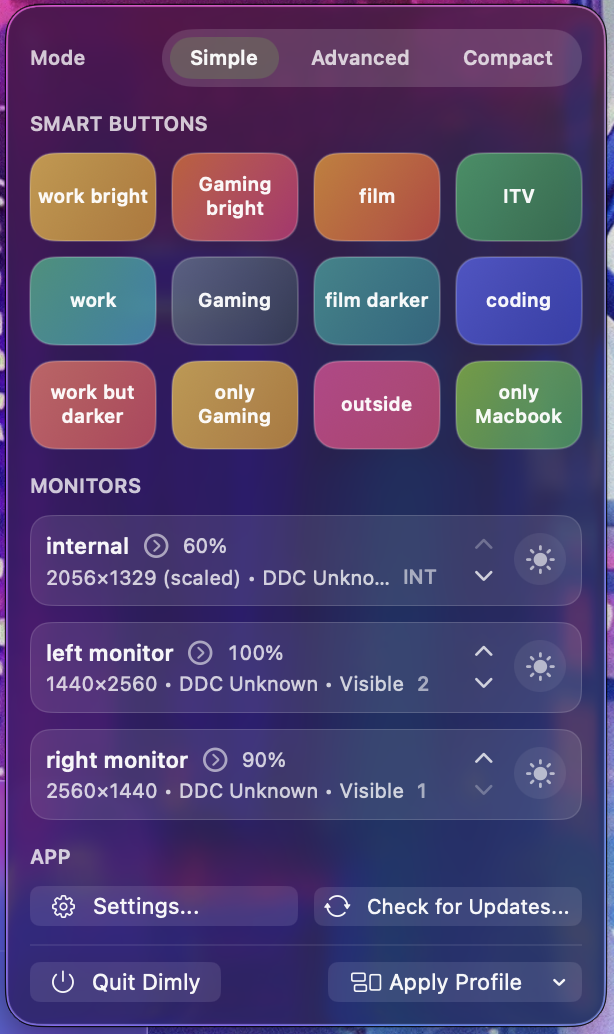
How to install Dimly on a Mac
- Get OpenDMG. It is a free app store for open source Mac apps. Download OpenDMG.
- Search for Dimly and press Get. OpenDMG downloads version 2026.6.0 from Punshnut's own GitHub release.
- Open it. The download is checked against its SHA-256 fingerprint and its signature is checked on your Mac before it lands in Applications.
Updates to Dimly show up in OpenDMG and install with one button. No account is needed.
Prefer to do it by hand? The developer's file is on GitHub: Dimly.dmg (8.5 MB).
What is new in Dimly 2026.6.0
A major update with a new LUT library, revamped display settings, and a completely redesigned intro window.

### Highlights
- New LUT library with .cube/.3dl/.lut/.csv support, per-display assignment, profile integration, backup/restore, and 5 bundled presets
- Collapsible display settings with ICC color profiles, appearance filters, DDC contrast, resolution/refresh rate, input source switching, Night Shift, and True Tone controls - localized in 40 languages
- Fully overhauled intro window with new glass UI
- New What's New page in the intro window with direct links to relevant Settings, localized in 40 languages

### Fixes & Stability
- App icon now compiles via Icon Composer (.icon bundle) through actool instead of raw PNGs - fixes flat, backgroundless app icon on macOS Tahoe
- Guarded against reentrant window frame sync - stops stack-overflow crash on menu bar icon click
- Deferred built-in display blackout restore during topology settle - fixes screen flicker when an external monitor is missing
- Bundled LUT presets no longer duplicate on every relaunch, and already-affected libraries are automatically repaired
…
More System Tools apps
-
 PearcleanerApp Cleaner and Uninstaller Tool
-
 OpenInTerminalFinder toolbar tool for opening the current folder in a terminal
-
 PureMacFree open-source system cleaner with privacy protection
-
 DockDoorWindow peeking for macOS
-
 LatestApp update checker that notifies you of available updates for installed applications
-
 DorsoPosture reminder that progressively blurs your screen when you slouch