

Claudometer for Mac
Menu bar Claude usage monitor with live session/weekly/per-model limits and service status.
By ananmouaz. Free and open source, MIT licence.
Claudometer at a glance
- Version
- 0.2.2
- Released
- 16 September 2026
- Download size
- 209 MB
- Works on
- Apple silicon and Intel
- Licence
- MIT
- Category
- Menu Bar and Notch
- Developer
- ananmouaz
- GitHub stars
- 5
About Claudometer
Your Claude usage limits in the macOS menu bar — shown exactly the way Claude shows them, plus live service status.
Screenshots

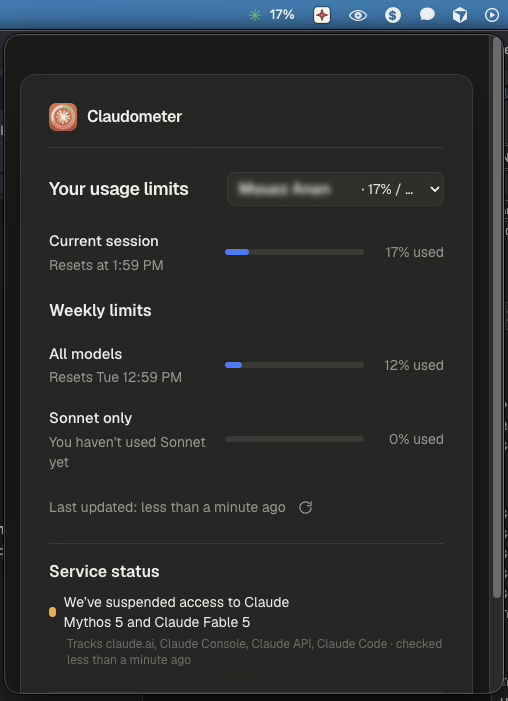
How to install Claudometer on a Mac
- Get OpenDMG. It is a free app store for open source Mac apps. Download OpenDMG.
- Search for Claudometer and press Get. OpenDMG downloads version 0.2.2 from ananmouaz's own GitHub release.
- Open it. The download is checked against its SHA-256 fingerprint and its signature is checked on your Mac before it lands in Applications.
Updates to Claudometer show up in OpenDMG and install with one button. No account is needed.
Prefer to do it by hand? The developer's files are on GitHub: Claudometer-0.2.2-arm64.dmg (209 MB), Claudometer-0.2.2-x64.dmg (211 MB).
What is new in Claudometer 0.2.2
Claudometer 0.2.2 — your **Claude and ChatGPT** usage limits in the macOS menu bar, each shown exactly the way its own settings screen shows them, with live service status for both.

The menu bar reads `C 4% G 100%` — both accounts at a glance, each number coloured on its own (green → amber → red as you approach the cap).

### Download
- **Apple Silicon** (M-series Macs): `Claudometer-0.2.2-arm64.dmg`
- **Intel** Macs: `Claudometer-0.2.2-x64.dmg`

### Install
1. Download the DMG for your Mac, open it, and drag **Claudometer** to **Applications**.
2. It lives in your menu bar (no dock icon). Click it, then **Sign in to Claude** — you log in to claude.ai once inside the app and that's it. Nothing to copy or paste.
3. The **ChatGPT** tab needs no setup at all if you use the [Codex CLI](https://github.com/openai/codex) — it reuses the login Codex already keeps on your machine. Otherwise you can paste an access token.

### First launch (unsigned build)
This build isn't code-signed, so macOS blocks the first launch (*"Apple could not verify…"*). Open it one of two ways:
- **System Settings → Privacy & Security → "Open Anyway"** (it appears right after you try to open the app), then reopen it — or
- run once in Terminal: `xattr -dr com.apple.quarantine "/Applications/Claudometer.app"`

*(On macOS 14 and earlier you could right-click → Open; that no longer works on macOS 15+.)*
…
More Menu Bar and Notch apps
-
 StatsmacOS system monitor in your menu bar
-
 IcePowerful menu bar manager for macOS (upstream, temporarily inactive)
-
 Hidden BarAn ultra-light MacOS utility that helps hide menu bar icons
-
 ThawThe open-source menu bar manager: hide, organize, and take control of menu bar icons
-
 Boring NotchTurn your MacBook notch into a music and file control center
-
 eulmacOS status monitoring app written in SwiftUI