
Cadence for Mac
Keyboard-focused native app for browsing your Apple Music library.
By alexandryasukaitisss-cmd. Free and open source, MIT licence.
Cadence at a glance
- Version
- 0.1.1
- Released
- 24 November 2026
- Download size
- 2.1 MB
- Works on
- Apple silicon
- Licence
- MIT
- Category
- Audio and Music
- Developer
- alexandryasukaitisss-cmd
- GitHub stars
- 1
About Cadence
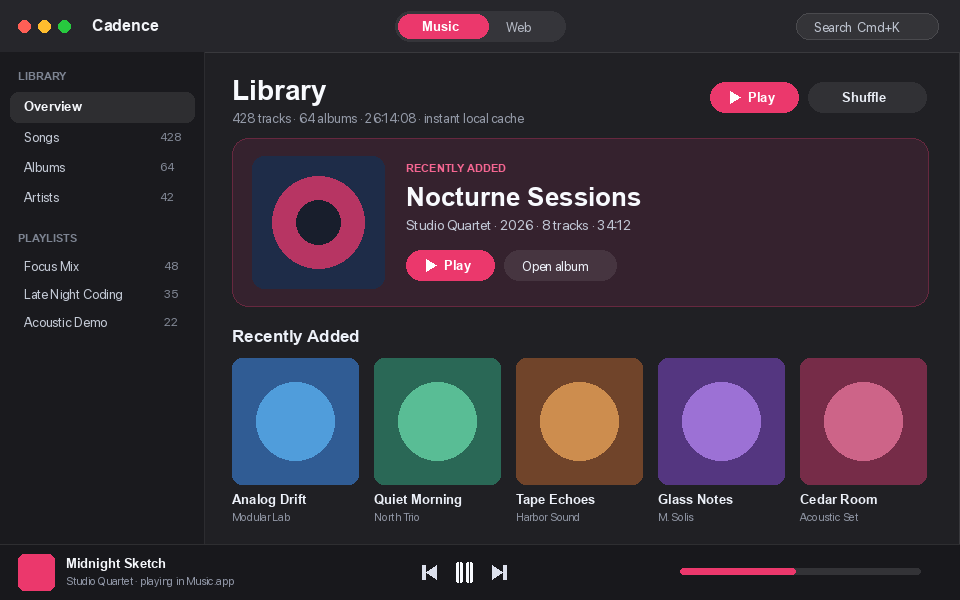
Fast native Apple Music client for macOS (SwiftUI/AppKit, no Electron). Instant library search and browsing while playback stays in Music.app.
Screenshots
How to install Cadence on a Mac
- Get OpenDMG. It is a free app store for open source Mac apps. Download OpenDMG.
- Search for Cadence and press Get. OpenDMG downloads version 0.1.1 from alexandryasukaitisss-cmd's own GitHub release.
- Open it. The download is checked against its SHA-256 fingerprint and its signature is checked on your Mac before it lands in Applications.
Updates to Cadence show up in OpenDMG and install with one button. No account is needed.
Prefer to do it by hand? The developer's file is on GitHub: Cadence-0.1.1-macos-arm64.zip (2.1 MB).
What is new in Cadence 0.1.1
## Highlights
- Native SwiftUI/AppKit Apple Music library browser & player controls (zero Electron, instant local library cache & in-memory search).
- Added UI preview, architecture rationale, and direct macOS Apple Silicon binary archive.

### Install via Homebrew
```bash
brew install --cask alexandryasukaitisss-cmd/tap/cadence
```

### Manual install (ad-hoc signed, Apple Silicon macOS 14+)
Unzip `Cadence-0.1.1-macos-arm64.zip`, move `Cadence.app` to `/Applications`, and run `xattr -dr com.apple.quarantine /Applications/Cadence.app` if Gatekeeper prompts.
More Audio and Music apps
-
 MonitorControlAdjust external monitor settings
-
 FluidVoiceVoice-to-text app with AI enhancement
-
 VoiceInkReal-time speech-to-text app
-
 eqMacSystem-wide audio equalizer and volume mixer
-
 LyricsXDisplay lyrics for iTunes/Spotify
-
 FreeFlowPush-to-talk speech-to-text tool that inserts polished transcripts into any app