
AutoDockDrive for Mac
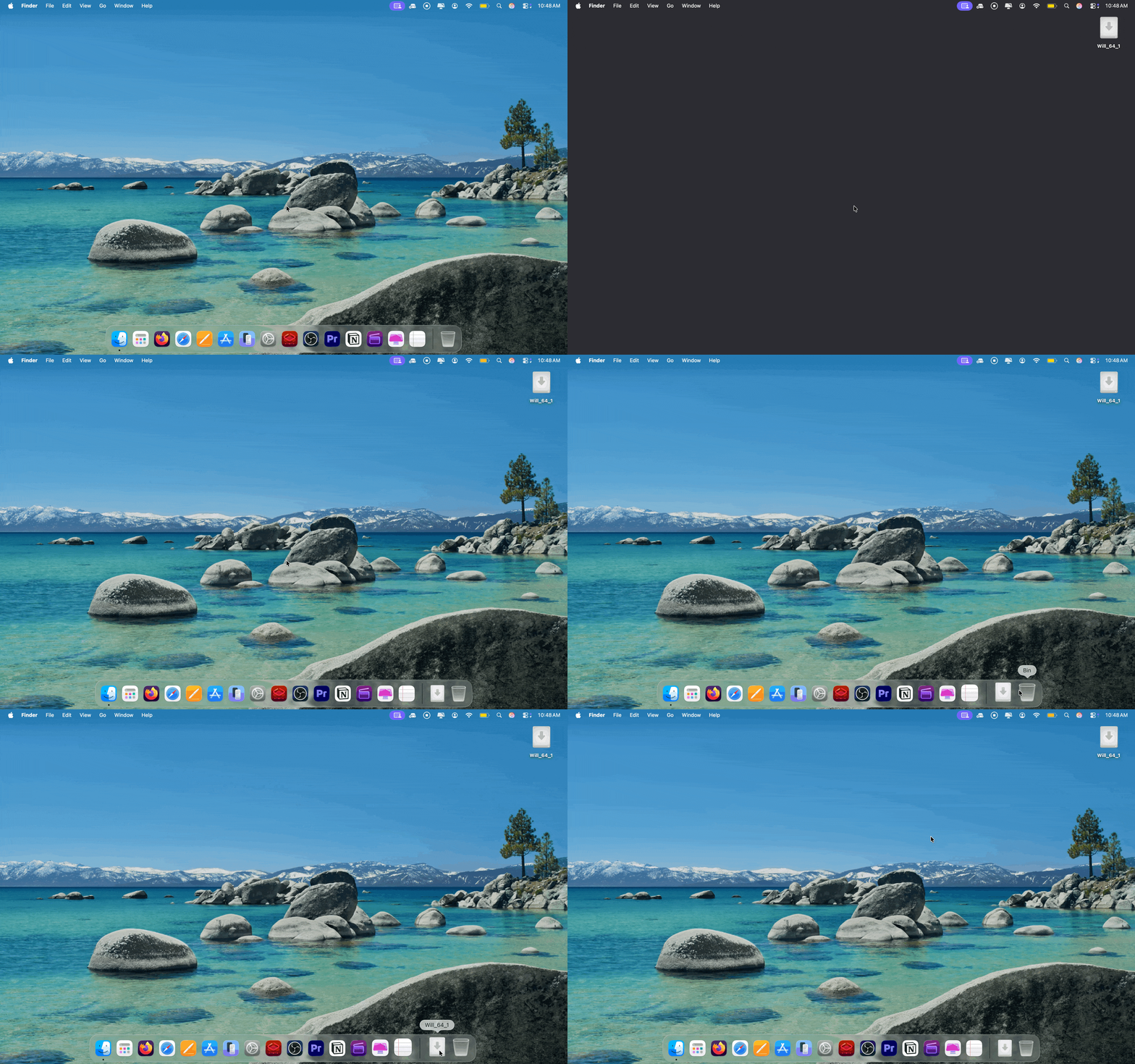
Automatically adds external drive shortcuts to the Dock and removes them on eject.
By willyhay22. Free and open source, MIT licence.
AutoDockDrive at a glance
- Version
- 1.3.0
- Released
- 15 September 2026
- Download size
- 2.4 MB
- Works on
- Apple silicon and Intel
- Licence
- MIT
- Category
- Menu Bar and Notch
- Developer
- willyhay22
- GitHub stars
- 17
About AutoDockDrive
A small macOS app that automatically adds and removes your external drives from the Dock when you plug them in.
Screenshots
How to install AutoDockDrive on a Mac
- Get OpenDMG. It is a free app store for open source Mac apps. Download OpenDMG.
- Search for AutoDockDrive and press Get. OpenDMG downloads version 1.3.0 from willyhay22's own GitHub release.
- Open it. The download is checked against its SHA-256 fingerprint and its signature is checked on your Mac before it lands in Applications.
Updates to AutoDockDrive show up in OpenDMG and install with one button. No account is needed.
Prefer to do it by hand? The developer's file is on GitHub: AutoDockDrive-1.3.0.dmg (2.4 MB).
What is new in AutoDockDrive 1.3.0
This update brings highly-requested support for network drives, squashes a few edge-case bugs, and adds some subtle fluid design improvements to the website UI!

### New Features
* **Network Drive Support (SMB/AFP):** You can now configure AutoDockDrive to pin connected network-attached storage (NAS) drives to the Dock! Enable this via the new checkbox in the **Filters** tab of the Preferences window.

### Bug Fixes
* **Sleep/Wake Ghost Drives:** Fixed an issue where yanking a drive out while the Mac was asleep would sometimes leave a broken "ghost" folder in the Dock after waking up. The app now listens for native wake notifications to instantly clean up your Dock.

### UI & Polish
* **Fluid Website Enhancements:** Upgraded the landing page with Apple-style fluid UI animations, making the buttons and interactions feel instantly responsive and tactile.
* Note: Due to a local toolchain issue, this release provides an Apple Silicon (M1/M2/M3) optimized build.
More Menu Bar and Notch apps
-
 StatsmacOS system monitor in your menu bar
-
 IcePowerful menu bar manager for macOS (upstream, temporarily inactive)
-
 Hidden BarAn ultra-light MacOS utility that helps hide menu bar icons
-
 ThawThe open-source menu bar manager: hide, organize, and take control of menu bar icons
-
 Boring NotchTurn your MacBook notch into a music and file control center
-
 eulmacOS status monitoring app written in SwiftUI