
Wink for Mac
Bind global shortcuts to apps — open, focus, and hide with a keystroke.
By hey-yvan. Free and open source, MIT licence.
Wink at a glance
- Version
- 0.7.5
- Released
- 8 September 2026
- Download size
- 3.4 MB
- Works on
- Apple silicon and Intel
- Licence
- MIT
- Category
- Productivity
- Developer
- hey-yvan
- GitHub stars
- 4
About Wink
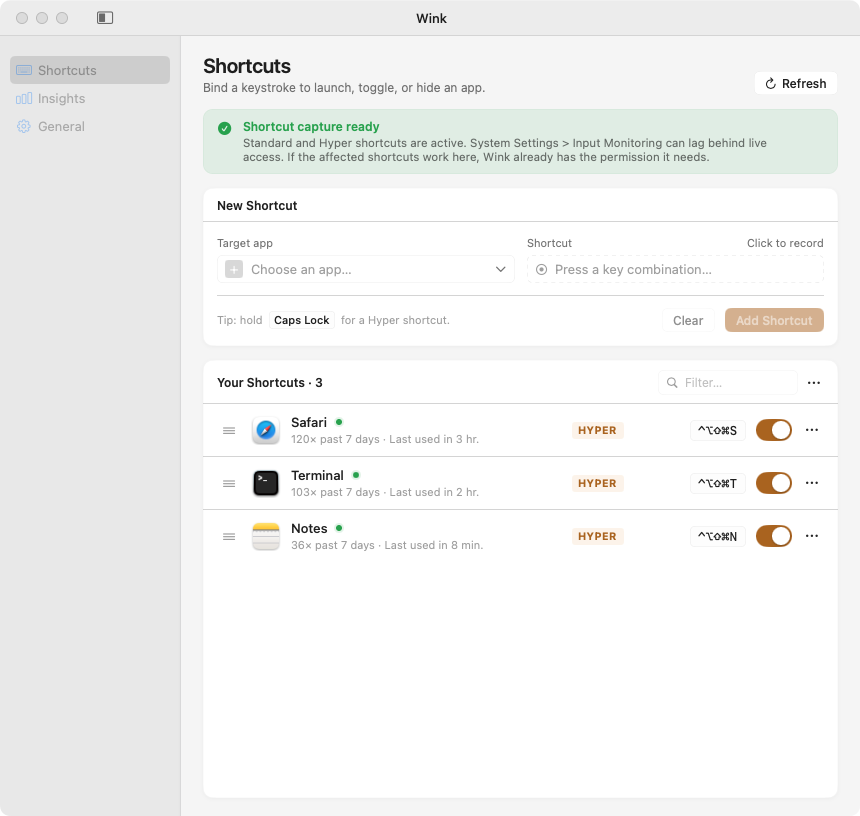
Bind global shortcuts to apps on macOS — Hyper key, Thor-like toggle, lightweight insights
Screenshots
How to install Wink on a Mac
- Get OpenDMG. It is a free app store for open source Mac apps. Download OpenDMG.
- Search for Wink and press Get. OpenDMG downloads version 0.7.5 from hey-yvan's own GitHub release.
- Open it. The download is checked against its SHA-256 fingerprint and its signature is checked on your Mac before it lands in Applications.
Updates to Wink show up in OpenDMG and install with one button. No account is needed.
Prefer to do it by hand? The developer's file is on GitHub: Wink-0.7.5.dmg (3.4 MB).
What is new in Wink 0.7.5
See the numbers behind your habits.

- **Activity heatmap hover tooltip** — hovering over any cell in the Insights
 24-hour activity grid now shows the exact activation count and time window
 (e.g., "5 activations · Tue Sep 8 2:00 PM – 3:00 PM"), with a highlighted
 border around the hovered cell. The tooltip stays clamped within the card
 and dynamically flips below the cell when space above is tight.
- **Accessible Insights** — each row in the 24-hour activity grid now exposes an
 aggregated VoiceOver label summarizing its active hours.

---
First install on macOS 15+: System Settings → Privacy & Security → **Open Anyway** (this build is ad-hoc signed and not notarized — issue #283). Updates after that arrive in-app via Sparkle.
More Productivity apps
-
 MaccyLightweight search-as-you-type clipboard manager
-
 AltTabBrings the Windows Alt-Tab functionality to macOS
-
 ClipyClipy is a Clipboard extension app for macOS
-
 TinycastLightweight native launcher with app search, clipboard management, window controls, and…
-
 FSNotesNotes manager for macOS/iOS: modern notational velocity (nvALT) on steroids
-
 OpenDisplayTurn spare Apple devices into second monitors — true extended display over USB or WiFi