
Tempo (Crows-Storm) for Mac
Local-first focus timer with a kanban board and private work history.
By Crows-Storm. Free and open source.
Tempo (Crows-Storm) at a glance
- Version
- 1.0.4
- Released
- 25 September 2026
- Download size
- 5.1 MB
- Works on
- Apple silicon and Intel
- Category
- Productivity
- Developer
- Crows-Storm
- GitHub stars
- 3
About Tempo (Crows-Storm)
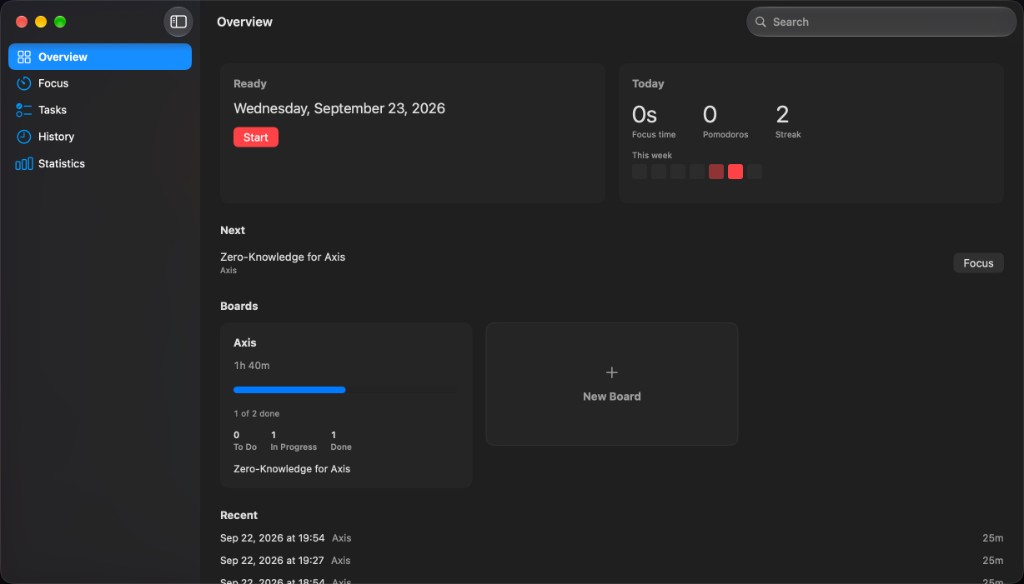
A local-first focus timer, kanban board, and private work history for macOS.
Screenshots
How to install Tempo (Crows-Storm) on a Mac
- Get OpenDMG. It is a free app store for open source Mac apps. Download OpenDMG.
- Search for Tempo (Crows-Storm) and press Get. OpenDMG downloads version 1.0.4 from Crows-Storm's own GitHub release.
- Open it. The download is checked against its SHA-256 fingerprint and its signature is checked on your Mac before it lands in Applications.
Updates to Tempo (Crows-Storm) show up in OpenDMG and install with one button. No account is needed.
Prefer to do it by hand? The developer's file is on GitHub: Tempo-1.0.4.dmg (5.1 MB).
What is new in Tempo (Crows-Storm) 1.0.4
## Tempo 1.0.4

Patch release on the V1 line. Overview, attention flow, permissions, and task cards.

### Install

1. Download `Tempo-1.0.4.dmg`
2. Open the image: **Tempo** on the left, **Applications** on the right
3. Drag Tempo into Applications and eject
4. First launch: **right-click → Open** (unidentified developer is expected; this build is ad-hoc signed and does not embed an Apple ID, Team ID, or developer name)

### Requirements

- macOS 26.0 or later
- Apple Silicon
- Bundle ID: `app.tempo.macos`

### Changes

- Overview: **Today's focus** replaces Recent — today's pomodoros concatenated into one app lane and one Sankey
- Sankey: hover a node or ribbon to isolate that flow
- Sankey: missing window titles use **Untitled** in the middle column (no app → Focused skip that covers other titles)
- Activity and Sankey ignore system chrome such as loginwindow, Dock, and Control Center
- Settings: On/Off for Accessibility, Screen Recording, and Notifications; Screen Recording is asked so window titles can be read
- Rebuilds re-prompt Accessibility / Screen Recording when the app binary path changes
- Tasks: Markdown checkboxes in the card preview can be toggled; clicking the rest of the card still opens the editor

### Asset

| File | Notes |
| ----------------- | ------------------------------------------ |
| `Tempo-1.0.4.dmg` | Drag-to-Applications image (ad-hoc signed) |
…
More Productivity apps
-
 MaccyLightweight search-as-you-type clipboard manager
-
 AltTabBrings the Windows Alt-Tab functionality to macOS
-
 ClipyClipy is a Clipboard extension app for macOS
-
 TinycastLightweight native launcher with app search, clipboard management, window controls, and…
-
 FSNotesNotes manager for macOS/iOS: modern notational velocity (nvALT) on steroids
-
 OpenDisplayTurn spare Apple devices into second monitors — true extended display over USB or WiFi