
System Data Unpacked for Mac
Mac app that shows what is inside macOS System Data and lets you delete it item by item.
By Jarvis322. Free and open source.
System Data Unpacked at a glance
- Version
- 1.13.1
- Released
- 12 November 2026
- Download size
- 8.4 MB
- Works on
- Apple silicon and Intel
- Category
- Social and Communication
- Developer
- Jarvis322
- GitHub stars
- 2.2K
About System Data Unpacked
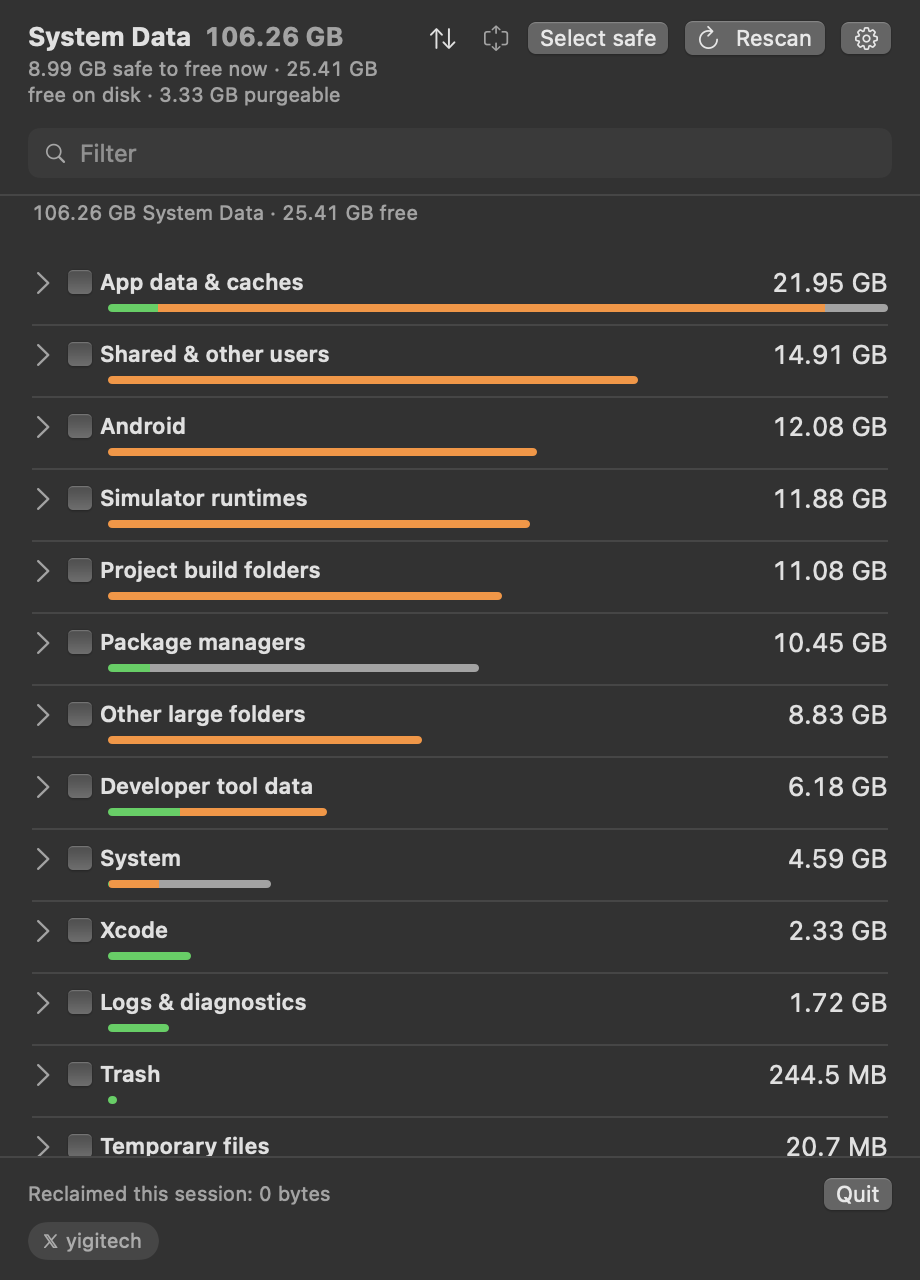
See what is really inside macOS System Data and delete it item by item. A free menu bar app that explains every category and shows each command before it runs.
Screenshots
How to install System Data Unpacked on a Mac
- Get OpenDMG. It is a free app store for open source Mac apps. Download OpenDMG.
- Search for System Data Unpacked and press Get. OpenDMG downloads version 1.13.1 from Jarvis322's own GitHub release.
- Open it. The download is checked against its SHA-256 fingerprint and its signature is checked on your Mac before it lands in Applications.
Updates to System Data Unpacked show up in OpenDMG and install with one button. No account is needed.
Prefer to do it by hand? The developer's file is on GitHub: SysDataMenu-1.13.1.dmg (8.4 MB).
What is new in System Data Unpacked 1.13.1
- **The menu bar switch works from the window.** Turning off "Show in menu bar" from the window's settings now removes the icon straight away, and turning it back on brings it back, instead of waiting for a relaunch. Thanks to @MaiwulanjiangMaiming (#30).

## Install
```bash
brew install --cask Jarvis322/tap/sysdata
```
or open `SysDataMenu-1.13.1.dmg` and drag the app to Applications. The zip is the same app for anyone scripting the download. Signed and notarized. Requires macOS 14 or later.
More Social and Communication apps
-
 CopilotForXcodeXcode extension for GitHub Copilot
-
 RedditOSA SwiftUI Reddit client for macOS
-
 HuggingChatNative chat interface for open-source language models
-
 LlamaChatChat with your favourite LLaMA models
-
 RsyncUIGraphical interface for rsync file synchronization and backup operations
-
 OnitAn AI chat sidebar that can dock to any app on your Mac