

Silica for Mac
Lightweight code editor with file search, syntax highlighting, a minimap, and Markdown preview.
By dqhieu. Free and open source, MIT licence.
Silica at a glance
- Version
- 0.4.0
- Released
- 13 November 2026
- Download size
- 7.5 MB
- Works on
- Apple silicon and Intel
- Licence
- MIT
- Category
- Writing and Editors
- Developer
- dqhieu
- GitHub stars
- 166
Screenshots
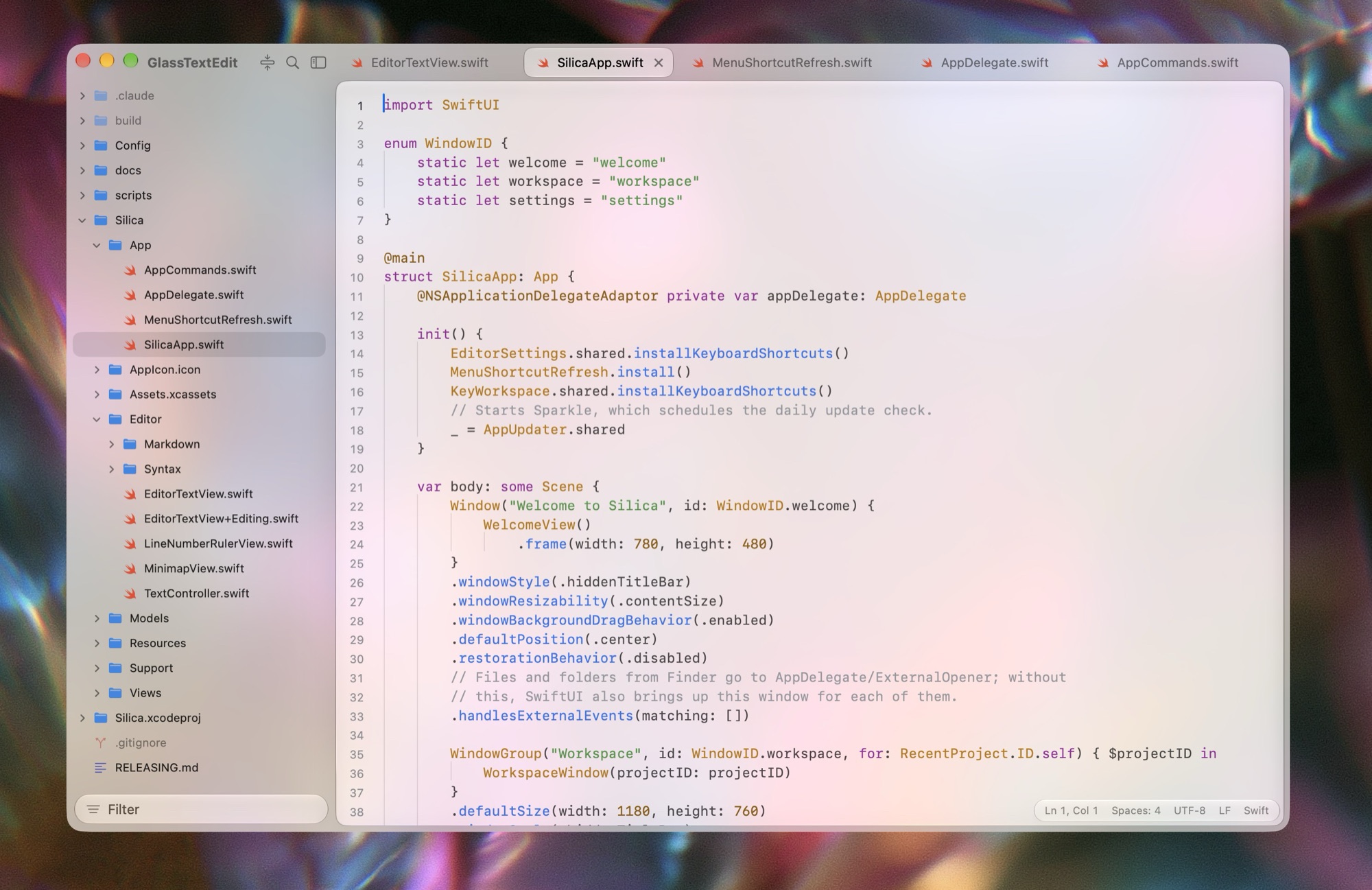
How to install Silica on a Mac
- Get OpenDMG. It is a free app store for open source Mac apps. Download OpenDMG.
- Search for Silica and press Get. OpenDMG downloads version 0.4.0 from dqhieu's own GitHub release.
- Open it. The download is checked against its SHA-256 fingerprint and its signature is checked on your Mac before it lands in Applications.
Updates to Silica show up in OpenDMG and install with one button. No account is needed.
Prefer to do it by hand? The developer's file is on GitHub: Silica-0.4.0.dmg (7.5 MB).
What is new in Silica 0.4.0
### What's new

- **Preview HTML files.** **View › Show Preview** (**⇧⌘V**) and the title bar toggle now work for .html, .htm and .xhtml files as they do for Markdown. The page is shown as a browser would show it, with its styles, images and scripts, and with your unsaved changes. Web links open in your browser and links to project files open in a Silica tab.
- **Preview CSV and TSV files as a table.** The same toggle shows a .csv or .tsv file as a table with a header row that stays at the top and numeric columns aligned right. Double-click a row to go to its line in the source. Very large files are cut off at 100,000 cells, with a note saying how many rows there are.
- **PDFs open in the editor.** A PDF file now opens in its own tab instead of showing as a binary file. A password-protected PDF asks for its password.
- **Video files play in the editor.** Videos open in a player, with the picture's size, length and file size beneath it. Each tab keeps its place in its video, and a video pauses when you switch away from its tab.
- **Animated GIFs play in the image viewer.** A GIF, animated PNG or animated WebP now plays in its tab, where only its first frame was shown.
- **Diff and patch files are highlighted.** .diff, .patch and .rej files, and diff code blocks in the Markdown preview, show added lines in green and removed lines in red in every theme.
…
More Writing and Editors apps
-
 CodeEditOpen-source code editor
-
 MiaoYanLightweight Markdown notebook that keeps notes as plain files in a folder you choose…
-
 CotEditorLightweight Plain-Text Editor for macOS
-
 CopilotForXcodeThe first GitHub Copilot, Codeium and ChatGPT Xcode Source Editor Extension
-
 MarkEditA simple and efficient Markdown editor focused on pure writing experience
-
 PineA modern MacOS markdown editor