

MiaoYan for Mac
Lightweight Markdown notebook that keeps notes as plain files in a folder you choose, with split preview, LaTeX, Mermaid and slides.
By tw93. Free and open source, MIT licence.
MiaoYan at a glance
- Version
- 4.9.0
- Released
- 11 November 2026
- Download size
- 12 MB
- Works on
- Apple silicon and Intel
- Licence
- MIT
- Category
- Writing and Editors
- Developer
- tw93
- GitHub stars
- 8.8K
About MiaoYan
⛷ A light, native Markdown notebook for Mac, iPhone and iPad.
Screenshots
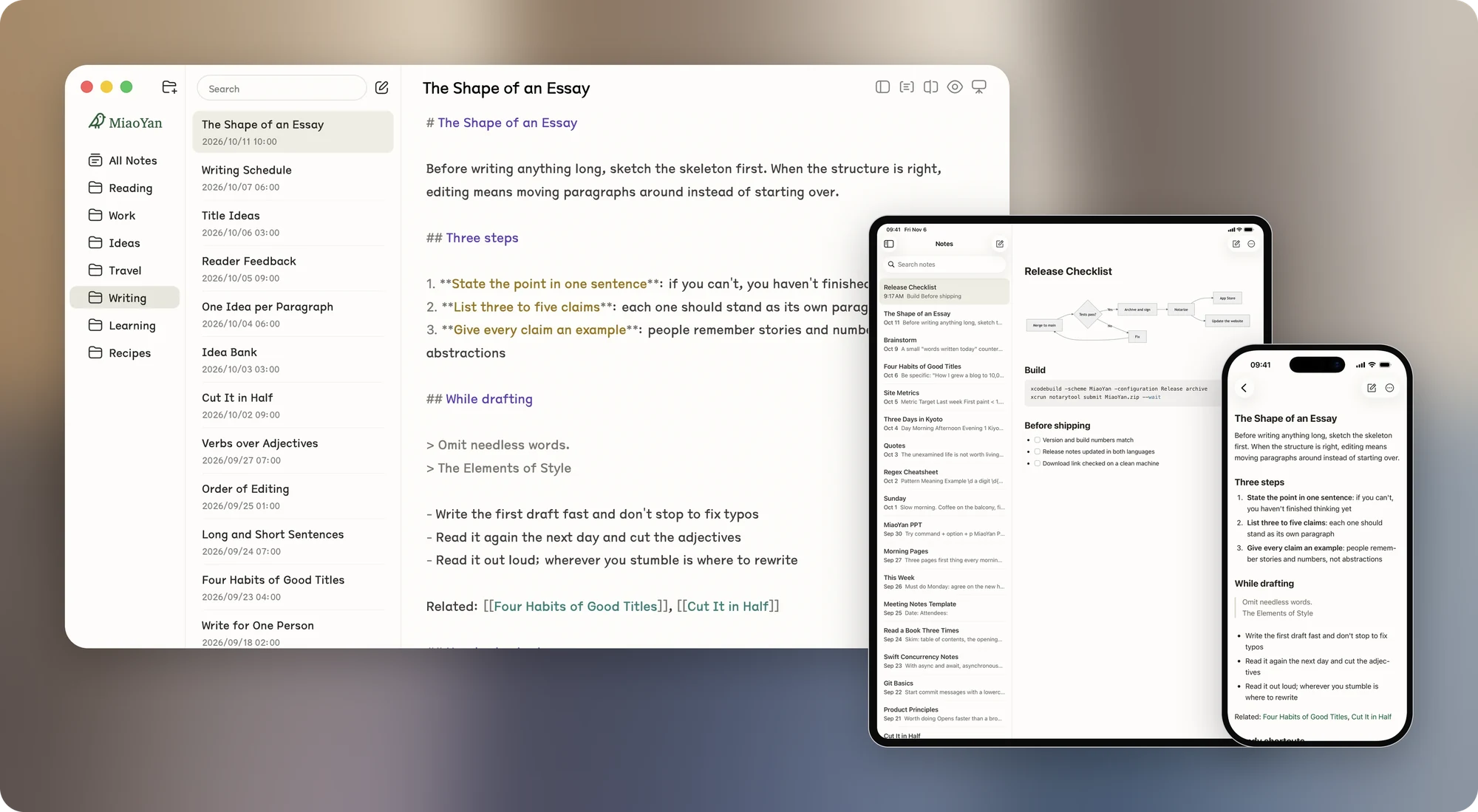
How to install MiaoYan on a Mac
- Get OpenDMG. It is a free app store for open source Mac apps. Download OpenDMG.
- Search for MiaoYan and press Get. OpenDMG downloads version 4.9.0 from tw93's own GitHub release.
- Open it. The download is checked against its SHA-256 fingerprint and its signature is checked on your Mac before it lands in Applications.
Updates to MiaoYan show up in OpenDMG and install with one button. No account is needed.
Prefer to do it by hand? The developer's file is on GitHub: MiaoYan.dmg (12 MB).
What is new in MiaoYan 4.9.0
<p align="center">
 <a href="https://miaoyan.app/" target="_blank">
 <img src="https://raw.githubusercontent.com/tw93/MiaoYan/main/Resources/app.icon/Assets/43.png" width="110" />
 </a>
 <h1 align="center">MiaoYan V4.9.0 Barioth 🐯</h1>
 <div align="center">A native Markdown editor for engineers.</div>
</p>

<h3>Changelog</h3>
 <ol>
 <li>Mac: Exported PDFs match the preview: captions, quotes and video posters are laid out properly, an export from dark mode comes out on a light page, headings in TsangerJinKai are no longer blurred, and a diagram still drawing doesn't print its loading line</li>
 <li>Mac: Replace moves on to the next match when the new text still matches the search, and Tab on a numbered item from 10 up keeps the caret on its line</li>
 <li>Mac: .md files show MiaoYan's document icon in Finder, and quotes in the preview sit tighter</li>
 <li>Mac: The MiaoYan menu and the About window link to the iPhone and iPad apps, which open the same iCloud Drive folder so you can keep writing on your phone and tablet</li>
 <li>iPhone and iPad: Tick tasks while reading, keep your place going into the editor and back, open Contents from the menu in a note with several headings, and see table columns aligned as the note wrote them</li>
…
More Writing and Editors apps
-
 CodeEditOpen-source code editor
-
 CotEditorLightweight Plain-Text Editor for macOS
-
 CopilotForXcodeThe first GitHub Copilot, Codeium and ChatGPT Xcode Source Editor Extension
-
 MarkEditA simple and efficient Markdown editor focused on pure writing experience
-
 PineA modern MacOS markdown editor
-
 Clearly MarkdownMarkdown editor with instant preview, syntax highlighting, and PDF export