

ScrollSnap for Mac
A macOS app for capturing and stitching scrolling screenshots.
By Brkgng. Free and open source, MIT licence.
ScrollSnap at a glance
- Version
- 3.1.0
- Released
- 2 August 2026
- Download size
- 827 KB
- Works on
- Apple silicon and Intel
- Licence
- MIT
- Category
- Graphics and Design
- Developer
- Brkgng
- GitHub stars
- 932
Screenshots
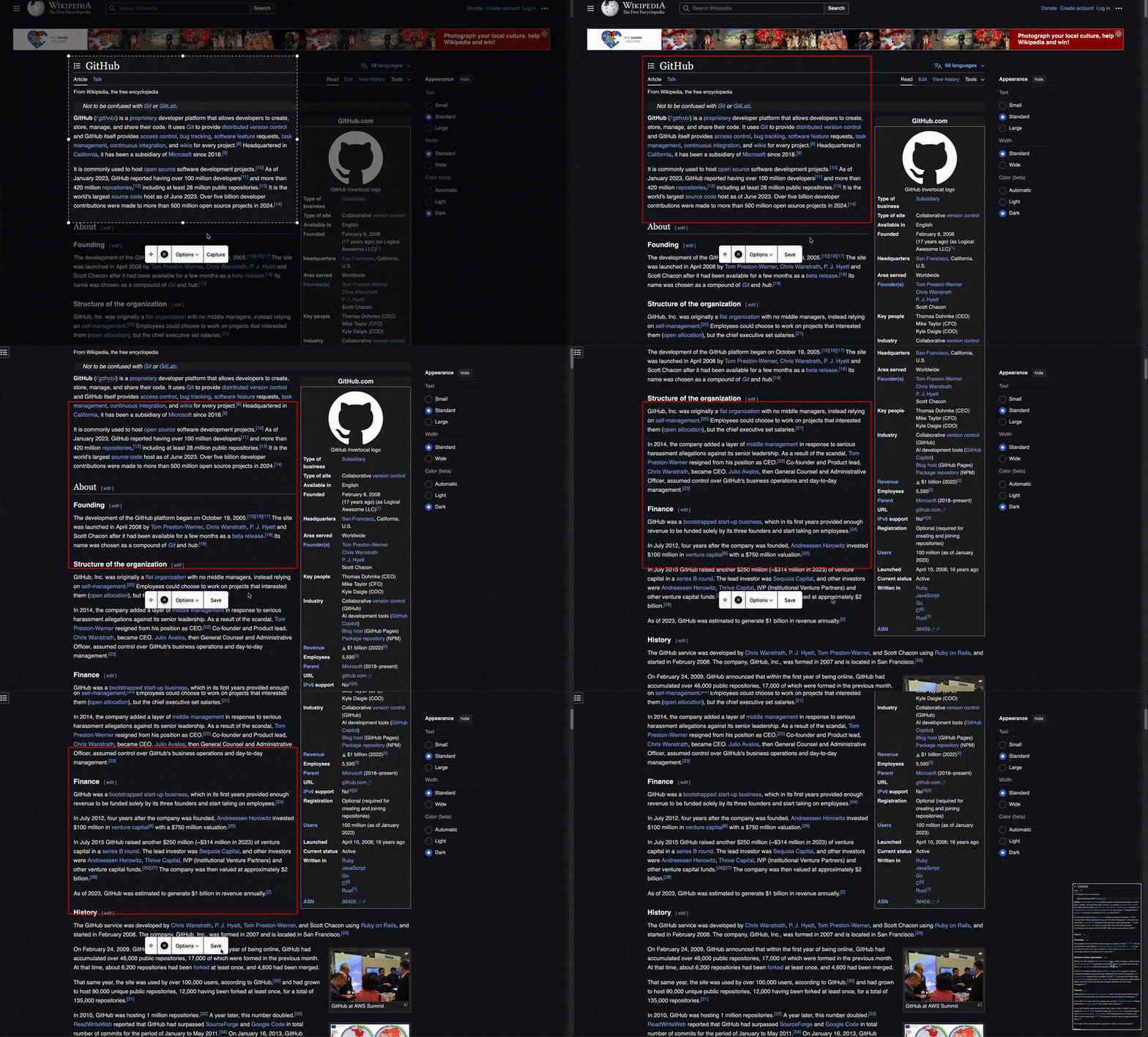
How to install ScrollSnap on a Mac
- Get OpenDMG. It is a free app store for open source Mac apps. Download OpenDMG.
- Search for ScrollSnap and press Get. OpenDMG downloads version 3.1.0 from Brkgng's own GitHub release.
- Open it. The download is checked against its SHA-256 fingerprint and its signature is checked on your Mac before it lands in Applications.
Updates to ScrollSnap show up in OpenDMG and install with one button. No account is needed.
Prefer to do it by hand? The developer's file is on GitHub: ScrollSnap_3.1.0.zip (827 KB).
What is new in ScrollSnap 3.1.0
## Improvements

- ⌨️ **Global Keyboard Shortcut:** Press **Control + Option + S (⌃⌥S)** from any app to open ScrollSnap. You can customize, reset, or disable the shortcut in Settings.

- 🌐 **Korean Language Support:** ScrollSnap is now fully available in Korean.

- 🕒 **Ready in the Background:** Dismissing the capture overlay now keeps ScrollSnap running. You can also launch it automatically at login, open Settings, or quit from the Options menu.

## Under the Hood

- ✅ **More Reliable Scrolling Captures:** Scrolling captures now include the final frame and use improved motion detection and stitching, preventing long screenshots from ending too early.

## Special Thanks

Huge thanks to @mrapemzheng for suggesting the global keyboard shortcut in #17 and helping improve this release!
More Graphics and Design apps
-
 AerialApple TV Aerial Screensaver for macOS
-
 CompositorFree, open-source image editor aiming to be a full Photoshop alternative
-
 BrooklynScreensaver inspired by Apple's Event on October 30, 2018
-
 EquinoxCreate dynamic wallpapers for macOS
-
 ExcalidrawZA virtual whiteboard for sketching hand-drawn-like diagrams with native file management…
-
 WaifuXOpen-source ACG app for wallpapers, animated backgrounds, and anime videos