

ScrollFix for Mac
Keeps trackpad scrolling natural and mouse-wheel scrolling classic.
By eShok93. Free and open source, Apache-2.0 licence.
ScrollFix at a glance
- Version
- 0.1.0 (pre-release)
- Released
- 24 September 2026
- Download size
- 430 KB
- Works on
- Apple silicon
- Licence
- Apache-2.0
- Category
- Utilities
- Developer
- eShok93
- GitHub stars
- 18
About ScrollFix
Windows-style mouse scrolling for Mac: reverse mouse scroll direction, keep your trackpad natural, middle-click to autoscroll or open links in new tabs. Open-source macOS menu bar app.
Screenshots
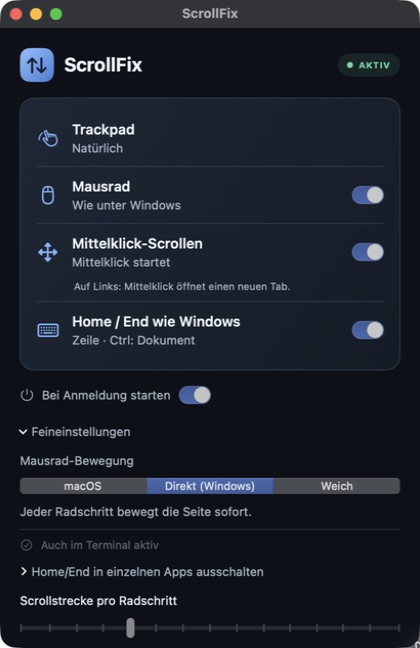
How to install ScrollFix on a Mac
- Get OpenDMG. It is a free app store for open source Mac apps. Download OpenDMG.
- Search for ScrollFix and press Get. OpenDMG downloads version 0.1.0 from eShok93's own GitHub release.
- Open it. The download is checked against its SHA-256 fingerprint and its signature is checked on your Mac before it lands in Applications.
Updates to ScrollFix show up in OpenDMG and install with one button. No account is needed.
Prefer to do it by hand? The developer's file is on GitHub: ScrollFix-v0.1.0-macos-arm64.zip (430 KB).
What is new in ScrollFix 0.1.0
## Legacy preview — current features are in the source

This September 2026 preview is kept for historical reference. It does **not** include the current Windows-style wheel modes, middle-click autoscroll, native link routing, simplified interface or later signing changes.

For the current version, [build ScrollFix from source](https://github.com/eShok93/ScrollFix#build-and-install). A new Developer ID signed and notarized download is not available yet.

## Original preview download

- **Apple Silicon (arm64):** `ScrollFix-v0.1.0-macos-arm64.zip`
- **SHA-256:** `443711d46fe664b25fa255d20dcbca01e1537f1c6c3a2959bfbc0a16b64e9731`

This binary is **ad hoc signed and not Apple-notarized**. It also predates the removal of the broad identifier-only code-signing requirement. Existing users should remove its old Accessibility / Device Control grant before granting access to a current build. The asset has not been replaced. See the [release requirements](https://github.com/eShok93/ScrollFix/blob/main/docs/RELEASING.md).

## Features in this old preview

Natural trackpad and classic mouse-wheel direction, menu bar controls, permission status and optional launch at login. Its heuristic device classification has limitations. See the [original changelog](https://github.com/eShok93/ScrollFix/blob/v0.1.0/CHANGELOG.md) and [current device limits](https://github.com/eShok93/ScrollFix#faq).
More Utilities apps
-
 BetterDisplayDisplay management tool with HiDPI scaling, PiP, and EDID controls
-
 VorssaintAn open-source, free, and local toolkit that integrates functions such as preventing…
-
 MosSmooth your mouse's scrolling and reverse the mouse scroll direction
-
 EasydictmacOS instant translator — type/select/screenshot, multi-service, zero setup
-
 OpenHaystackOpen-source tracker for finding Bluetooth devices through Apple's Find My network
-
 KekaKeka is a full featured file archiver, as easy as it can be