
MultiScreenDock for Mac
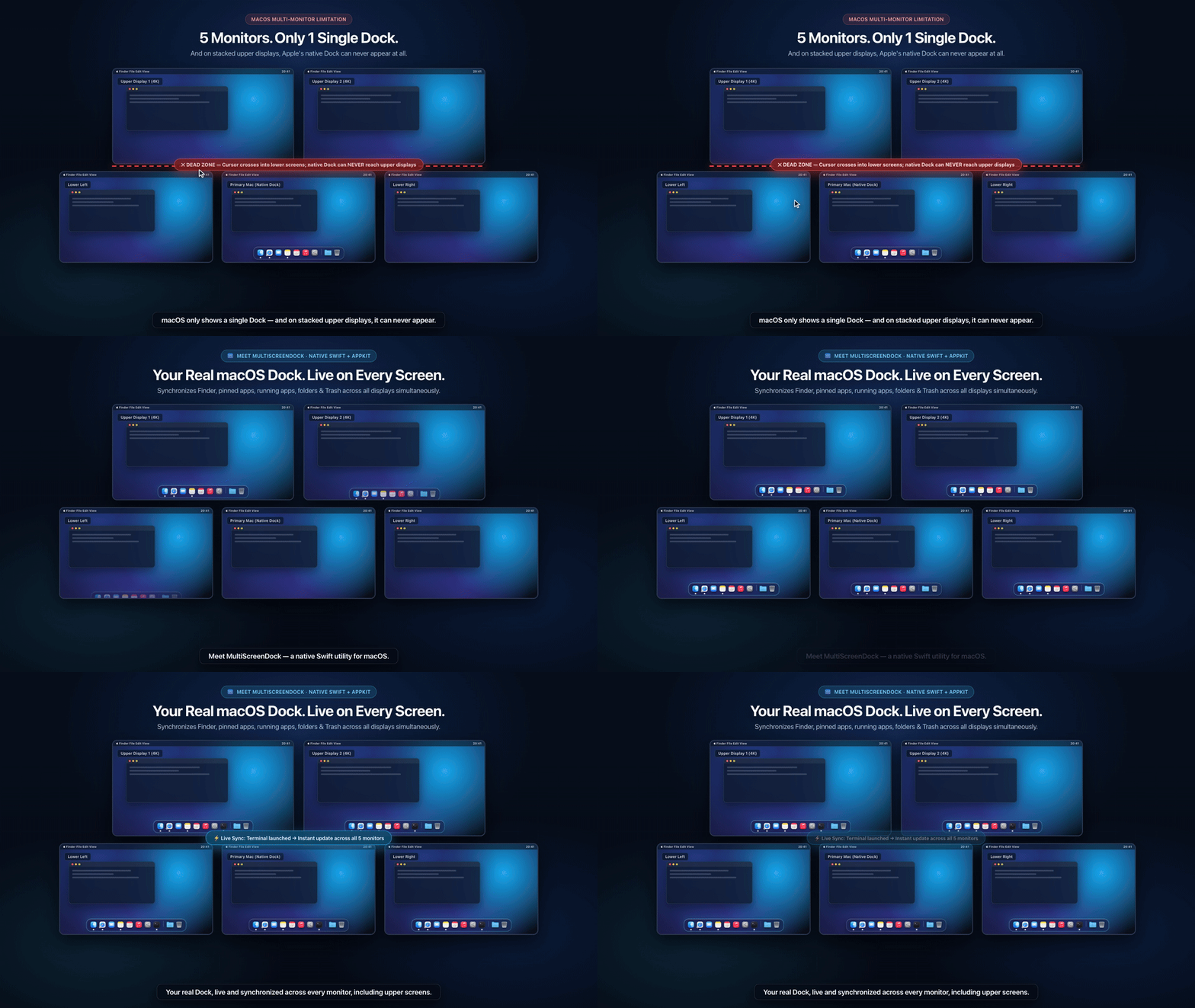
Mirrors your live macOS Dock across all connected displays, including vertically stacked upper monitors.
By fgomsan. Free and open source, MIT licence.
MultiScreenDock at a glance
- Version
- 1.4.1
- Released
- 8 November 2026
- Download size
- 824 KB
- Works on
- Apple silicon and Intel
- Licence
- MIT
- Category
- Windows and Keyboard
- Developer
- fgomsan
- GitHub stars
- 8
About MultiScreenDock
Lightweight native Swift/AppKit utility that keeps a live synchronized macOS Dock visible across all connected monitors simultaneously (including stacked upper displays).
Screenshots
How to install MultiScreenDock on a Mac
- Get OpenDMG. It is a free app store for open source Mac apps. Download OpenDMG.
- Search for MultiScreenDock and press Get. OpenDMG downloads version 1.4.1 from fgomsan's own GitHub release.
- Open it. The download is checked against its SHA-256 fingerprint and its signature is checked on your Mac before it lands in Applications.
Updates to MultiScreenDock show up in OpenDMG and install with one button. No account is needed.
Prefer to do it by hand? The developer's file is on GitHub: MultiScreenDock-v1.4.1-macOS.zip (824 KB).
What is new in MultiScreenDock 1.4.1
## What's Fixed in v1.4.1

- **Fan Folder Stack Drag-Out & Hit-Testing on Stacked Monitors:** Fixed coordinate space conversion in `FanPassthroughRootView.hitTest` and first-mouse subview routing in `DraggableStackItemControl`, ensuring every row in Fan mode (`Downloads` and pinned folders) can be clicked or dragged out by either its icon or its filename pill on any display—including upper stacked monitors when MultiScreenDock is non-activating.
- **Cross-Monitor Drag Session Stability:** Keeps the `FolderStackPanel` drag source alive (faded out and mouse-transparent) until `NSDraggingSession` finishes, preventing long drags between stacked displays from terminating early.

---

## Correcciones en v1.4.1

- **Arrastre de archivos y clic en modo Abanico sobre monitores superiores:** Corregida la conversión de coordenadas en `FanPassthroughRootView.hitTest` y la captura de primer clic (`acceptsFirstMouse`) sobre iconos y etiquetas en `DraggableStackItemControl`, permitiendo arrastrar cualquier documento desde el abanico (tanto desde el icono como desde el nombre) hacia cualquier pantalla o aplicación.
- **Estabilidad del arrastre entre pantallas:** El panel de la pila se desvanece y pasa a ser transparente a clics sin destruirse hasta que concluye `NSDraggingSession`, garantizando arrastres largos entre monitores superiores e inferiores sin cortes.

### Install / Upgrade
```bash
…
More Windows and Keyboard apps
-
 RectangleRectangle is a window manager heavily based on Spectacle, written in Swift
-
 AeroSpaceAeroSpace is an i3-like tiling window manager for macOS
-
 AmethystAutomatic tiling window manager for macOS
-
 LoopWindow management made elegant
-
 OmniWMA Flexible and Modern Tiling Window Manager
-
 FlashSpaceEnhance and replace the native Spaces functionality of macOS