
Meeting Transcriber for Mac
Local-first meeting transcriber for Teams, Zoom, and Webex with on-device transcription, speaker separation, and Markdown protocol generation via your own LLM.
By pasrom. Free and open source, MIT licence.
Meeting Transcriber at a glance
- Version
- 0.9.0
- Released
- 8 November 2026
- Download size
- 17 MB
- Works on
- Apple silicon and Intel
- Licence
- MIT
- Category
- Artificial Intelligence
- Developer
- pasrom
- GitHub stars
- 263
About Meeting Transcriber
On-device meeting transcriber for macOS — auto-records Teams/Zoom/Webex, transcribes & separates speakers locally. No cloud. Open-source alternative to Otter/Granola/Fireflies.
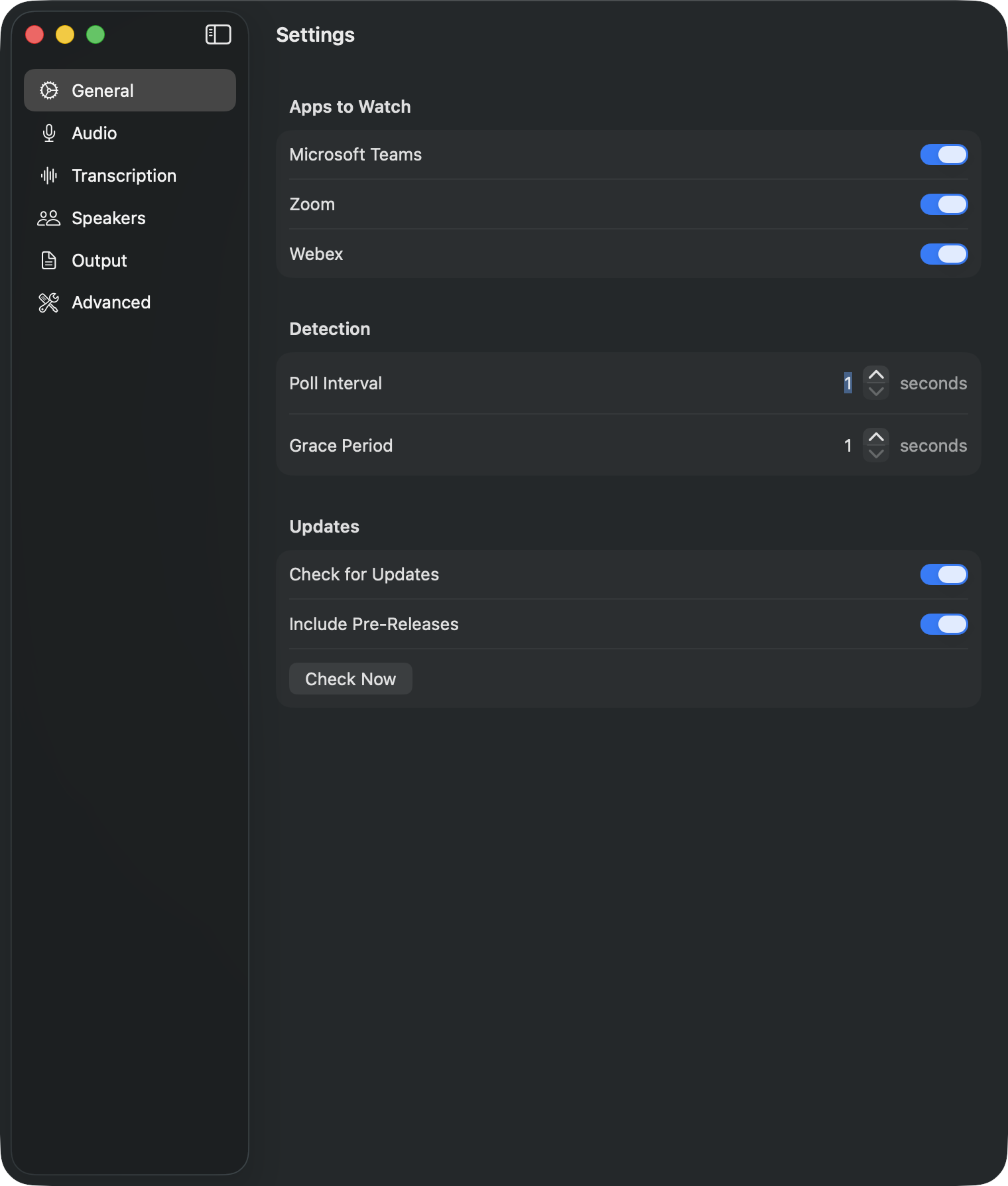
Screenshots

How to install Meeting Transcriber on a Mac
- Get OpenDMG. It is a free app store for open source Mac apps. Download OpenDMG.
- Search for Meeting Transcriber and press Get. OpenDMG downloads version 0.9.0 from pasrom's own GitHub release.
- Open it. The download is checked against its SHA-256 fingerprint and its signature is checked on your Mac before it lands in Applications.
Updates to Meeting Transcriber show up in OpenDMG and install with one button. No account is needed.
Prefer to do it by hand? The developer's file is on GitHub: MeetingTranscriber-0.9.0.dmg (17 MB).
What is new in Meeting Transcriber 0.9.0
## MeetingTranscriber 0.9.0

### Installation

**Via Homebrew (recommended):**
```bash
brew tap pasrom/meeting-transcriber
brew install --cask meeting-transcriber
```

> Homebrew 6.0+ may flag the third-party tap as untrusted. If so, run `brew trust --tap pasrom/meeting-transcriber` before installing.

**Manual:**
1. Download the DMG below
2. Mount it and drag MeetingTranscriber to Applications

### SHA256
```
f4be4d8df28cfa977ece120d8544491f40842ccede9fc18aa4e27f31a871e070
```
<!-- Release notes generated using configuration in .github/release.yml at v0.9.0 -->

### TL;DR

**New**
- **Notion export:** send the meeting notes to a Notion database, with retry for failed exports.
- **Launch at login** and start watching for meetings when the app opens.
- **More call apps:** watch any app for calls via its microphone use, including Slack Huddles; back-to-back Teams calls are now split into separate recordings.
- **Diarization:** new Nemotron 3 mode for up to 8 speakers.
- **Transcription:** load a custom WhisperKit model from any repository or local folder; switch custom vocabulary on or off; optional terminology rules file.
- **Protocol:** custom API key headers and optional temperature/top_p for OpenAI-compatible endpoints; Indonesian as protocol language; AI meeting title as file name (opt-in).
- **Live captions:** size presets for the caption bar.
…
More Artificial Intelligence apps
-
 CodexBarShow usage stats for OpenAI Codex and Claude Code, without having to login
-
 CodeBurnTracks token usage, cost, and performance across 25 AI agents with per-task breakdowns
-
 OsaurusLocal LLM server and AI infrastructure with menu bar, CLI, and shared tools
-
 QuotioAI subscription manager with quota tracking and automatic failover
-
 Claude Usage TrackerTrack the usage of Claude Code
-
 VibeProxyMenu bar app to use existing Claude, ChatGPT, and other subscriptions with AI coding…