

Markout for Mac
Modern Markdown editor with offline syntax, math, and diagram engines — spiritual successor to MacDown.
By maxmilian. Free and open source, MIT licence.
Markout at a glance
- Version
- 0.3.0
- Released
- 11 September 2026
- Download size
- 3.2 MB
- Works on
- Apple silicon and Intel
- Licence
- MIT
- Category
- Writing and Editors
- Developer
- maxmilian
- GitHub stars
- 12
About Markout
A modern, native macOS Markdown editor for Apple Silicon — the spiritual successor to MacDown
Screenshots
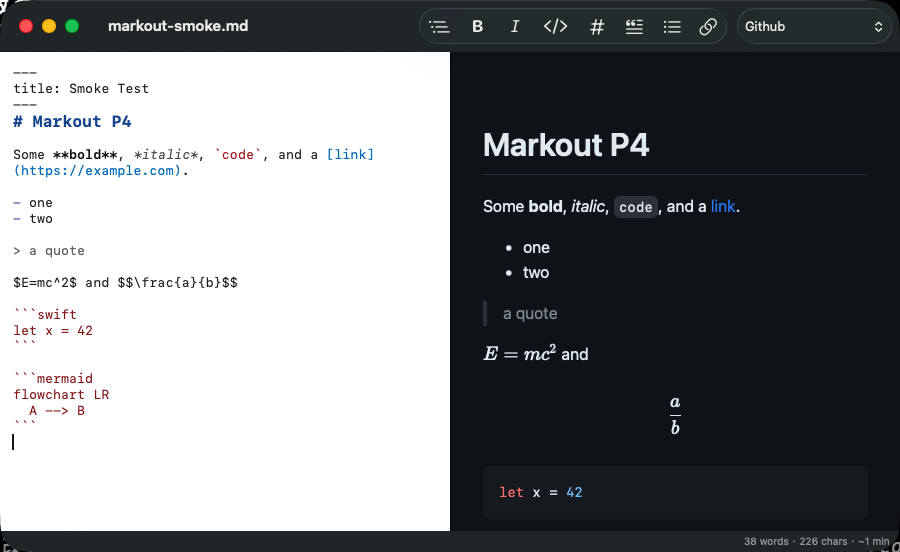
How to install Markout on a Mac
- Get OpenDMG. It is a free app store for open source Mac apps. Download OpenDMG.
- Search for Markout and press Get. OpenDMG downloads version 0.3.0 from maxmilian's own GitHub release.
- Open it. The download is checked against its SHA-256 fingerprint and its signature is checked on your Mac before it lands in Applications.
Updates to Markout show up in OpenDMG and install with one button. No account is needed.
Prefer to do it by hand? The developer's file is on GitHub: Markout-v0.3.0.dmg (3.2 MB).
What is new in Markout 0.3.0
## What's new in v0.3.0

- **Native window tabs** — new documents join the existing tab group instead of opening scattered windows (⌘⇧[ / ⌘⇧] to switch, drag a tab out to split it off).
- **Welcome window with recent documents** — shown on launch with nothing to open, from **Window ▸ Welcome to Markout**, and on Dock-icon reopen.
- **Own recent-documents list** — the 10 newest files, missing ones dimmed, stored in `~/Library/Application Support/Markout/recents.json` (the system recents list never persists for an ad-hoc-signed app).

Full changelog: https://github.com/maxmilian/markout/compare/v0.2.0...v0.3.0

## Install

1. Download `Markout-v0.3.0.dmg` below and open it.
2. Drag **Markout** into your **Applications** folder.
3. First launch only: right-click **Markout.app** → **Open** → **Open**.

This build is ad-hoc signed (not notarized by Apple), so macOS shows a
Gatekeeper warning on first launch. If double-clicking still refuses to
open it, run this once in Terminal to clear the quarantine flag:

```sh
xattr -cr /Applications/Markout.app
```

Requires macOS 14 or later (Apple Silicon recommended).
More Writing and Editors apps
-
 CodeEditOpen-source code editor
-
 CotEditorLightweight Plain-Text Editor for macOS
-
 CopilotForXcodeThe first GitHub Copilot, Codeium and ChatGPT Xcode Source Editor Extension
-
 MarkEditA simple and efficient Markdown editor focused on pure writing experience
-
 PineA modern MacOS markdown editor
-
 Clearly MarkdownMarkdown editor with instant preview, syntax highlighting, and PDF export