

lyricglow for Mac
Real-time synced lyrics for Spotify & Apple Music in your macOS menu bar. Word-by-word karaoke highlighting, lyrics translation into 43 languages with RTL support, artist metadata and album art. Free, open source, private — no account needed.
By ateymoori. Free and open source, MIT licence.
lyricglow at a glance
- Version
- 0.8.0
- Released
- 10 August 2026
- Download size
- 94 MB
- Works on
- Apple silicon and Intel
- Licence
- MIT
- Category
- Utilities
- Developer
- ateymoori
- GitHub stars
- 44
Screenshots

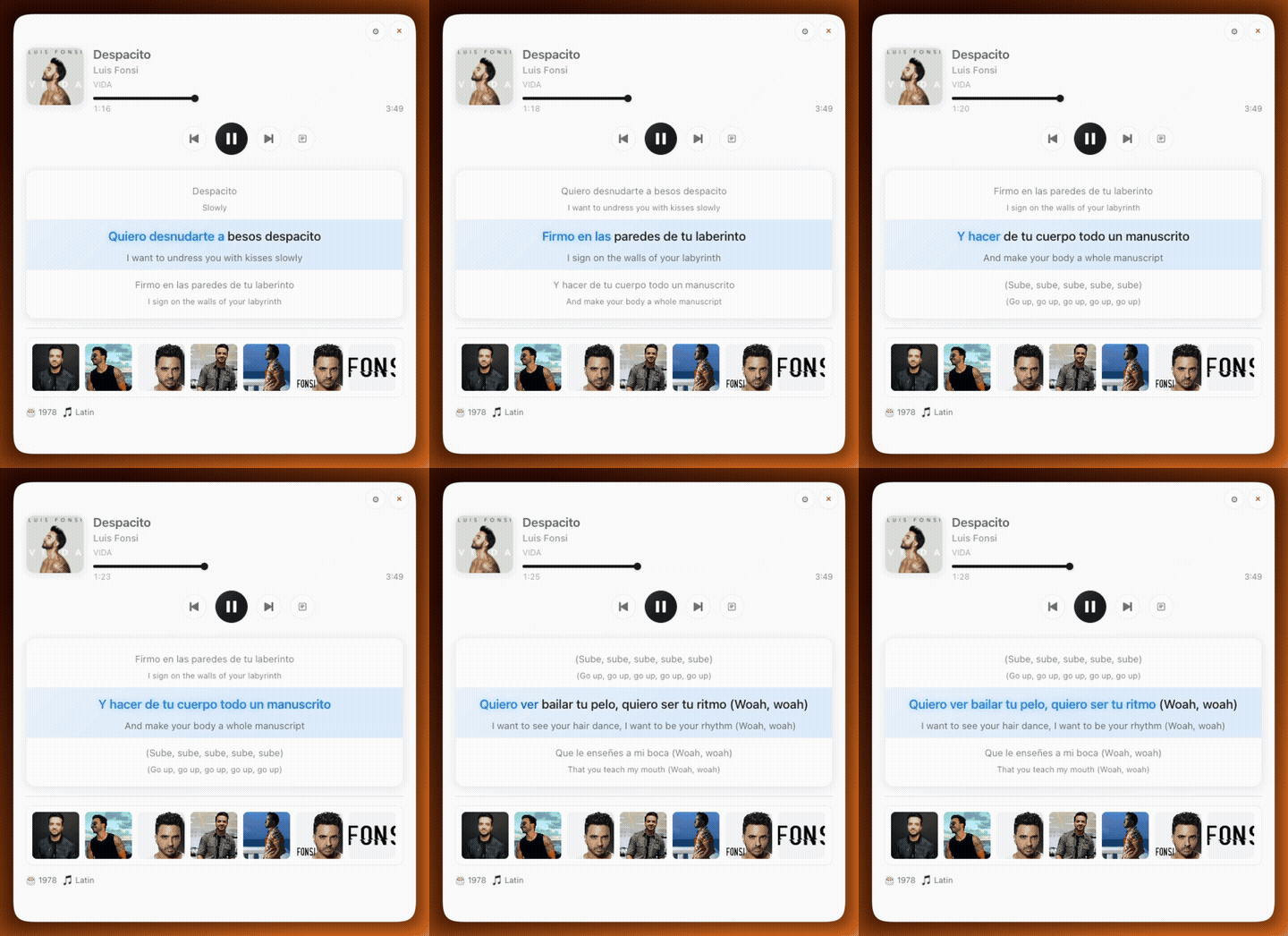


How to install lyricglow on a Mac
- Get OpenDMG. It is a free app store for open source Mac apps. Download OpenDMG.
- Search for lyricglow and press Get. OpenDMG downloads version 0.8.0 from ateymoori's own GitHub release.
- Open it. The download is checked against its SHA-256 fingerprint and its signature is checked on your Mac before it lands in Applications.
Updates to lyricglow show up in OpenDMG and install with one button. No account is needed.
Prefer to do it by hand? The developer's files are on GitHub: LyricGlow-arm64.dmg (94 MB), LyricGlow-x64.dmg (101 MB).
What is new in lyricglow 0.8.0
## [0.8.0] - 2026-08-10

### Added

- **Floating Lyrics.** A desktop overlay mode that shows only the current lyric
 line — large, centred, word-by-word glow, translation underneath, no window
 chrome or background. It is click-through and floats above full-screen apps;
 **Move Floating Lyrics** in the menu bar makes it draggable, **Lock Floating
 Lyrics** puts it back and remembers the position. Toggle it from the menu bar
 or Settings → General.
- **Capture-friendly mode.** Launching with `LYRICGLOW_CAPTURE=1` keeps the
 window on the normal layer, so screen recorders and the window pickers in
 Zoom, Meet and Cap can finally see and share it. (The always-on-top overlay
 layer is invisible to them.)

### Changed

- **Translation is far more reliable — and faster.** Translation now runs
 through a modular provider system: Google Translate's own web endpoint
 first, Lingva as automatic fallback. A dead service gets one log line and a
 10-minute cooldown instead of a 60-second retry storm per song. Fresh songs
 translate in about a second; previously cached translations are untouched.
- New retina demo GIFs, a promo-video preview, and two downloadable promo
 videos in the README; repo media slimmed from 16 MB to ~3 MB.
More Utilities apps
-
 VorssaintAn open-source, free, and local toolkit that integrates functions such as preventing…
-
 BetterDisplayDisplay management tool with HiDPI scaling, PiP, and EDID controls
-
 MosSmooth your mouse's scrolling and reverse the mouse scroll direction
-
 EasydictmacOS instant translator — type/select/screenshot, multi-service, zero setup
-
 OpenHaystackOpen-source tracker for finding Bluetooth devices through Apple's Find My network
-
 OrkasOrkas is an open-source (MIT), local-first AI team for your desktop: a Commander turns…