

Launchy for Mac
Free open-source launcher alternative.
By Punshnut. Free and open source, AGPL-3.0 licence.
Launchy at a glance
- Version
- 2026.9.0
- Released
- 31 October 2026
- Download size
- 9.4 MB
- Works on
- Apple silicon and Intel
- Licence
- AGPL-3.0
- Category
- Productivity
- Developer
- Punshnut
- GitHub stars
- 210
About Launchy
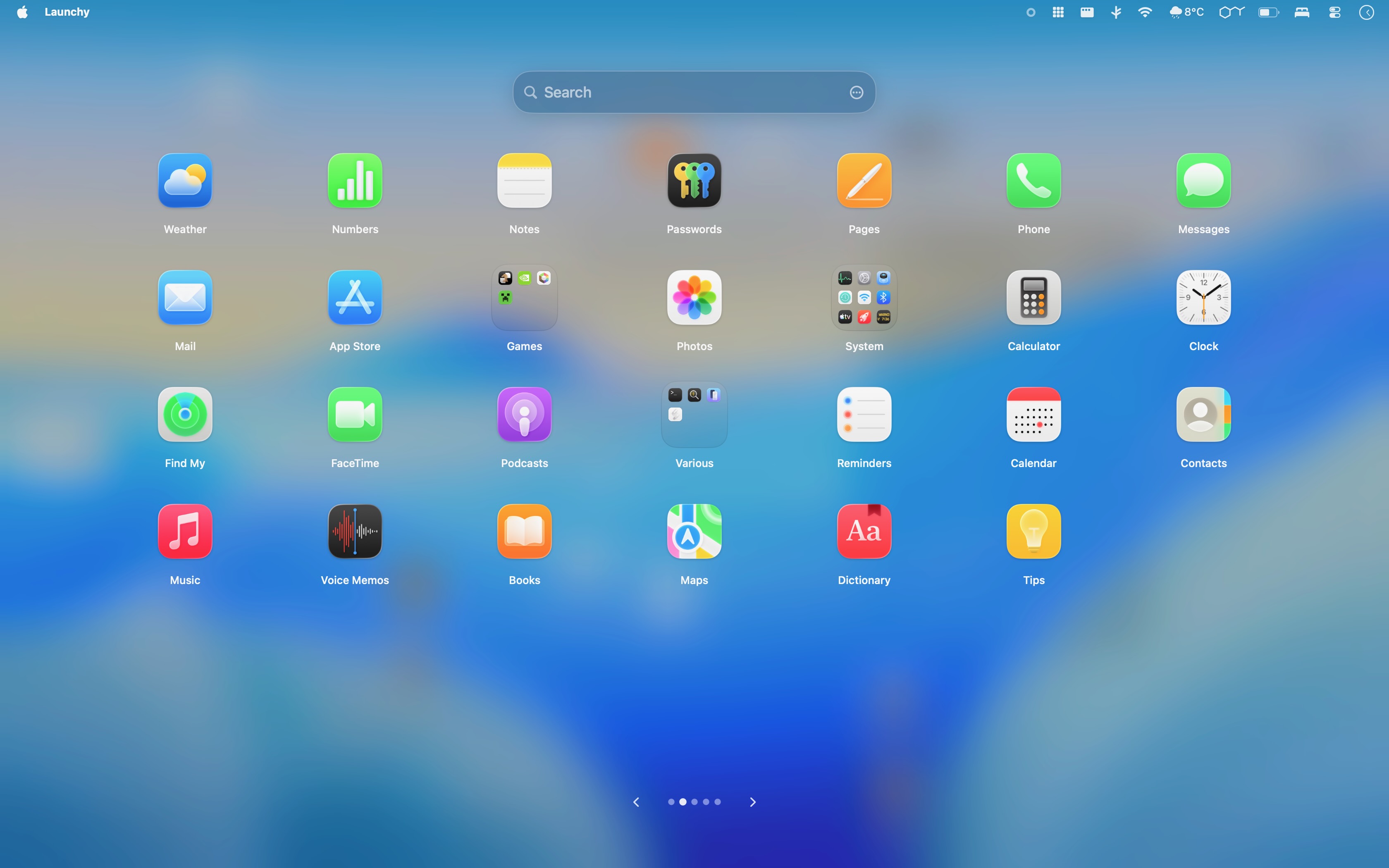
Launchy Launchpad is the free open-source launchpad alternative macOS users have been waiting for!
Screenshots
How to install Launchy on a Mac
- Get OpenDMG. It is a free app store for open source Mac apps. Download OpenDMG.
- Search for Launchy and press Get. OpenDMG downloads version 2026.9.0 from Punshnut's own GitHub release.
- Open it. The download is checked against its SHA-256 fingerprint and its signature is checked on your Mac before it lands in Applications.
Updates to Launchy show up in OpenDMG and install with one button. No account is needed.
Prefer to do it by hand? The developer's file is on GitHub: Launchy.dmg (9.4 MB).
What is new in Launchy 2026.9.0
A maintenance release focused on Dock and focus behavior, folder management, and click and scroll handling, plus a round of code cleanup and wiki improvements.

### Features
- Added “Delete folder” and “Remove from folder” actions (localized)

### Fixes
- Fixed the Dock icon reappearing when “Hide Dock icon” is enabled (#21)
- Fixed focus handover when the launcher opened from the Dock is dismissed, and made Launchy claim activation on Dock reopen (#22)
- Fixed Floaty mode losing its selection when the presentation check fails (#20)
- Fixed the launcher reopening when an app launched from it quits (#23)
- Fixed folder names not refreshing after a rename, folders reopening with settings open, and folder details
- Restored focus to the previous app synchronously on dismiss
- Limited the app icon hit area to the icon and its label (#19)
- Fixed mouse wheel paging in horizontal mode, which now follows natural scrolling (#17)
- Registered the page-arrow hitboxes so clicks no longer dismiss the launcher

### Maintenance
- Removed dead code, unreachable OS fallbacks, and unused strings

### Documentation
- Documented “Remove from folder” and “Delete folder” in the wiki
- Fixed wiki inaccuracies and added a Tips and Tricks page
…
More Productivity apps
-
 MaccyLightweight search-as-you-type clipboard manager
-
 AltTabBrings the Windows Alt-Tab functionality to macOS
-
 TinycastLightweight native launcher with app search, clipboard management, window controls, and…
-
 ClipyClipy is a Clipboard extension app for macOS
-
 FSNotesNotes manager for macOS/iOS: modern notational velocity (nvALT) on steroids
-
 OpenDisplayTurn spare Apple devices into second monitors — true extended display over USB or WiFi