

Konverter for Mac
Menu bar image converter and optimizer for converting, compressing, and stripping metadata.
By davidpraznik. Free and open source, MIT licence.
Konverter at a glance
- Version
- 1.2.0
- Released
- 27 October 2026
- Download size
- 2.4 MB
- Works on
- Apple silicon and Intel
- Licence
- MIT
- Category
- Graphics and Design
- Developer
- davidpraznik
- GitHub stars
- 14
About Konverter
macOS menu bar file converter and image optimizer. Shift-drag to convert, ⌘-drag to prepare images for the web or strip metadata.
Screenshots
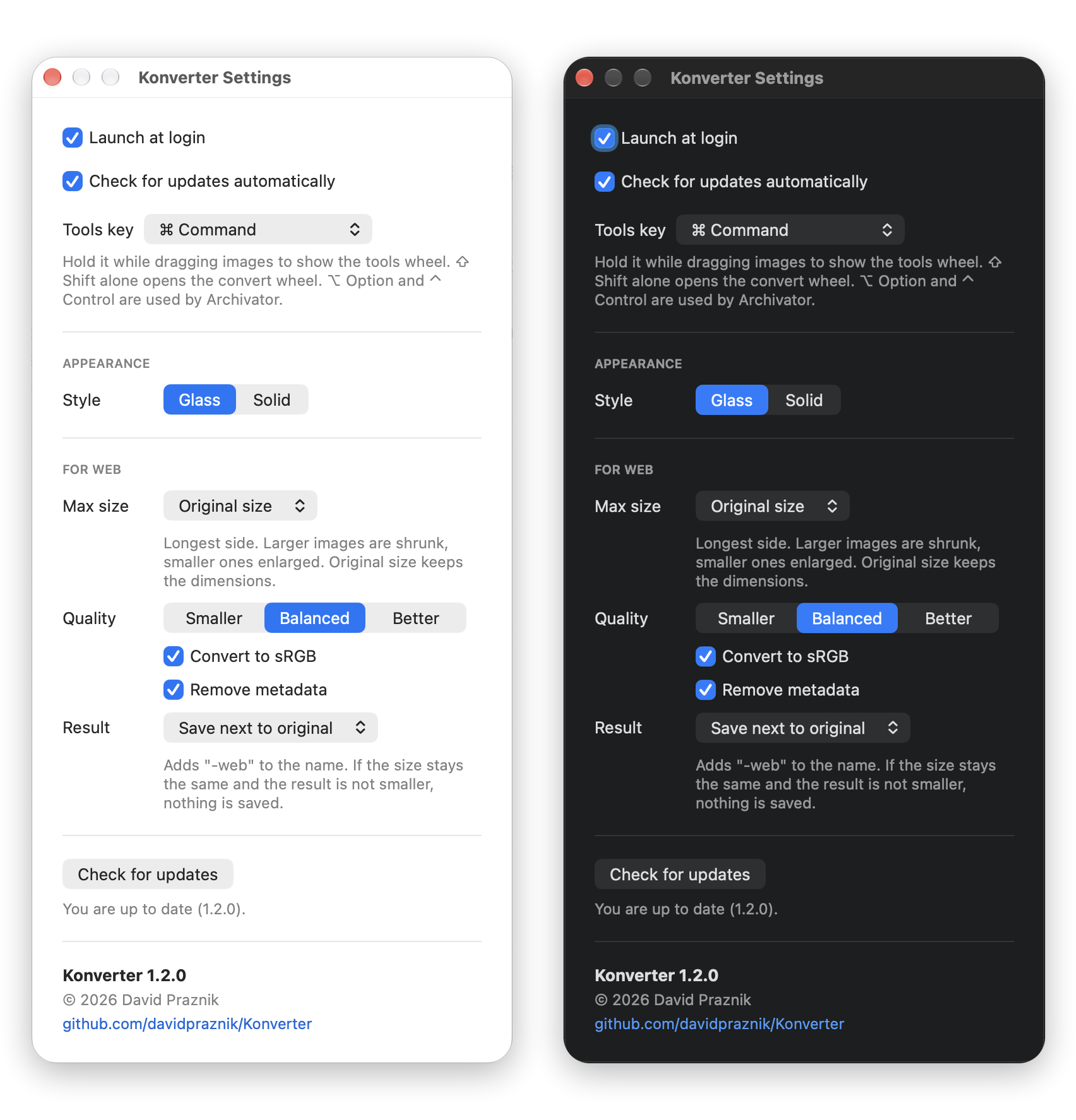
How to install Konverter on a Mac
- Get OpenDMG. It is a free app store for open source Mac apps. Download OpenDMG.
- Search for Konverter and press Get. OpenDMG downloads version 1.2.0 from davidpraznik's own GitHub release.
- Open it. The download is checked against its SHA-256 fingerprint and its signature is checked on your Mac before it lands in Applications.
Updates to Konverter show up in OpenDMG and install with one button. No account is needed.
Prefer to do it by hand? The developer's file is on GitHub: Konverter.zip (2.4 MB).
What is new in Konverter 1.2.0
New in 1.2.0:

- **For web** replaces Compress in the tools wheel. One step: set the longest side (larger images are shrunk, smaller ones enlarged, or keep the original size), compress with the chosen quality, convert to sRGB and remove metadata. Saves `name-web.ext` or replaces the original (it goes to the Trash). PNG stays lossless.
- **Glass style**: the wheel carrier is now translucent. Switch back to the classic look in Settings, Style, Solid.
- **File size in the wheel centre**: while dragging it shows the number of files and their total size, and after For web how much space was saved.
- **TIFF and BMP** output formats.
- **Energy efficient**: drag detection runs only while the mouse button is held down, so an idle Konverter uses practically no energy.
- Fixed: HEIC photos from iPhone no longer get darker after compression (the HDR gain map is preserved).
- Compress is now part of For web. Its settings moved to the For web section of Settings; earlier values are not carried over.

Opening a downloaded build: see the README.
More Graphics and Design apps
-
 AerialApple TV Aerial Screensaver for macOS
-
 CompositorFree, open-source image editor aiming to be a full Photoshop alternative
-
 BrooklynScreensaver inspired by Apple's Event on October 30, 2018
-
 EquinoxCreate dynamic wallpapers for macOS
-
 ExcalidrawZA virtual whiteboard for sketching hand-drawn-like diagrams with native file management…
-
 WaifuXOpen-source ACG app for wallpapers, animated backgrounds, and anime videos