
Keyboard Backlight Limiter for Mac
Menu bar app that caps keyboard backlight brightness and controls when it turns on via the ambient light sensor.
By dmartoon. Free and open source, MIT licence.
Keyboard Backlight Limiter at a glance
- Version
- 1.2.0
- Released
- 29 August 2026
- Download size
- 1.5 MB
- Works on
- Apple silicon and Intel
- Licence
- MIT
- Category
- Windows and Keyboard
- Developer
- dmartoon
- GitHub stars
- 11
About Keyboard Backlight Limiter
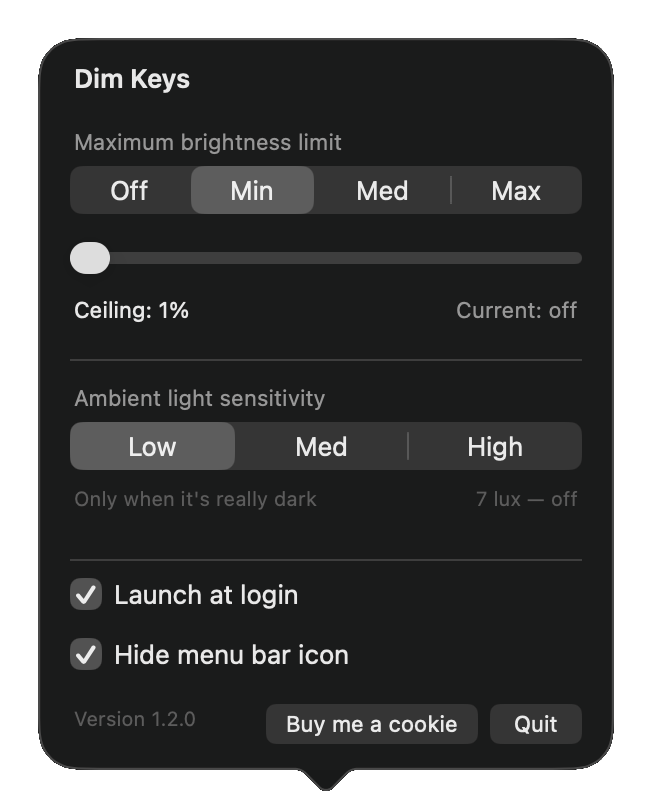
Simple macOS app that lets you set ambient light sensitivity and cap the brightness of your MacBook keyboard backlight.
Screenshots
How to install Keyboard Backlight Limiter on a Mac
- Get OpenDMG. It is a free app store for open source Mac apps. Download OpenDMG.
- Search for Keyboard Backlight Limiter and press Get. OpenDMG downloads version 1.2.0 from dmartoon's own GitHub release.
- Open it. The download is checked against its SHA-256 fingerprint and its signature is checked on your Mac before it lands in Applications.
Updates to Keyboard Backlight Limiter show up in OpenDMG and install with one button. No account is needed.
Prefer to do it by hand? The developer's file is on GitHub: DimKeys-1.2.0.dmg (1.5 MB).
What is new in Keyboard Backlight Limiter 1.2.0
Keyboard Backlight Limiter is now Dim Keys. Same app, same settings — the name is what changed.

**Your settings carry over untouched.** The brightness ceiling, the ambient sensitivity and Launch at login all belong to the app's identity rather than to its name, and that has not moved.

**Dragging the new app in does not replace the old one.** A renamed app lands beside its predecessor in Applications rather than on top of it, and both copies drive the same keyboard backlight — so left alone they work against each other. If the old copy is still your login item, the one that wins on the next boot is the one you are no longer looking at.

**Dim Keys offers to clean that up the first time you open it.** It quits the old app, moves it to the Trash — not a permanent delete — and re-points Launch at login at the new app for you. Prefer to handle it yourself? Choose *Not Now* and drag the old app to the Trash; the offer will not come back. Fresh installs never see any of this.

**If you are updating from a notification, the banner will still say "Keyboard Backlight Limiter".** It is posted by the copy already on your Mac, which predates the rename. The download is called `DimKeys-1.2.0.dmg` and it is the right one.
…
More Windows and Keyboard apps
-
 RectangleRectangle is a window manager heavily based on Spectacle, written in Swift
-
 AeroSpaceAeroSpace is an i3-like tiling window manager for macOS
-
 AmethystAutomatic tiling window manager for macOS
-
 LoopWindow management made elegant
-
 FlashSpaceEnhance and replace the native Spaces functionality of macOS
-
 OmniWMA Flexible and Modern Tiling Window Manager