

ImageCanvas for Mac
Visual reference board for arranging images on a canvas with grid layouts, annotations, and drawings.
By viktorkpkn. Free and open source, MIT licence.
ImageCanvas at a glance
- Version
- 0.5.0
- Released
- 19 July 2026
- Download size
- 3.0 MB
- Works on
- Apple silicon and Intel
- Licence
- MIT
- Category
- Graphics and Design
- Developer
- viktorkpkn
- GitHub stars
- 15
About ImageCanvas
ImageCanvas is a native macOS visual reference board for arranging locally stored images on a canvas.
Screenshots
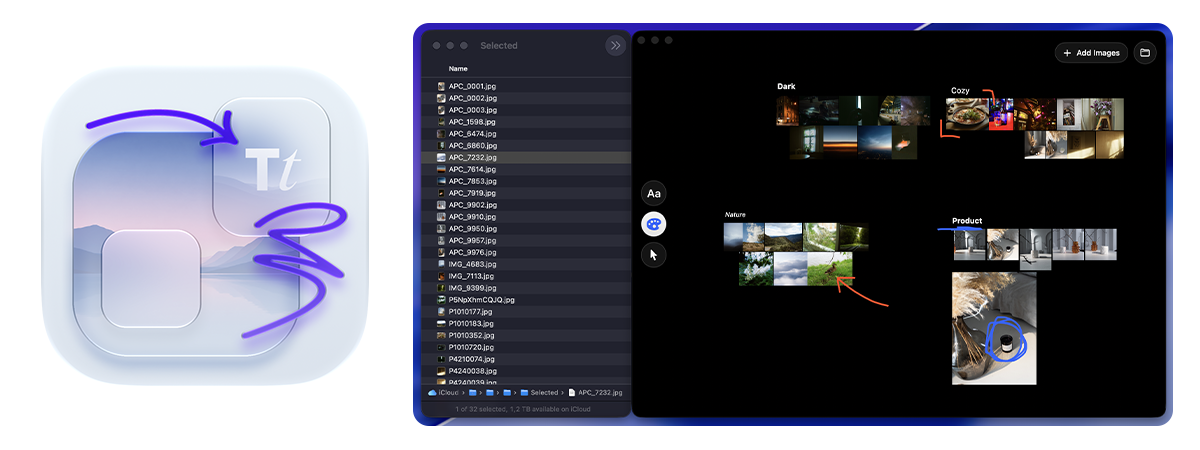
How to install ImageCanvas on a Mac
- Get OpenDMG. It is a free app store for open source Mac apps. Download OpenDMG.
- Search for ImageCanvas and press Get. OpenDMG downloads version 0.5.0 from viktorkpkn's own GitHub release.
- Open it. The download is checked against its SHA-256 fingerprint and its signature is checked on your Mac before it lands in Applications.
Updates to ImageCanvas show up in OpenDMG and install with one button. No account is needed.
Prefer to do it by hand? The developer's file is on GitHub: ImageCanvas-0.5.0-build4.zip (3.0 MB).
What is new in ImageCanvas 0.5.0
# Release notes

### **Filename on hover**
Hold Option while hovering over an image to reveal its complete filename in a floating capsule below the image. The label remains upright and readable at every canvas zoom level and stays within the current window.

### **Image actions**

- Images now have a right-click context menu with:
- Rotate Clockwise
- Rotate Counterclockwise
- Flip Horizontal
- Flip Vertical
- Reveal in Finder

The same commands are available from the Selection menu. Right-clicking an image outside the current selection selects only that image; right-clicking an already selected image preserves the group.

### **New shortcuts:**

- ⌘R — Rotate Clockwise
- ⇧⌘R — Rotate Counterclockwise
- ⌘F — Flip Horizontal
- ⇧⌘F — Flip Vertical

Transforms are saved with the board, leave the original files unchanged, and can be reversed with ⌘Z using the existing capped history.

### **Built-in update checks**

ImageCanvas can now check the latest stable GitHub Release from ImageCanvas → Check for Updates…. Checks occur only when requested—there are no background requests, credentials, or telemetry.

For automatic installation, ImageCanvas verifies:

- GitHub’s published SHA-256 digest
- the ImageCanvas bundle identifier
- the release version and build
- the app bundle and executable structure
- the ad-hoc signature structure
…
More Graphics and Design apps
-
 AerialApple TV Aerial Screensaver for macOS
-
 CompositorFree, open-source image editor aiming to be a full Photoshop alternative
-
 BrooklynScreensaver inspired by Apple's Event on October 30, 2018
-
 EquinoxCreate dynamic wallpapers for macOS
-
 ExcalidrawZA virtual whiteboard for sketching hand-drawn-like diagrams with native file management…
-
 WaifuXOpen-source ACG app for wallpapers, animated backgrounds, and anime videos