
Healthy Battery for Mac
Menu bar battery care app for charge limits, live power flow, and long-term health tracking.
By berkinefeavci. Free and open source, MIT licence.
Healthy Battery at a glance
- Version
- 1.4.2
- Released
- 16 October 2026
- Download size
- 4.4 MB
- Works on
- Apple silicon and Intel
- Licence
- MIT
- Category
- System Tools
- Developer
- berkinefeavci
- GitHub stars
- 9
About Healthy Battery
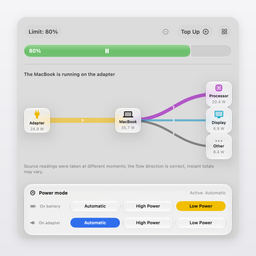
Free, open-source battery care for Apple Silicon MacBooks: charge limit, live power flow, long-term health.
Screenshots
How to install Healthy Battery on a Mac
- Get OpenDMG. It is a free app store for open source Mac apps. Download OpenDMG.
- Search for Healthy Battery and press Get. OpenDMG downloads version 1.4.2 from berkinefeavci's own GitHub release.
- Open it. The download is checked against its SHA-256 fingerprint and its signature is checked on your Mac before it lands in Applications.
Updates to Healthy Battery show up in OpenDMG and install with one button. No account is needed.
Prefer to do it by hand? The developer's file is on GitHub: Cellkeep-1.4.2.dmg (4.4 MB).
What is new in Healthy Battery 1.4.2
## 1.4.2

- Adapter mode tests itself. Right after the charge helper is installed (or the next time the adapter is plugged in), Healthy Battery cuts the adapter, waits for the battery gauge to report that the battery really powers the Mac (it reports only about once a minute), brings the adapter back, then cuts it once more without heartbeats and checks that the helper's 60-second safety timer restores it. It takes a few minutes and always ends with the adapter on. Adapter mode can be turned on only after this test passes; the result is shown in Settings → Charge Control.
- The charge helper (version 2) answers only Healthy Battery signed by the same developer. Before, any program running as your user could ask it to cut the adapter. If you installed the helper from 1.4.1, install it again from the same place.
- While Healthy Battery itself has cut the adapter, reminders no longer treat it as the cable being pulled out.
- Heat protection, Ready by and Optimized Charging messages showed the percent sign in front of the number ("%80") in English, German, French and Spanish. German texts now address you the same way everywhere.
- New "Top energy users" card on the Energy page: which apps used the most energy now, over the last 7 days and over 30 days. Healthy Battery samples energy every 5 minutes in the background for it and keeps 35 days.
…
More System Tools apps
-
 PearcleanerApp Cleaner and Uninstaller Tool
-
 PureMacFree open-source system cleaner with privacy protection
-
 OpenInTerminalFinder toolbar tool for opening the current folder in a terminal
-
 DockDoorWindow peeking for macOS
-
 DigUpSemantic search app that finds files by their contents
-
 LatestApp update checker that notifies you of available updates for installed applications