
FnKeyboard for Mac
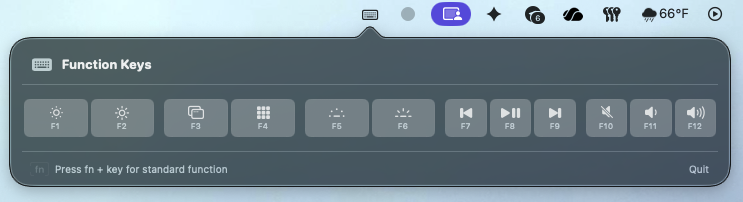
Menu-bar tool for quick F1–F12 access on Mac.
By kotique123. Free and open source, MIT licence.
FnKeyboard at a glance
- Version
- 1.1.0
- Released
- 15 February 2026
- Download size
- 1.1 MB
- Works on
- Apple silicon and Intel
- Licence
- MIT
- Category
- Windows and Keyboard
- Developer
- kotique123
- GitHub stars
- 11
About FnKeyboard
macOS menu-bar utility for on-screen F1–F12 keys — hardened runtime, HID event simulation, key profiles
Screenshots
How to install FnKeyboard on a Mac
- Get OpenDMG. It is a free app store for open source Mac apps. Download OpenDMG.
- Search for FnKeyboard and press Get. OpenDMG downloads version 1.1.0 from kotique123's own GitHub release.
- Open it. The download is checked against its SHA-256 fingerprint and its signature is checked on your Mac before it lands in Applications.
Updates to FnKeyboard show up in OpenDMG and install with one button. No account is needed.
Prefer to do it by hand? The developer's files are on GitHub: FnKeyboard-macos-arm64.dmg (1.1 MB), FnKeyboard-macos-x86_64.dmg (1.1 MB).
What is new in FnKeyboard 1.1.0
## FnKeyboard v1.1.0 — Security Hardening

This release significantly hardens FnKeyboard's security posture — from memory safety in low-level system APIs to build-time integrity checks and runtime protections against event flooding.

### What's New

**Runtime Security**
- **Memory-safe event tap lifecycle** — replaced raw `Unmanaged<Self>` pointer with a weak-reference `TapContext` wrapper, eliminating dangling-pointer dereferences if the monitor is deallocated while the CGEvent tap callback is in-flight
- **Thread-safe monitoring flag** — `isMonitoring` is now protected by `NSLock` for safe access across the main thread and the CGEvent tap callback
- **CGEvent memory leak fix** — switched from `passRetained` to `passUnretained` for event return values (listenOnly taps ignore the return, so retaining leaked every keyboard event flowing through the system)
- **Reduced event surface** — removed `flagsChanged` from the event mask; only `keyDown` and `keyUp` are intercepted

**Rate Limiting & Debouncing**
- **Per-key rate limiting** in `KeySimulator` — enforces a 150ms minimum interval between simulated presses, preventing event flooding from rapid automated clicks
- **UI tap debouncing** in `FunctionKeyView` — 200ms cooldown as a second layer of defense
- **Input validation** — `KeySimulator` now validates key IDs (1–12) before processing
…
More Windows and Keyboard apps
-
 RectangleRectangle is a window manager heavily based on Spectacle, written in Swift
-
 AeroSpaceAeroSpace is an i3-like tiling window manager for macOS
-
 AmethystAutomatic tiling window manager for macOS
-
 LoopWindow management made elegant
-
 FlashSpaceEnhance and replace the native Spaces functionality of macOS
-
 OmniWMA Flexible and Modern Tiling Window Manager