

DockPin for Mac
Keeps the Dock on your chosen display and restores the default behavior when closed.
By kangaroo-demo. Free and open source, MIT licence.
DockPin at a glance
- Version
- 0.2.1
- Released
- 17 October 2026
- Download size
- 179 KB
- Works on
- Apple silicon and Intel
- Licence
- MIT
- Category
- Windows and Keyboard
- Developer
- kangaroo-demo
- GitHub stars
- 7
About DockPin
Keep the macOS Dock on your chosen monitor, including stacked displays. Free, open-source menu bar app for multi-monitor Macs.
Screenshots

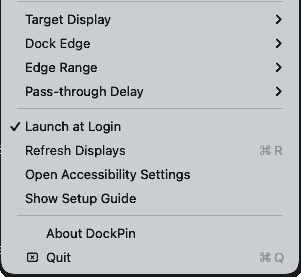
How to install DockPin on a Mac
- Get OpenDMG. It is a free app store for open source Mac apps. Download OpenDMG.
- Search for DockPin and press Get. OpenDMG downloads version 0.2.1 from kangaroo-demo's own GitHub release.
- Open it. The download is checked against its SHA-256 fingerprint and its signature is checked on your Mac before it lands in Applications.
Updates to DockPin show up in OpenDMG and install with one button. No account is needed.
Prefer to do it by hand? The developer's file is on GitHub: DockPin.zip (179 KB).
What is new in DockPin 0.2.1
修复外接显示器重新连接后,菜单仍选中目标屏幕、Dock 却留在 Mac 内置屏的问题。

- 重新接屏或唤醒 Mac 后,等待显示器就绪并自动恢复 Dock 的目标位置,无需手动切换显示器。
- 目标屏幕断开时保留原选择,临时使用可用屏幕;重接后恢复原目标。
- 加入有限重试,并在快速拔插、切换目标、睡眠或退出时取消过期动作。

下载下方的 **DockPin.zip**,解压后替换 `/Applications/DockPin.app` 并重新打开。

---

Fixes the Dock staying on the built-in display after reconnecting an external monitor even though the saved target remains selected.

- Automatically reapplies the saved target after reconnect or wake, allowing the display configuration to settle first.
- Preserves the preferred display while it is disconnected and temporarily falls back to an available display.
- Retries a limited number of times and cancels stale activation work after display changes, target changes, sleep, or quit.

Download **DockPin.zip** below, replace `/Applications/DockPin.app`, and reopen it.

Validation: 11 automated regression tests passed; macOS release build and code-signature verification passed. Physical cable reconnection still requires manual verification.
More Windows and Keyboard apps
-
 RectangleRectangle is a window manager heavily based on Spectacle, written in Swift
-
 AeroSpaceAeroSpace is an i3-like tiling window manager for macOS
-
 AmethystAutomatic tiling window manager for macOS
-
 LoopWindow management made elegant
-
 OmniWMA Flexible and Modern Tiling Window Manager
-
 FlashSpaceEnhance and replace the native Spaces functionality of macOS