

Deskset for Mac
Native macOS desktop widgets with support for Rainmeter skins.
By jokyme. Free and open source, GPL-3.0 licence.
Deskset at a glance
- Version
- 1.0.0
- Released
- 2 November 2026
- Download size
- 17 MB
- Works on
- Apple silicon and Intel
- Licence
- GPL-3.0
- Category
- Utilities
- Developer
- jokyme
- GitHub stars
- 35
About Deskset
Native desktop widgets for macOS — and it runs Rainmeter skins.
Screenshots
How to install Deskset on a Mac
- Get OpenDMG. It is a free app store for open source Mac apps. Download OpenDMG.
- Search for Deskset and press Get. OpenDMG downloads version 1.0.0 from jokyme's own GitHub release.
- Open it. The download is checked against its SHA-256 fingerprint and its signature is checked on your Mac before it lands in Applications.
Updates to Deskset show up in OpenDMG and install with one button. No account is needed.
Prefer to do it by hand? The developer's files are on GitHub: Deskset-1.0.0-arm64.dmg (17 MB), Deskset-1.0.0-x86_64.dmg (18 MB).
What is new in Deskset 1.0.0
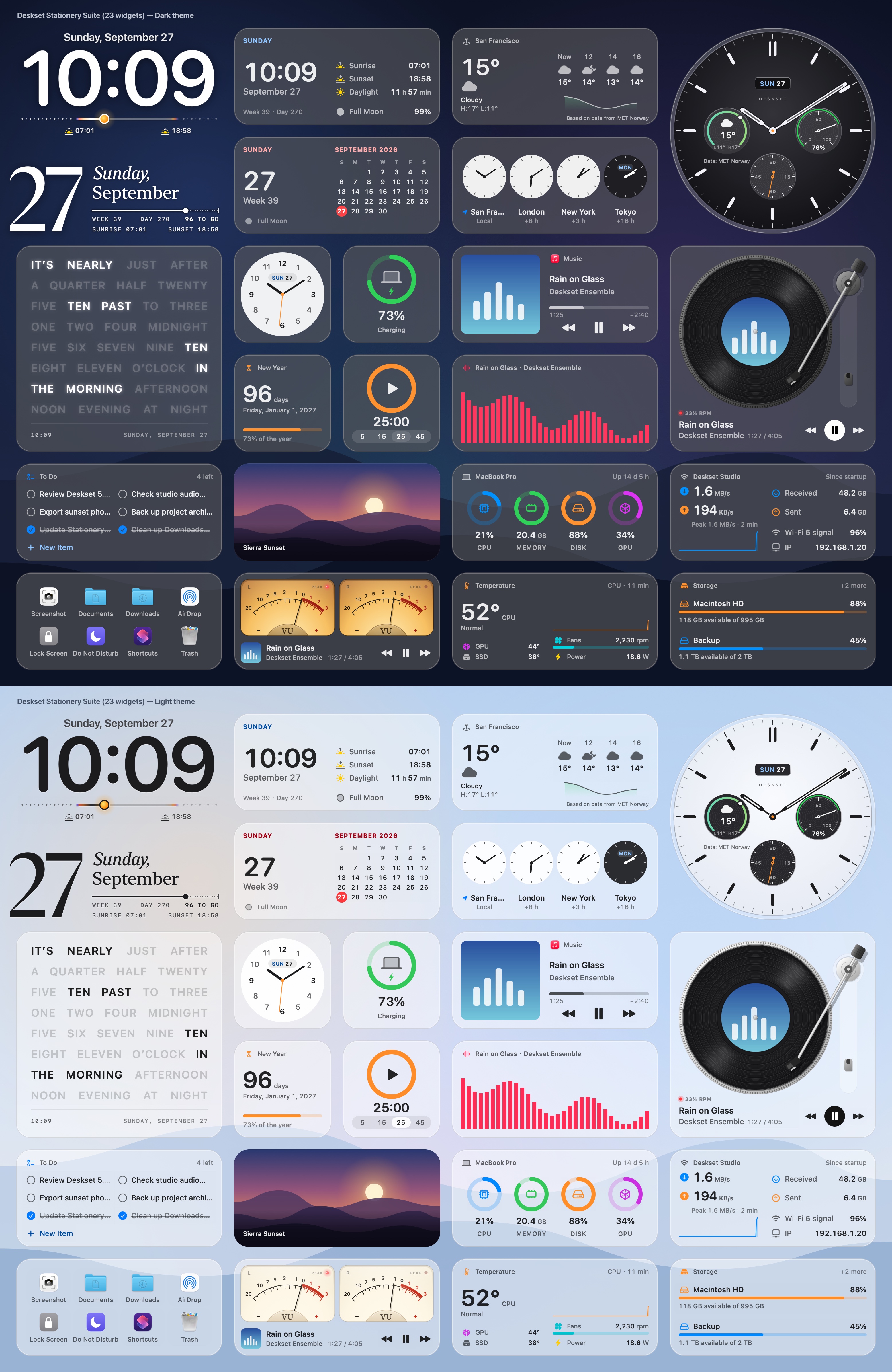
Deskset 1.0 is the first stable release: the complete Rainmeter experience, as it is on Windows, running natively on the Mac. Little changes on the surface since 0.6.1; the version marks that what the 0.x releases built up — the skin engine, the Stationery widgets, the Skin Studio, layouts, in-app updates and 38 languages — is complete enough to rely on.

### Who this release is for, and what comes next

- **1.0.0 is for Rainmeter users coming from Windows.** It gives you the complete Rainmeter experience you know from Windows, with your skins running natively on the Mac.
- **The releases after it turn to the Mac itself.** The interface, ease of use and how Deskset fits macOS will be refined step by step. If you are a Mac user new to Rainmeter, use the latest release available rather than 1.0.0.

### Deskset 1.0 at a glance

- **Desktop widgets for the Mac.** The bundled Stationery collection: clocks, calendars, weather, system monitors, music controls, a vinyl turntable, an audio spectrum, photos, notes, to-do lists, timers and folder launchers, with light and dark looks, several sizes, and English and Chinese labels.
…
More Utilities apps
-
 VorssaintAn open-source, free, and local toolkit that integrates functions such as preventing…
-
 BetterDisplayDisplay management tool with HiDPI scaling, PiP, and EDID controls
-
 MosSmooth your mouse's scrolling and reverse the mouse scroll direction
-
 EasydictmacOS instant translator — type/select/screenshot, multi-service, zero setup
-
 OpenHaystackOpen-source tracker for finding Bluetooth devices through Apple's Find My network
-
 OrkasOrkas is an open-source (MIT), local-first AI team for your desktop: a Commander turns…