

CodexDog for Mac
Auto-switch Codex accounts when quota runs out and resume unfinished tasks in the same session.
By forge-ui. Free and open source.
CodexDog at a glance
- Version
- 0.8.4 (pre-release)
- Released
- 29 July 2026
- Download size
- 2.6 MB
- Works on
- Apple silicon
- Category
- Artificial Intelligence
- Developer
- forge-ui
- GitHub stars
- 0
About CodexDog
Native macOS menu bar watchdog for quota-aware ChatGPT Codex account switching and best-effort task recovery.
Screenshots
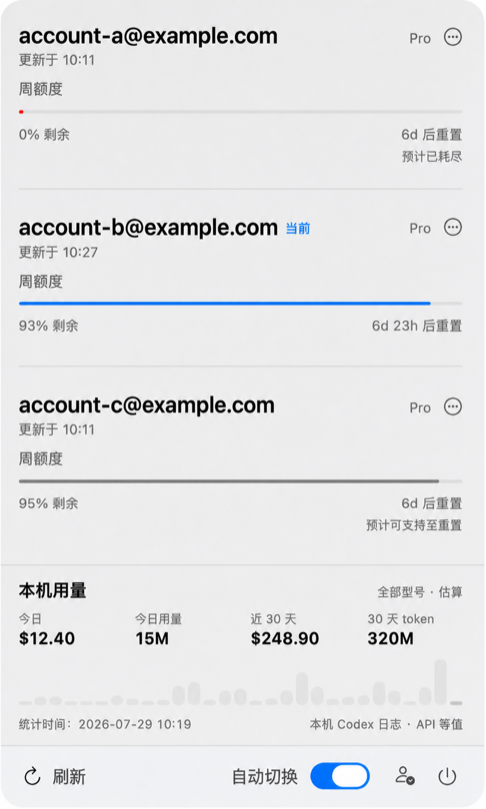
How to install CodexDog on a Mac
- Get OpenDMG. It is a free app store for open source Mac apps. Download OpenDMG.
- Search for CodexDog and press Get. OpenDMG downloads version 0.8.4 from forge-ui's own GitHub release.
- Open it. The download is checked against its SHA-256 fingerprint and its signature is checked on your Mac before it lands in Applications.
Updates to CodexDog show up in OpenDMG and install with one button. No account is needed.
Prefer to do it by hand? The developer's file is on GitHub: CodexDog-v0.8.4-macos-arm64-preview.zip (2.6 MB).
What is new in CodexDog 0.8.4
## 主要更新

- 修复额度接口偶发网络失败后,旧的 `failed to fetch codex rate limits` 告警持续显示的问题。
- 当三个账号后续刷新全部成功时,CodexDog 会立即清除这类瞬时额度请求告警。
- 与任务恢复、账号切换有关的看门狗错误不会被误清除,仍会保留供用户处理。

## 验证

- 112 项自动化测试全部通过。
- 已在本机完成三个账号的官方额度刷新,成功后全局错误状态为空。
- 适用于 macOS 14+、Apple Silicon(arm64)。
- Release ZIP 已重新解压,并通过签名、版本、目录结构和 SHA-256 校验。
- 源码和发布包均已检查,不包含真实邮箱、账号 ID、Token、Cookie、本机个人路径或本地状态文件。

## 安装说明

这是 ad-hoc 签名、尚未公证的 Preview 构建。解压后将 `CodexDog.app` 放入“应用程序”;如果 macOS 首次阻止启动,请右键选择“打开”,或在“系统设置 → 隐私与安全性”中允许。
More Artificial Intelligence apps
-
 CodexBarShow usage stats for OpenAI Codex and Claude Code, without having to login
-
 CodeBurnTracks token usage, cost, and performance across 25 AI agents with per-task breakdowns
-
 OsaurusLocal LLM server and AI infrastructure with menu bar, CLI, and shared tools
-
 QuotioAI subscription manager with quota tracking and automatic failover
-
 Claude Usage TrackerTrack the usage of Claude Code
-
 VibeProxyMenu bar app to use existing Claude, ChatGPT, and other subscriptions with AI coding…