

Clippo for Mac
Clipboard history with search, saved snippet lists and a paste queue that pastes copied items one by one.
By Lorder19. Free and open source, MIT licence.
Clippo at a glance
- Version
- 0.5.0
- Released
- 5 November 2026
- Download size
- 1.5 MB
- Works on
- Apple silicon and Intel
- Licence
- MIT
- Category
- Productivity
- Developer
- Lorder19
- GitHub stars
- 6
About Clippo
Clipboard history for the Mac with saved lists, a paste queue and wrong keyboard layout fixing as you type (Punto Switcher style). Free and open source.
Screenshots
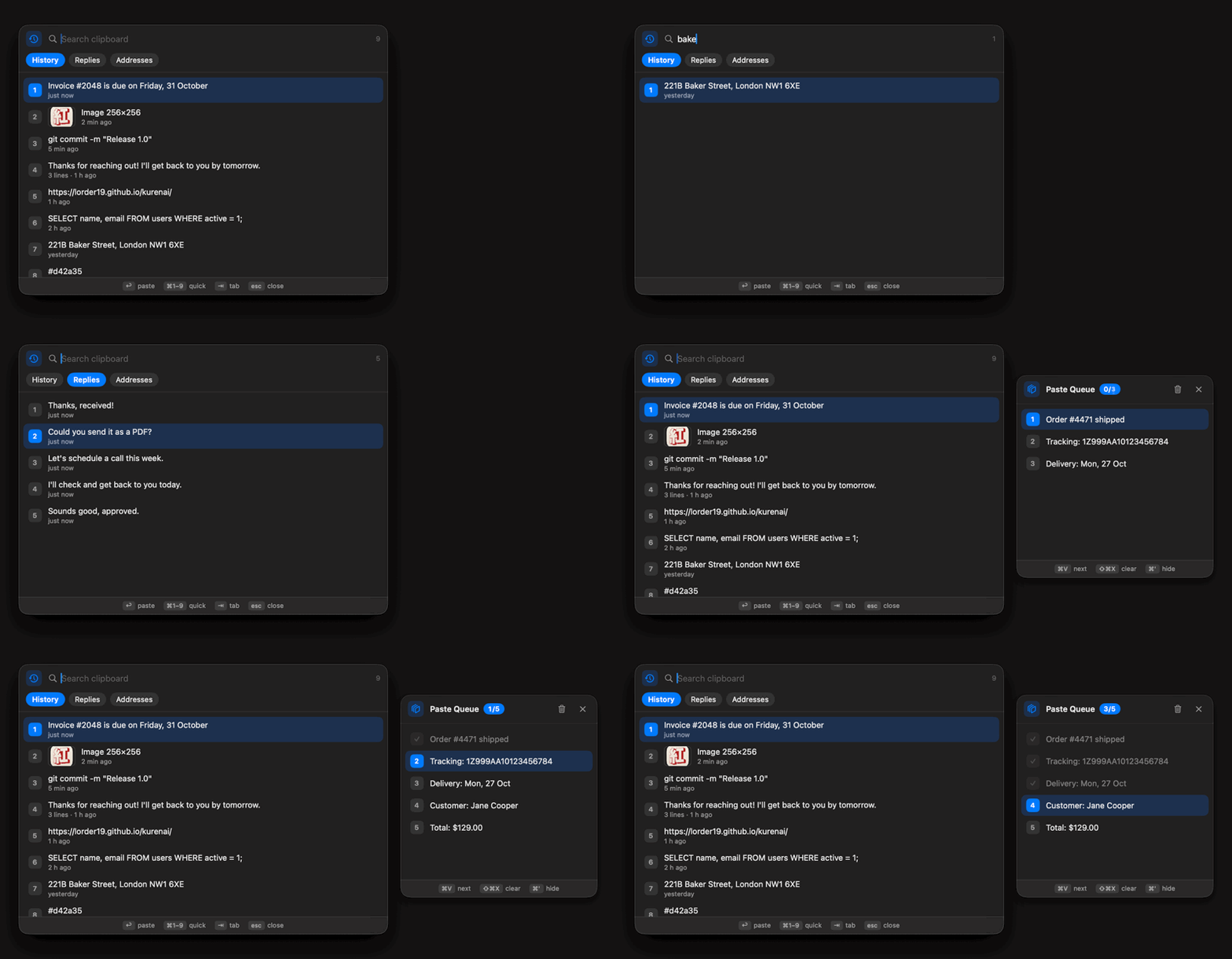
How to install Clippo on a Mac
- Get OpenDMG. It is a free app store for open source Mac apps. Download OpenDMG.
- Search for Clippo and press Get. OpenDMG downloads version 0.5.0 from Lorder19's own GitHub release.
- Open it. The download is checked against its SHA-256 fingerprint and its signature is checked on your Mac before it lands in Applications.
Updates to Clippo show up in OpenDMG and install with one button. No account is needed.
Prefer to do it by hand? The developer's file is on GitHub: Clippo.zip (1.5 MB).
What is new in Clippo 0.5.0
- Typed in the wrong layout? Kurenai fixes it as you type, like Punto Switcher. "ghbdtn" turns into "привет" by the fourth letter and the layout switches, so you just keep typing. Words it can't judge mid-word are checked again at the Space.
- Tap the right Shift twice to retype the selection or the last word in the other layout yourself, slang and names included. With no text it just switches the layout.
- Fixed one by mistake? Tap the right Shift twice right away to get it back. Undo the same word a few times and Kurenai leaves it alone from then on.
- The mapping comes from your own layouts and keyboard (ABC, Russian, Russian PC, Ukrainian and others, ISO or ANSI), not from a built-in table.
- If a layout's language has no spelling dictionary in macOS, Kurenai offers to download a free one.
- Off in terminals, code editors, remote desktop and password fields. Both features can be turned off in Settings.
- Security: the data folder is readable only by you, the encryption key file is created private from the start, and updates are checked more strictly before they replace the app.
More Productivity apps
-
 MaccyLightweight search-as-you-type clipboard manager
-
 AltTabBrings the Windows Alt-Tab functionality to macOS
-
 TinycastLightweight native launcher with app search, clipboard management, window controls, and…
-
 ClipyClipy is a Clipboard extension app for macOS
-
 FSNotesNotes manager for macOS/iOS: modern notational velocity (nvALT) on steroids
-
 OpenDisplayTurn spare Apple devices into second monitors — true extended display over USB or WiFi