
Claude-Usage for Mac
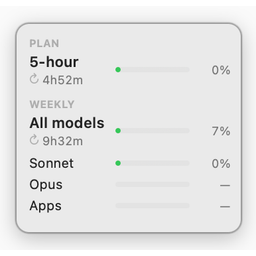
A tiny floating widget that shows your Claude.ai usage at a glance without opening the browser.
By eastonsuo. Free and open source, MIT licence.
Claude-Usage at a glance
- Version
- 0.1.0
- Released
- 21 May 2026
- Download size
- 280 KB
- Works on
- Apple silicon and Intel
- Licence
- MIT
- Category
- Artificial Intelligence
- Developer
- eastonsuo
- GitHub stars
- 3
About Claude-Usage
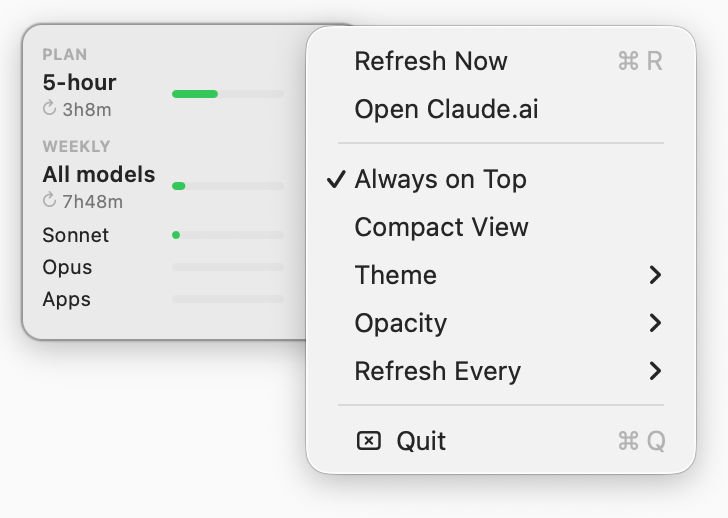
macOS floating widget for Claude.ai Pro/Max usage — glance at your 5h + 7d budget without opening the browser
Screenshots
How to install Claude-Usage on a Mac
- Get OpenDMG. It is a free app store for open source Mac apps. Download OpenDMG.
- Search for Claude-Usage and press Get. OpenDMG downloads version 0.1.0 from eastonsuo's own GitHub release.
- Open it. The download is checked against its SHA-256 fingerprint and its signature is checked on your Mac before it lands in Applications.
Updates to Claude-Usage show up in OpenDMG and install with one button. No account is needed.
Prefer to do it by hand? The developer's file is on GitHub: Claude-Usage.app.zip (280 KB).
What is new in Claude-Usage 0.1.0
## Install (pre-built)

1. Download **Claude-Usage.app.zip** below.
2. Unzip — you get `Claude Usage.app`.
3. Drag to `/Applications`.
4. **First launch**: the app isn't notarized (no Apple Developer cert for a personal tool), so macOS Gatekeeper will block it. Bypass once via either:
 - **Right-click** the app → **Open** → confirm in the dialog, or
 - Terminal: `xattr -dr com.apple.quarantine "/Applications/Claude Usage.app"`

5. The first time the widget tries to fetch usage, macOS will prompt:
 > `python wants to access "Claude Safe Storage"`

 Click **Always Allow** — this is your Claude desktop app's keychain entry, used to decrypt the session cookies locally. (See [how it works](https://github.com/eastonsuo/claude-desktop-usage#how-it-works).)

### Prerequisites
- macOS 11+
- You must already be **logged into the Claude desktop app** — the widget piggybacks on its existing browser session.

### Open at login
System Settings → General → Login Items & Extensions → Open at Login → **+** → select `Claude Usage.app`.

---

**This is unofficial and unaffiliated with Anthropic. Personal use only — please don't redistribute or hammer the endpoint.** See the [README](https://github.com/eastonsuo/claude-desktop-usage#disclaimer) for details.
More Artificial Intelligence apps
-
 CodexBarShow usage stats for OpenAI Codex and Claude Code, without having to login
-
 CodeBurnTracks token usage, cost, and performance across 25 AI agents with per-task breakdowns
-
 OsaurusLocal LLM server and AI infrastructure with menu bar, CLI, and shared tools
-
 QuotioAI subscription manager with quota tracking and automatic failover
-
 Claude Usage TrackerTrack the usage of Claude Code
-
 VibeProxyMenu bar app to use existing Claude, ChatGPT, and other subscriptions with AI coding…