

Claude Codex Battery for Mac
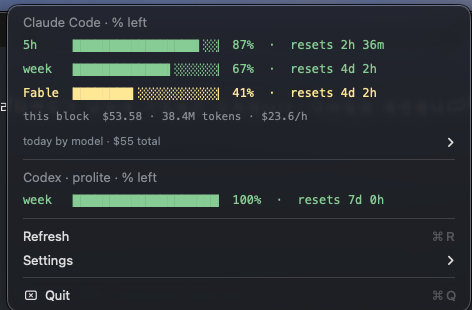
Show Claude Code and Codex usage limits as battery icons — green for plenty, red for almost out.
By dennykim123. Free and open source, MIT licence.
Claude Codex Battery at a glance
- Version
- 2.7.2
- Released
- 23 November 2026
- Download size
- 1.9 MB
- Works on
- Apple silicon and Intel
- Licence
- MIT
- Category
- Artificial Intelligence
- Developer
- dennykim123
- GitHub stars
- 104
About Claude Codex Battery
macOS menu bar widget showing Claude Code & Codex usage limits as battery icons 🔋
Screenshots
How to install Claude Codex Battery on a Mac
- Get OpenDMG. It is a free app store for open source Mac apps. Download OpenDMG.
- Search for Claude Codex Battery and press Get. OpenDMG downloads version 2.7.2 from dennykim123's own GitHub release.
- Open it. The download is checked against its SHA-256 fingerprint and its signature is checked on your Mac before it lands in Applications.
Updates to Claude Codex Battery show up in OpenDMG and install with one button. No account is needed.
Prefer to do it by hand? The developer's file is on GitHub: ClaudeCodexBattery-v2.7.2.dmg (1.9 MB).
What is new in Claude Codex Battery 2.7.2
### New
- **Settings → Accounts.** Always there now, even with a single login. It shows which Claude and Codex account the menu bar batteries follow, and lets you switch when you have more than one.
- **Add Claude account… / Add Codex account…** One click opens Terminal on a fresh `~/.claude-2` or `~/.codex-2` folder and starts the CLI's own sign-in. Sign in with your other account and the menu bar finds it within about 2 minutes. The app never sees your password or token.

Both downloads are signed & notarized. Update from the dropdown's **Install update** row, or Settings → Check for updates.
More Artificial Intelligence apps
-
 CodexBarShow usage stats for OpenAI Codex and Claude Code, without having to login
-
 CodeBurnTracks token usage, cost, and performance across 25 AI agents with per-task breakdowns
-
 OsaurusLocal LLM server and AI infrastructure with menu bar, CLI, and shared tools
-
 QuotioAI subscription manager with quota tracking and automatic failover
-
 Claude Usage TrackerTrack the usage of Claude Code
-
 VibeProxyMenu bar app to use existing Claude, ChatGPT, and other subscriptions with AI coding…