
Burrow (khan-umirzakoff) for Mac
Native SwiftUI Mac cleaner for Mole: clean caches, uninstall apps, map disk usage, and monitor health.
By khan-umirzakoff. Free and open source, GPL-3.0 licence.
Burrow (khan-umirzakoff) at a glance
- Version
- 0.4.4
- Released
- 4 November 2026
- Download size
- 8.0 MB
- Works on
- Apple silicon and Intel
- Licence
- GPL-3.0
- Category
- System Tools
- Developer
- khan-umirzakoff
- GitHub stars
- 88
About Burrow (khan-umirzakoff)
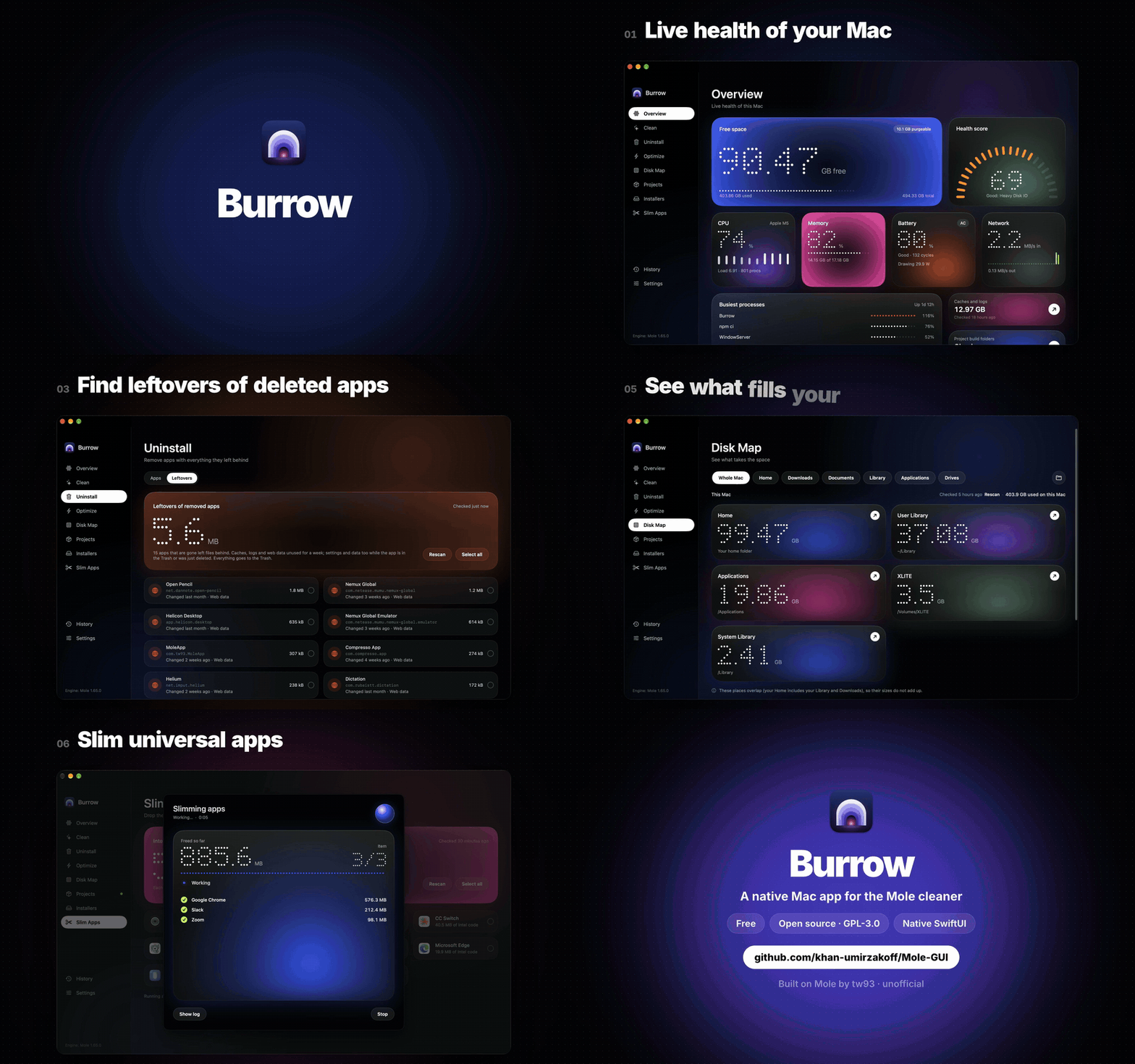
Free, open-source Mac cleaner: a native SwiftUI app for Mole. Clean caches, uninstall apps and their leftovers, map your disk, monitor your Mac. A CleanMyMac alternative.
Screenshots
How to install Burrow (khan-umirzakoff) on a Mac
- Get OpenDMG. It is a free app store for open source Mac apps. Download OpenDMG.
- Search for Burrow (khan-umirzakoff) and press Get. OpenDMG downloads version 0.4.4 from khan-umirzakoff's own GitHub release.
- Open it. The download is checked against its SHA-256 fingerprint and its signature is checked on your Mac before it lands in Applications.
Updates to Burrow (khan-umirzakoff) show up in OpenDMG and install with one button. No account is needed.
Prefer to do it by hand? The developer's file is on GitHub: Burrow.dmg (8.0 MB).
What is new in Burrow (khan-umirzakoff) 0.4.4
## Menu bar

Burrow now lives in the menu bar too. Click its arch icon for:

- free space, CPU, memory and battery at a glance;
- memory pressure, the number that matters: a full RAM is normal on a Mac, so Burrow warns only when macOS itself is short of memory;
- caches and logs, leftovers of removed apps and old installers, each a shortcut to its page;
- a **Clean** button that opens the Clean page and asks before Mole removes anything.

Turn it off in Settings → Show in menu bar. While it sits in the menu bar, Burrow keeps running after you close its window.

## Fix: leftovers offer after an update

macOS drops Burrow's Full Disk Access when an update changes the app, and Burrow then could not confirm that an app you deleted was in the Trash, so it never offered its leftovers. It now offers them either way.

## Install

Already on 0.4.0 or later? Burrow updates itself when you quit.

Burrow is not notarized, so macOS stops it twice: once when you open the DMG ("Burrow.dmg Not Opened") and once on the app's first launch. Each time, press **Done**, then go to **System Settings → Privacy & Security → Open Anyway**. Or skip both dialogs from Terminal:

```bash
xattr -d com.apple.quarantine ~/Downloads/Burrow.dmg
```
Then open the DMG, drag Burrow to Applications, and run:
```bash
xattr -dr com.apple.quarantine /Applications/Burrow.app
```
More System Tools apps
-
 PearcleanerApp Cleaner and Uninstaller Tool
-
 PureMacFree open-source system cleaner with privacy protection
-
 OpenInTerminalFinder toolbar tool for opening the current folder in a terminal
-
 DockDoorWindow peeking for macOS
-
 DigUpSemantic search app that finds files by their contents
-
 LatestApp update checker that notifies you of available updates for installed applications