

AM Native for Mac
Native macOS settings for the Angry Miao AM Infinity .97 mouse — battery, DPI, and button mapping.
By op7418. Free and open source, MIT licence.
AM Native at a glance
- Version
- 0.6.0 (pre-release)
- Released
- 14 October 2026
- Download size
- 3.5 MB
- Works on
- Apple silicon
- Licence
- MIT
- Category
- Utilities
- Developer
- op7418
- GitHub stars
- 13
About AM Native
Native macOS settings for the Angry Miao AM Infinity .97 — battery, DPI and onboard button mapping. SwiftUI + AppKit.
Screenshots
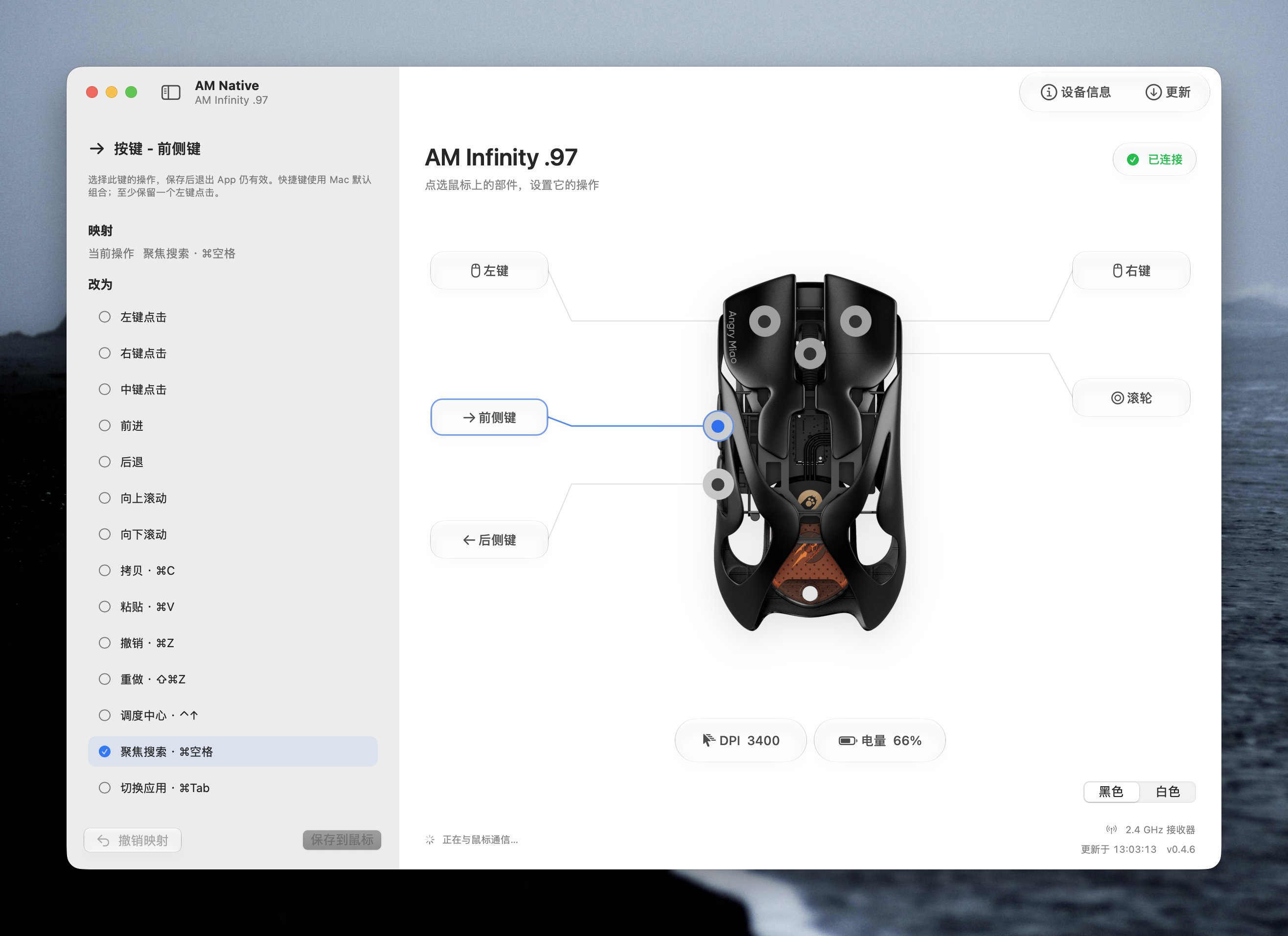
How to install AM Native on a Mac
- Get OpenDMG. It is a free app store for open source Mac apps. Download OpenDMG.
- Search for AM Native and press Get. OpenDMG downloads version 0.6.0 from op7418's own GitHub release.
- Open it. The download is checked against its SHA-256 fingerprint and its signature is checked on your Mac before it lands in Applications.
Updates to AM Native show up in OpenDMG and install with one button. No account is needed.
Prefer to do it by hand? The developer's file is on GitHub: AMNative-0.6.0-arm64-preview.zip (3.5 MB).
What is new in AM Native 0.6.0
为鼠标和接收器加入原生光效面板。点击右上「光效」,选择目标、效果、颜色和速度,保存后完整读回;支持撤销恢复原动画。

- 鼠标:常亮、呼吸、霓虹,速度 1–10,最多 7 色。
- 接收器自身:常亮、呼吸、弧光、马赛克、极光、夜城、流光,支持速度、亮度及部分模式颜色。
- 蓝牙与 USB:完整多色设置,已通过实机写入、读回与恢复。
- 2.4 GHz:三种精简鼠标动画及 App 保存/撤销已通过。长回复仍有限制,部分慢速多色组合或已有长动画需改用蓝牙/USB;App 会提前提示。
- 每次保存保留原始备份;验证结束后原灯效、DPI 和全部按键映射均保持不变。

Apple Silicon 测试版;仅 ad-hoc 签名,没有 Developer ID 签名和 Apple 公证。下载 ZIP 后解压,将 App 拖入应用程序。中英文使用说明随包提供。

---

Native lighting controls for the mouse and receiver, with raw backups, complete persisted readback and undo.

Mouse: Solid, Breathing and Neon, speed 1–10, up to 7 colors. Receiver: seven effects with speed, brightness and effect-specific colors. Bluetooth and USB support the full palette/speed range. The 2.4 GHz mouse route uses verified compact animations; some slow multicolor combinations and existing long animations require Bluetooth or USB. The app checks this before writing.

Hardware write/readback/restore and App save/undo passed for the supported scope. Original lighting, DPI and all button mappings were restored. This verifies persisted configuration, not a physical LED visual comparison.

Apple Silicon preview, ad-hoc signed, no Developer ID signature or Apple notarization. Unzip and drag the app into Applications. Chinese and English instructions are included.
More Utilities apps
-
 VorssaintAn open-source, free, and local toolkit that integrates functions such as preventing…
-
 BetterDisplayDisplay management tool with HiDPI scaling, PiP, and EDID controls
-
 MosSmooth your mouse's scrolling and reverse the mouse scroll direction
-
 EasydictmacOS instant translator — type/select/screenshot, multi-service, zero setup
-
 OpenHaystackOpen-source tracker for finding Bluetooth devices through Apple's Find My network
-
 OrkasOrkas is an open-source (MIT), local-first AI team for your desktop: a Commander turns…